

Dashboard Notes
v1.0.3MIGHTYminnow · 2014年4月18日 上架
Easily create notes/instructions in the WordPress admin using any widget you like!
- 正在使用
- 500+
- 评分
- 4.7 / 5
- 累计下载
- 1.6 万
- 最近更新
- 2026年3月10日
19 条评价需要 WordPress 3.0+已测试到 6.9.12
 Mickey Kay
 MIGHTYminnow
截图
The plugin Classic Widgets is needed (this plugin doesn’t work with Gutenberg).
Compatible with PHP 8.2
Do you find this plugin helpful? Please consider leaving a 5-star review.
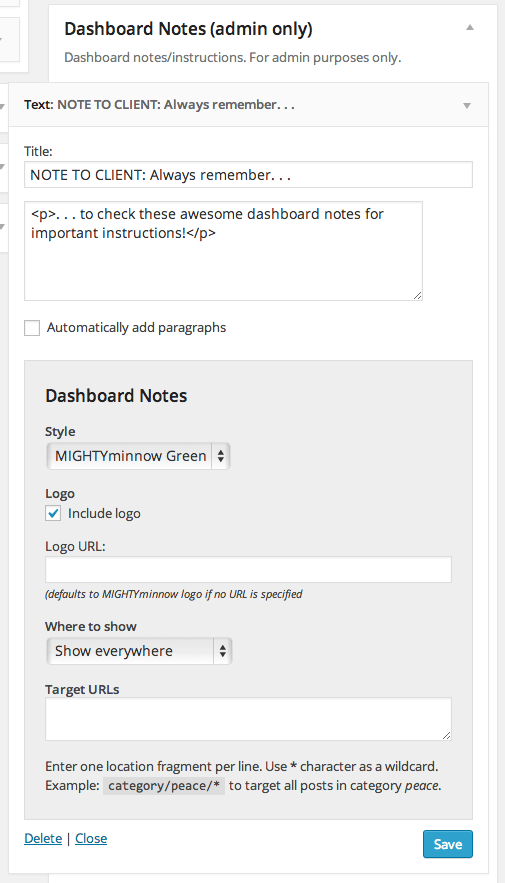
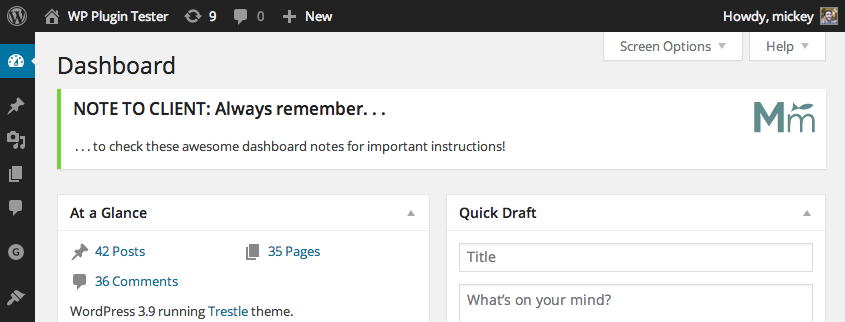
Dashboard Notes lets you create super simple notes and instructions for your clients within the WordPress dashboard. Choose the color of the notification, whether or not to include a logo, and exactly what pages to include the notification on (uses simple URL matching).
Usage
- Install the Dashboard Notes.
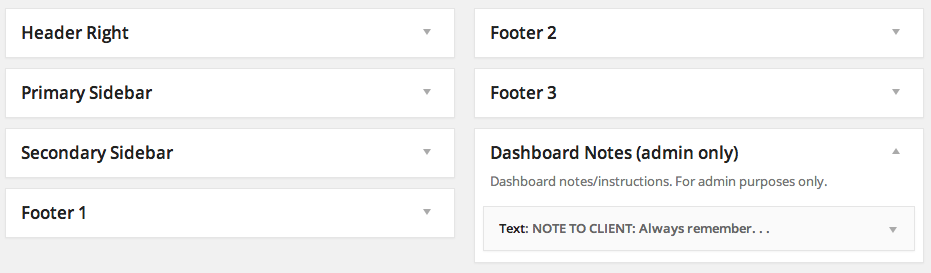
- Go to Appearance > Widgets where you will see a new “Dashboard Notes” sidebar.
- To create a note, simply drag a new widget into the sidebar and give it some content (we typically use a text/HTML widget).
- Once you’ve added content to the widget, click save, and the Dashboard Notes settings for this widget will appear.
- Adjust the settings to meet your needs, and click save when you’re done.
- Refresh, or navigate to any page to see your new note in action.
- Use the plugin settings found via Settings > Dashboard Notes to choose which user roles can/can’t see the notices.
Credits
Special thanks to Kaspars Dambis for his work on Widget Context – much of this project is based on that code.