

Custom Login Admin Front-end CSS
v1.8Arun Basil Lal · 2016年4月14日 上架
Loads custom CSS on WordPress Login Pages, Admin and Front-end via admin interface. Works on Multisites as well.
- 正在使用
- 300+
- 评分
- 5.0 / 5
- 累计下载
- 9,501
- 最近更新
- 2024年12月9日
贡献者
 Arun Basil Lal
截图
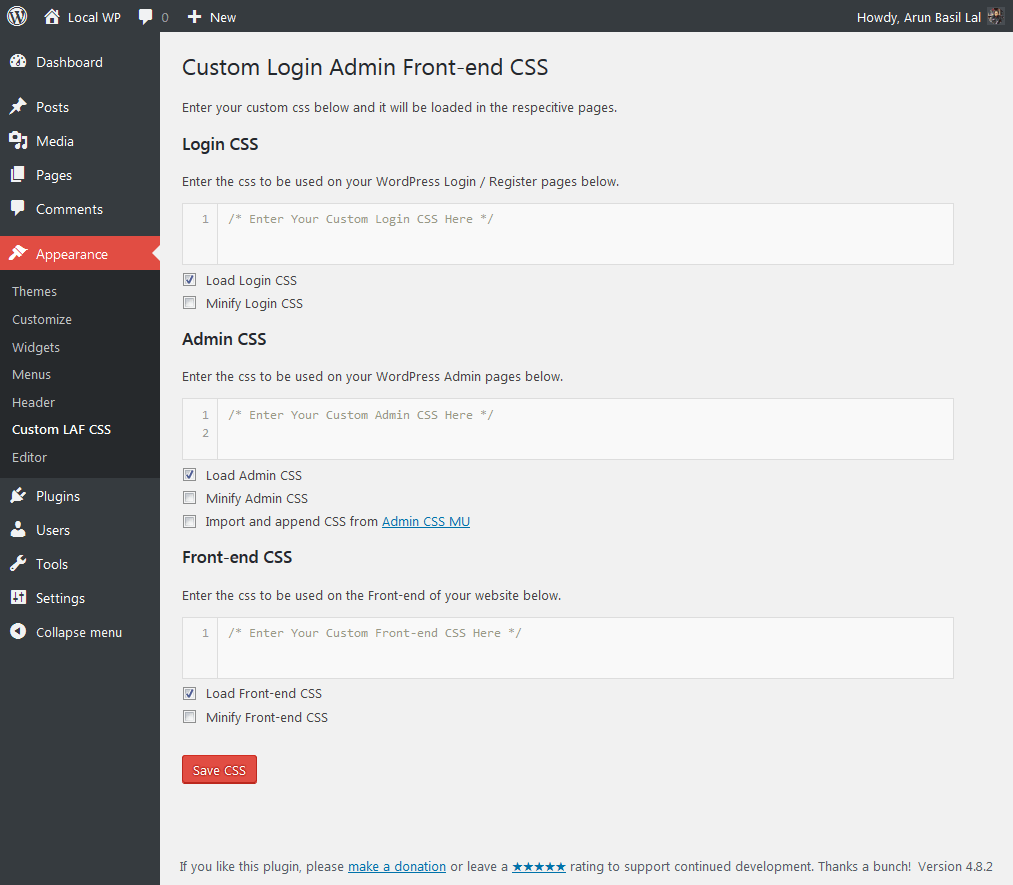
Loads custom CSS on WordPress Login Pages, Admin and Front-end via the admin interface. Can be used with WordPress single install and WordPress multisites.
Custom LAF CSS is very useful on multisite networks. Admins can customize the look and feel of the network and add CSS for the entire network. Adding CSS to the front-end via this plugin is handy when common features need styling and you are not sure which theme the user will be activating.
Main features:
- Loads custom CSS on Login, Admin and Front-end pages regardless of the active theme.
- CSS for Login, Admin and Front-end is separately saved and used.
- CSS is beautified and neatly presented in the admin.
- CSS minification.
- Multisite compatible.
- Translation ready.
- Compatible with Admin CSS MU plugin with inbuilt feature to import CSS.
You can add your custom CSS in WordPress Admin > Appearance > Custom LAF CSS of your WordPress install or the base site on a WordPress multisite network.
Upgrading From Admin CSS MU
Follow these steps if you are upgrading from the Admin CSS MU plugin.
- Install Custom LAF CSS plugin. Do not delete the Admin CSS MU plugin yet.
- Go to the plugin page and in the ‘Admin CSS’ section, check the box that says ‘Import and append CSS from Admin CSS MU’.
- Click ‘Save CSS’. Your CSS should be imported now.
- Deactivate and delete the Admin CSS MU plugin.