

CSS Page Ancestors
v0.95giannisg · 2017年11月19日 上架
Add ancestors classes in your body_class to CSS control ALL the anchestors of your page.
- 正在使用
- 10 以下
- 评分
- 暂无
- 累计下载
- 1,580
- 最近更新
- 2017年11月20日
贡献者
 giannisg
截图
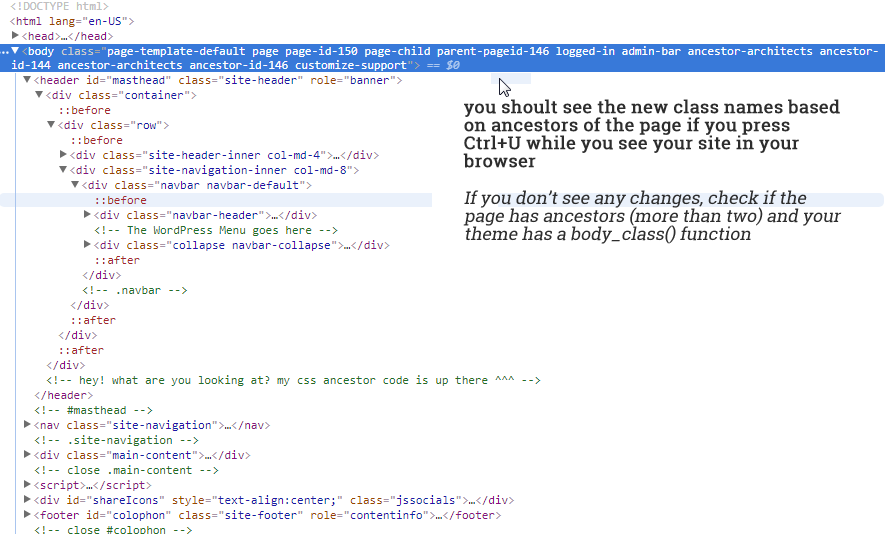
Please, keep in mind that THIS IS IN BETA. I’m relying to your feedback, positive or with suggestions, to release it out of beta
This plugin will give you the extra class you need in your tag of ALL (and not just one) of the anchestors of a page in WordPress.
This way you will be able to color a certain section of a site, based on the root’s ancestor – no matter how deep is the page (WordPress does this only for the direct father of a page)
Also, the printed class names are ancestor-[slug] and ancestor-id-[id]. This way, you can use it with your page slug (very conviniate if you move sites between instalations where id can change) and id (useful if you use a non-latin site, and slug can’t be used in css)
–
So, let’s imagine you have this tree of pages on your site:
- Home
- Clients
- Web
- EShops
- Portfolio
- Web
- Contact
Let’s see this scenario: You want all the pages under ‘Clients’ to have a red background. Now, it’s easy to do that – but only for the ‘Web’, and ‘Print’ pages because WordPress gives you only the fathers in the body classes – in this case, the id of ‘Clients’. ‘Eshops’ and ‘Portfolio’ can also have a red background, but you will have to add a new class in your css with the id of ‘Web’ at your css. And, if you add pages under ‘Eshops’, same thing, you will have to add a new class in your css file with the id of ‘Eshops’ page. So, all this is easy if you do it yourself – but if you handle the site to an editor, that knows only to create content – you will have to add the class in the CSS every time someone adds a level to all this.
With this plugin all the ancestors of a page, no matter the depth will be in your body as class names – as a slug, and as an id. And you want all the pages under ‘Clients’ to have a red background you just add to your css .achestor-clients {background:red;} in your css, and you are done – no matter the level the final page is under.
Finaly, the order is with top ancestor first (in our example, Portfolio page will have “ancestor-clients ancestor-web”) – this way, it’s simpler in CSS to overwrite the -clients class with the -web attributes.
There is no writing on the database, or other change on the site, so, even if something goes wrong, just de-activate the plugin, and you’ll be fine.