

Coupon Audit and Analytics for WooCommerce
v0.10.0David Marín Carreño (DaveFX) · 2026年8月22日 上架
Audit your WooCommerce coupons and see each one's profit margin: which are still live, which overlap, and which are quietly losing money.
- 正在使用
- 10 以下
- 评分
- 暂无
- 累计下载
- 908
- 最近更新
- 2026年11月22日
 David Marín Carreño (DaveFX)
截图
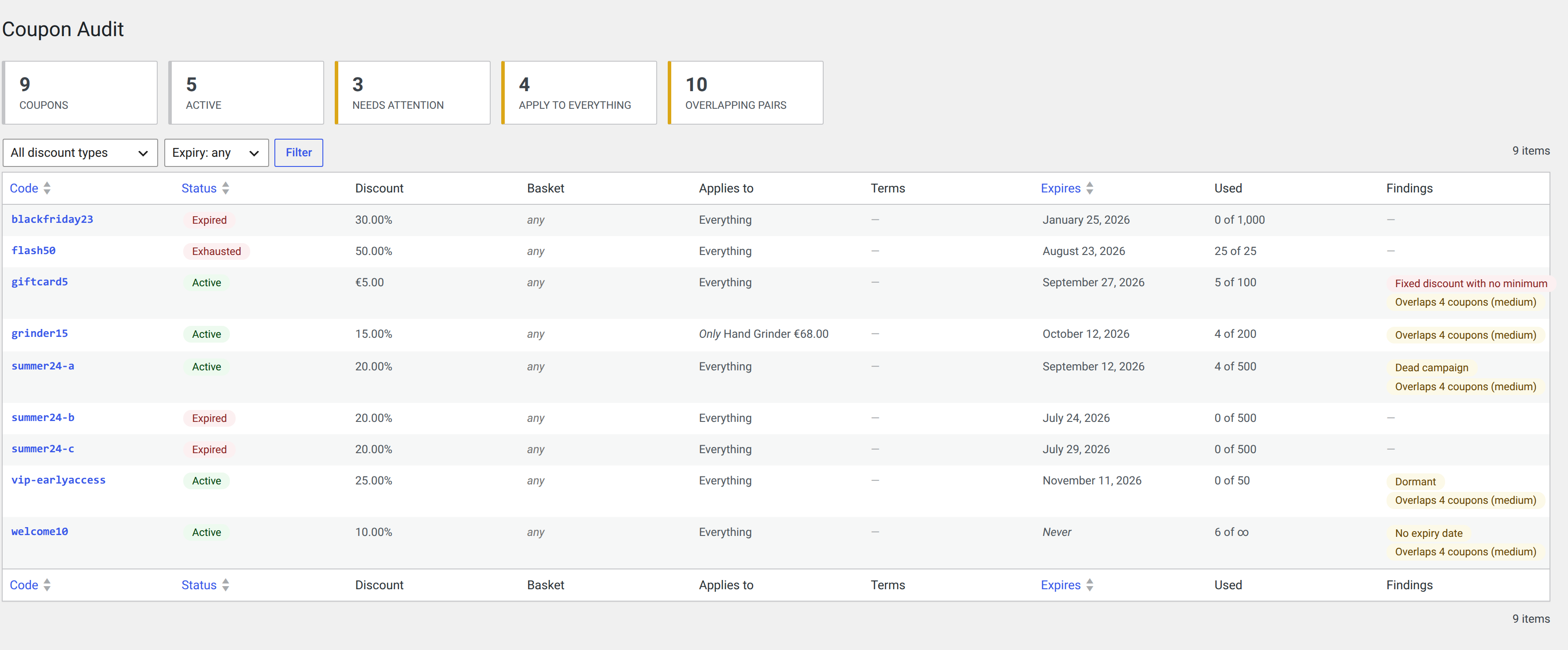
Most shops accumulate coupons. A launch code from two years ago, a partner discount nobody switched off, three variations of the same campaign where only one was meant to survive. WooCommerce will happily keep honouring all of them, and it will not tell you.
This plugin reads your coupons and says what is wrong with them.
The audit
Works on day one, in every shop, with no setup and no cost data:
- Never expires — live, with nothing scheduled to ever turn it off.
- Dormant — live, but nobody has redeemed it in months.
- Dead campaign — live, while every other code from its campaign has expired.
- Applies to everything — live, with no product or category restriction at all.
- Overlaps — two live coupons that can both apply to the same product. Nothing in WooCommerce compares one coupon against another, so this is not a finding you can reach any other way.
Status is worked out when you look, never stored, so a coupon that expired overnight says so the next morning.
Filter the list by discount type, or by whether a coupon expires at all — a shop with four hundred coupons cannot be read top to bottom, and “show me everything that never expires” is the question worth asking first.
The warning where it matters
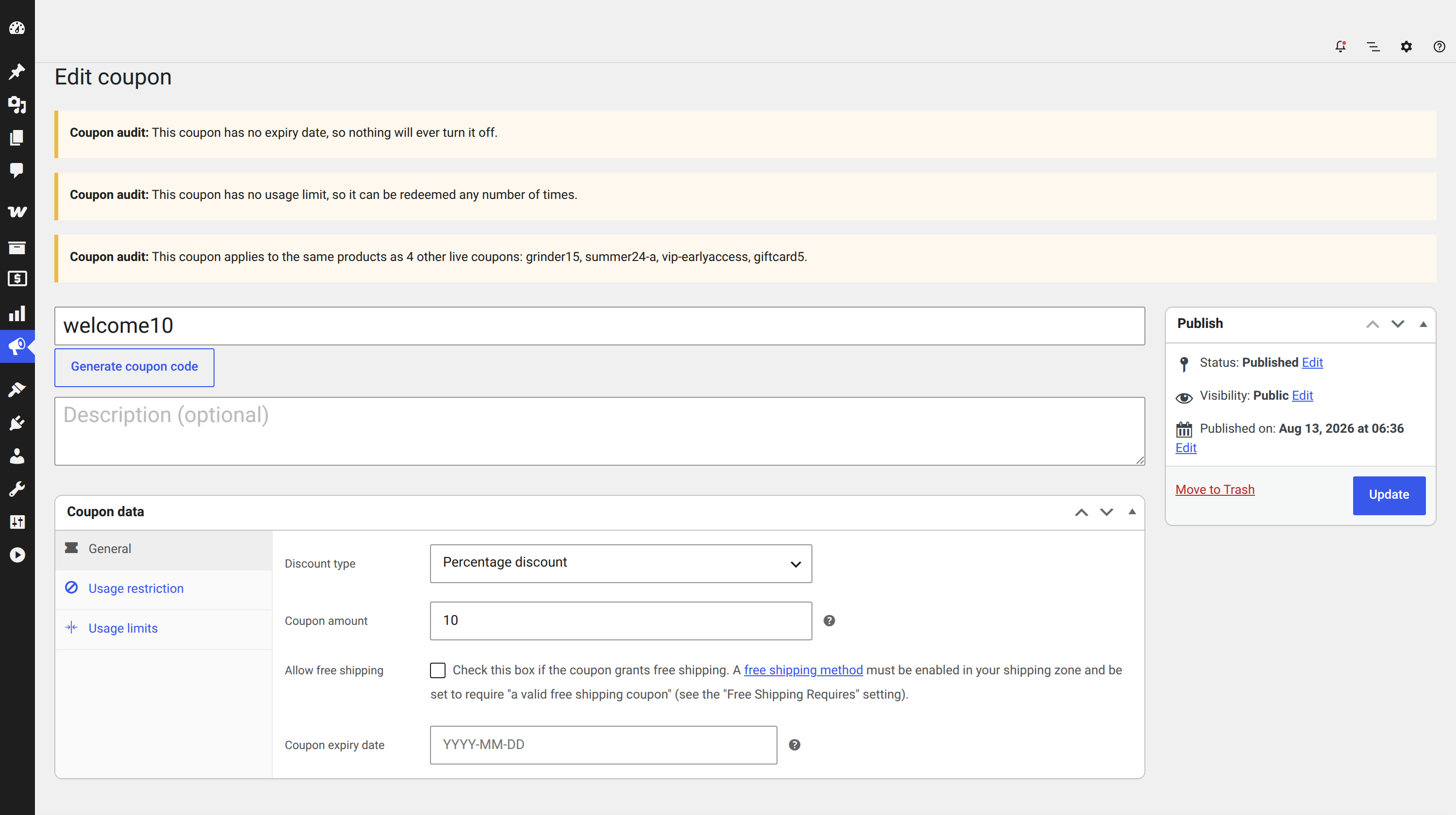
The same findings appear on the coupon edit screen, against the coupon in front of you. They never block a save. You are told, and you decide.
The margin
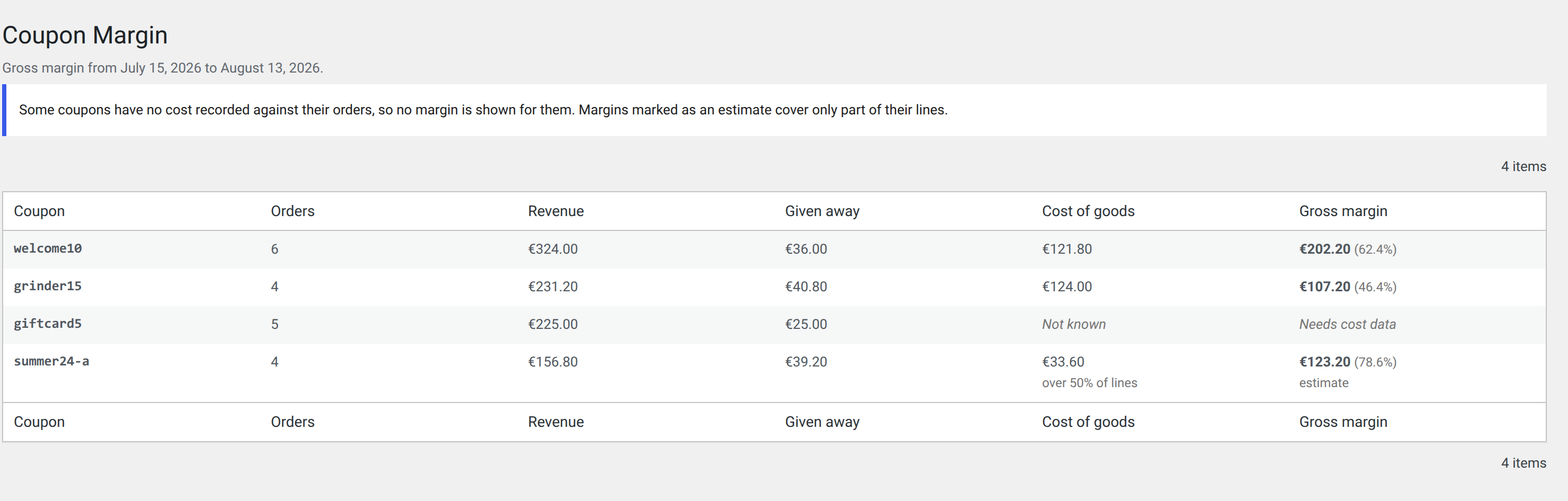
For each coupon: revenue, what it gave away, the cost of the goods it moved, and the gross margin left over. Over the last 30 days.
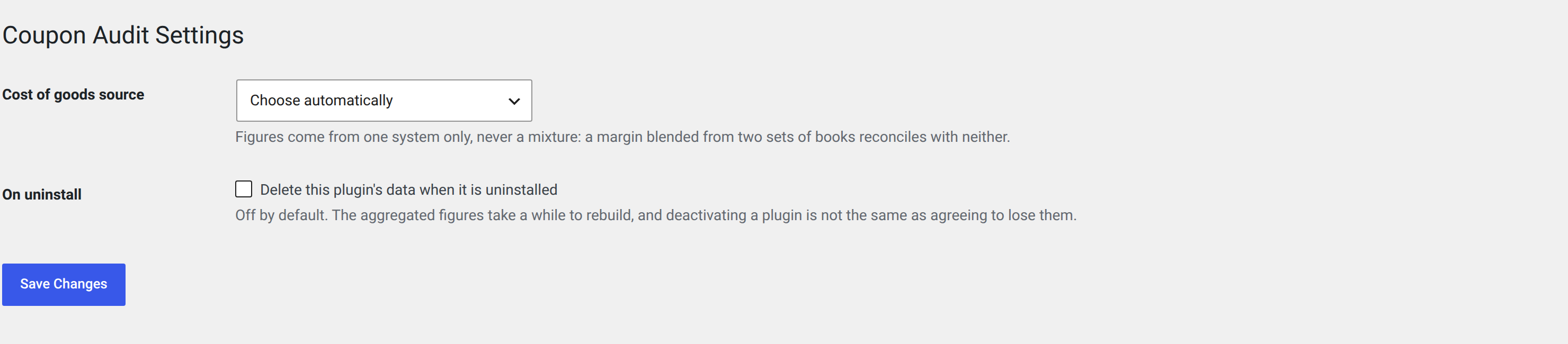
This half needs cost data, and it is honest about not having it. WooCommerce’s own cost-of-goods feature is off by default, so the plugin also reads the cost plugins shops actually use:
- WooCommerce’s built-in Cost of Goods (10.3 and later)
- Cost of Goods for WooCommerce, by WPFactory
- WooCommerce Cost of Goods
- Booster for WooCommerce
Figures come from one of these, never a mixture — a margin blended from two sets of books reconciles with neither. If several are installed you choose which one to believe.
Where cost is only partly known, the margin says so and states how much of it is real. Where no cost is known at all, no margin is shown. A wrong number in a financial dashboard destroys trust far faster than a missing number builds it.
The paid version
Coupon Audit and Analytics Premium is this plugin with more in it. It replaces this one rather than sitting beside it: installing the paid version deactivates the free one automatically, and your settings and the figures already gathered carry straight over.
It is not a licence key that switches on something already sitting here. The paid features are not in this plugin at all — they ship in the paid build and nowhere else.
- A year of margin history. The margin report covers 365 days.
- Export to CSV. The audit with its findings, and the margin figures, as they are on screen — whatever you have filtered the list down to.
- Net margin. Gross margin less what it cost to take the money. The fee is read from the gateway that actually charged it — Stripe, WooPayments and PayPal are supported, and another can be added with a filter. Where no fee was recorded, or where it was settled in a different currency from the order, the figure says so instead of guessing: a confident wrong margin is worse than an honest gap.
What it costs, and how to get it
What it does not do
It does not track your shoppers, and it does not need an account to work. Your coupons, orders and customers never leave your server: every figure on every screen is computed from your own database, on your own machine.
The plugin itself does talk to two outside services. It checks for updates, and it asks — once, and it takes no for an answer — whether you are willing to send diagnostics about the site. And the “More plugins” tab of its settings screen fetches a list of the author’s other plugins when you open it. “External services” below says exactly what each covers.
External services
This plugin uses Freemius for software licensing, updates and — only with your agreement — usage diagnostics. Freemius is operated by Freemius, Inc.
What is sent, and when
When the plugin is activated you are shown an opt-in screen. Nothing about you or your site is sent unless you accept it, the screen can be skipped, and the plugin works in full either way.
If you opt in, Freemius receives:
- your site’s URL, name and language, and an anonymous site identifier
- the name and email address of the WordPress user who opted in
- the plugin’s version, and whether it is the free or the paid build
- whether the site is a local development install
Separately from the opt-in, the plugin contacts freemius.com to check for plugin updates and, where the paid version is installed, to validate its licence key.
davefx.com: the “More plugins” tab
The “More plugins” tab of the settings page downloads the list of the author’s other plugins from davefx.com (https://davefx.com/plugins.json) when an administrator opens it, at most once a week. Nothing about the site or its users is sent, not even its URL: the request identifies itself only as DFX-Plugin-Showcase and its version. As with any web request, davefx.com’s server receives the IP address of the server making it. Until the tab is opened, no request is made. Privacy policy: https://davefx.com/en/privacy-policy/
What is never sent
No coupon, order, customer or revenue data. Every figure this plugin reports is calculated on your own server, from your own database, and stays there.