
Conditional Menus
v1.2.9themifyme · 2016年9月1日 上架
This plugin enables you to set conditional menus per posts, pages, categories, archive pages, etc.
- 正在使用
- 6 万+
- 评分
- 4.4 / 5
- 累计下载
- 99 万
- 最近更新
- 2026年8月13日
贡献者
 themifyme
截图
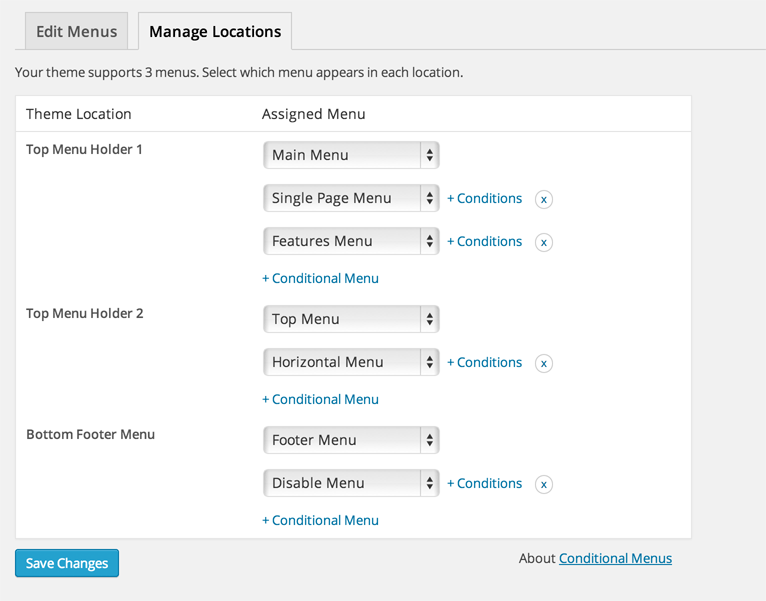
Conditional Menus is a simple yet useful WordPress plugin by Themify, which allows you to swap the menus in the theme as per specific conditions. In short, you can have different menus in different posts, pages, categories, archive pages, etc. It works with any WordPress theme that uses the standard WordPress menu function.
How to use it
Once you activate the plugin, you will see the conditional menus on the Manage Locations tab located in your WP Admin > Appearance > Menus page.
1) To add conditional menu: click “Conditional Menu” and select a menu from the list (you can create these menus in the “Edit Menus” tab)
– You can remove the menu by selecting “Disable Menu” from the list.
2) Click on “+ Conditions” to add conditions in the modal box (tick the checkboxes where you want the menu to appear)
3) To remove the conditional menus, click on the “X” button
Visit https://themify.me/conditional-menus for more details.