CodeCareBD – Payment Gateway for WooCommerce
v1.6.0Shakil Ahamed · 2022年9月20日 上架
bKash, Nagad, Rocket, Upay, CellFin, Bangla QR, bank transfer and Payoneer manual payments for WooCommerce. Block checkout and HPOS ready.
- 正在使用
- 600+
- 评分
- 5.0 / 5
- 累计下载
- 1.6 万
- 最近更新
- 2026年11月15日
 Shakil Ahamed
 codecarebd
 shakvaro
截图
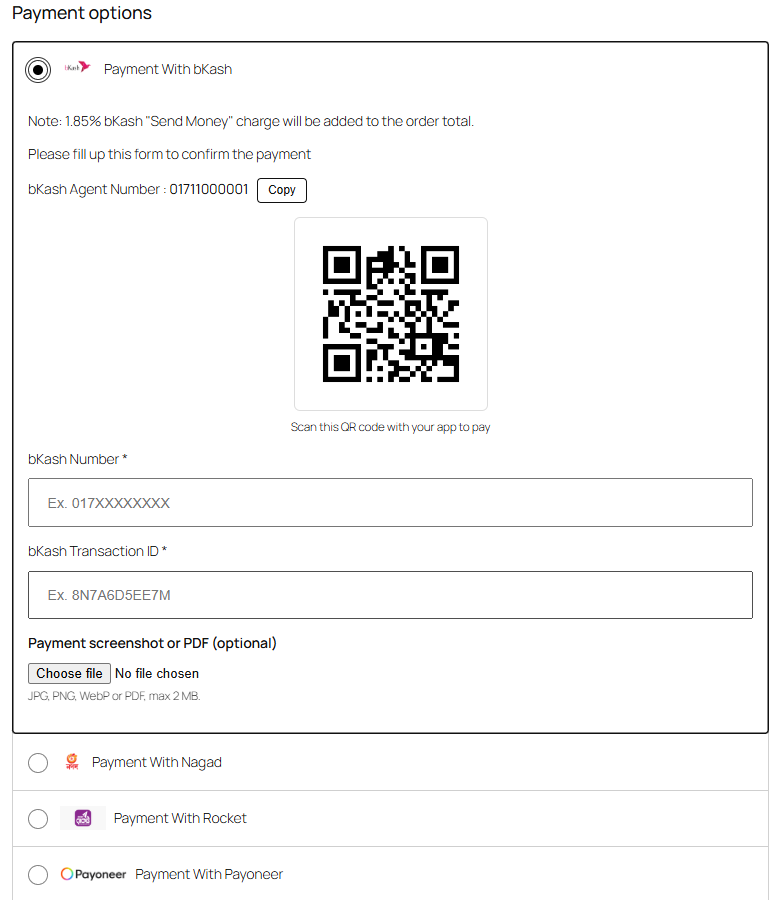
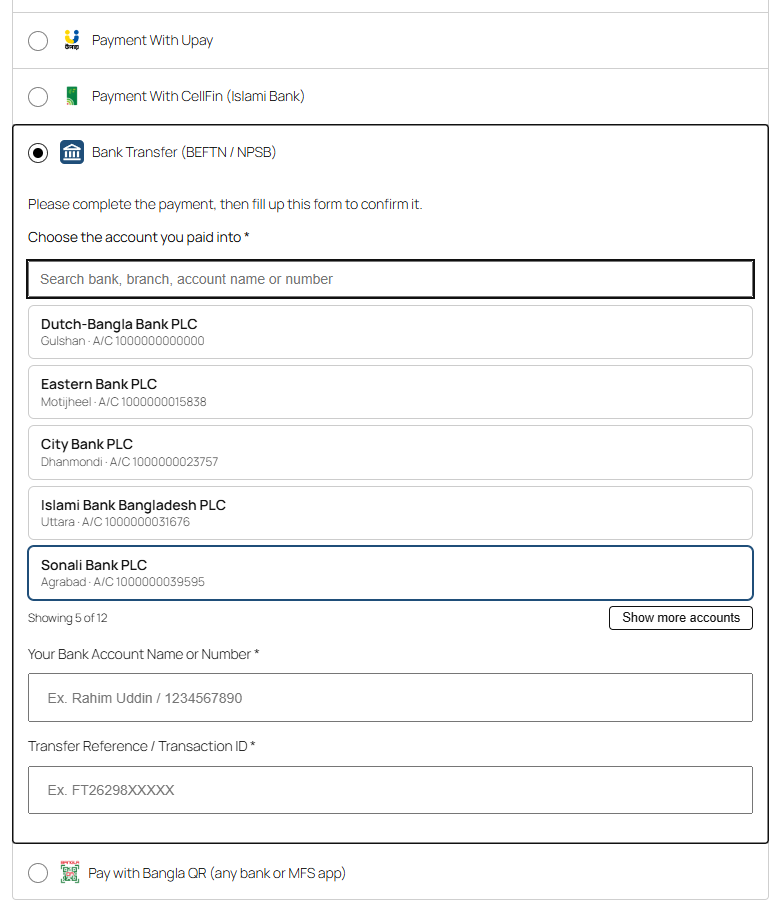
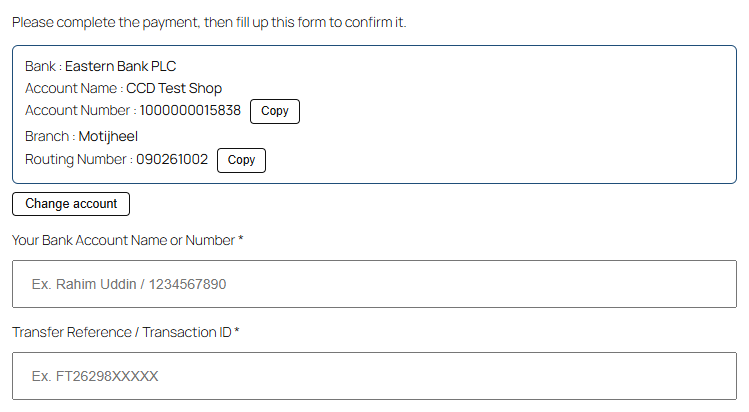
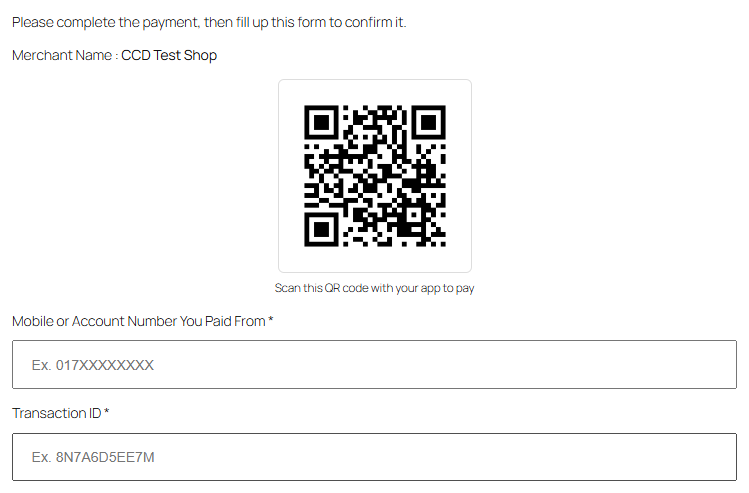
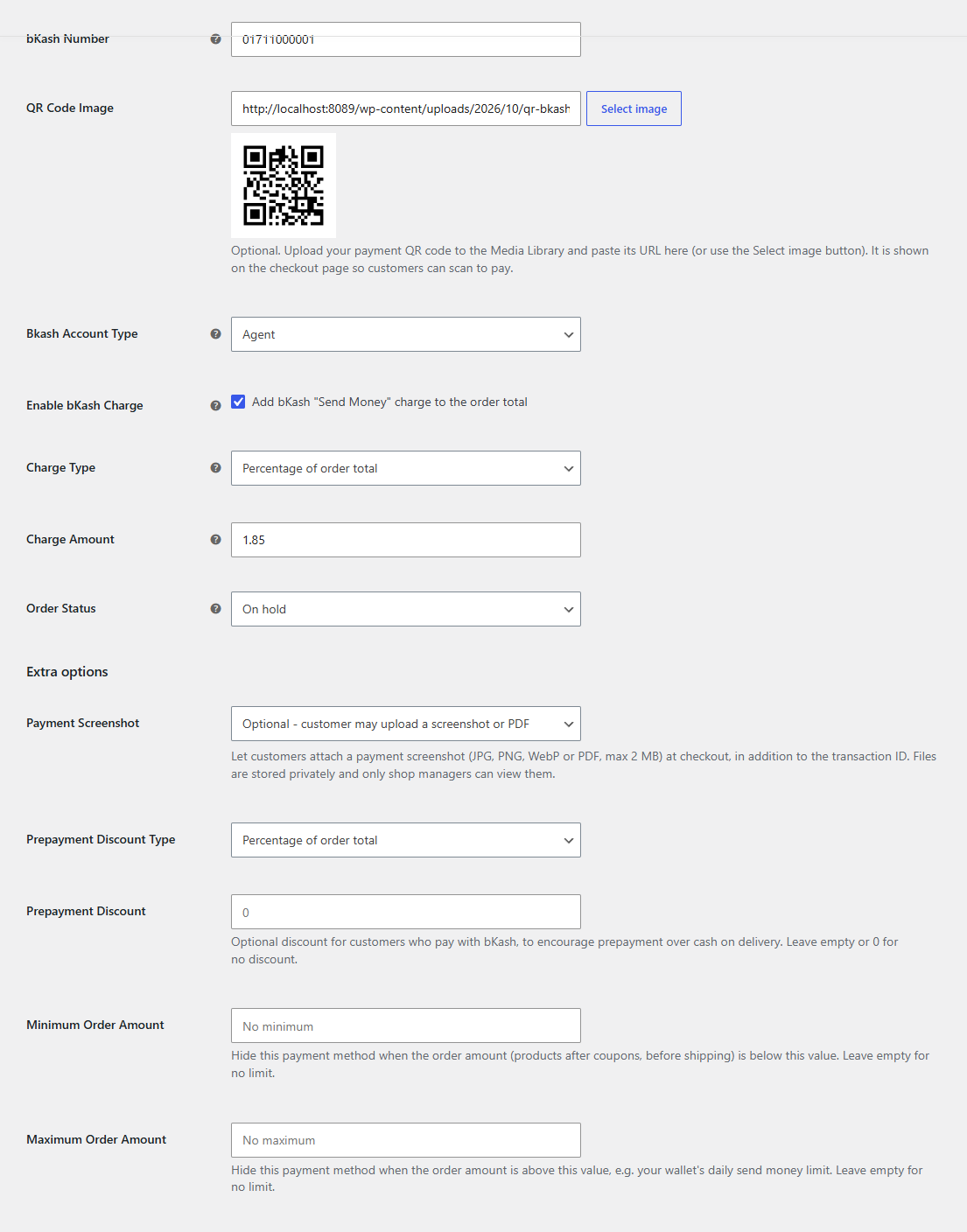
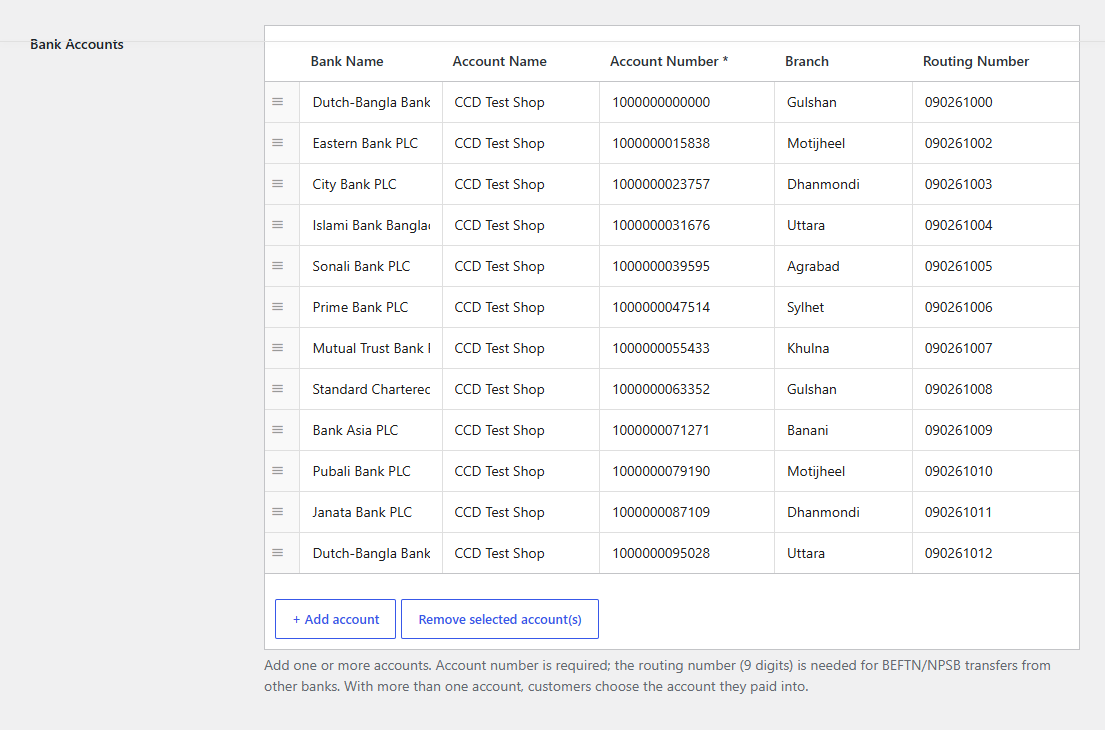

CodeCareBD – Payment Gateway for WooCommerce is a free, lightweight plugin that adds bKash, Nagad, Rocket, Upay, CellFin (Islami Bank), Bangla QR, bank transfer (BEFTN / NPSB) and Payoneer as manual payment methods to your WooCommerce store. It is built for Bangladeshi e-commerce and F-commerce sellers who want to accept mobile financial service (MFS) and bank payments without expensive merchant API onboarding.
The customer pays you from their own app (send money, cash out, Bangla QR scan or bank transfer), then confirms the payment on the checkout page with their number and Transaction ID (TrxID), and optionally a screenshot of the payment. You check the payment and process the order from your WooCommerce dashboard.
Why choose this plugin?
- 100% free – no monthly fees, no per-transaction charges from the plugin.
- Eight payment methods in one plugin – bKash, Nagad, Rocket, Upay, CellFin, Bangla QR, bank transfer and Payoneer.
- Block Checkout ready – works natively with the WooCommerce Cart & Checkout Blocks (the default checkout for new stores) and the classic shortcode checkout.
- HPOS compatible – fully supports WooCommerce High-Performance Order Storage.
- No API or merchant account required – use your existing personal, agent or merchant number.
- Stops fake payment claims – a Transaction ID that was already used on another order is rejected at checkout.
- Lightweight and fast – no bloat, minimal impact on checkout speed.
Payment methods
- bKash, Nagad, Rocket, Upay – show your number (Personal, Agent or Merchant) with a one-click Copy button and your QR code. Add as many numbers as you need: customers search and pick the number they sent money to.
- CellFin (Islami Bank) – show your Islami Bank account or CellFin number (one or several).
- Bangla QR – show your Bangla QR code; customers pay from any bank or mobile banking app.
- Bank transfer (BEFTN / NPSB / RTGS) – add as many bank accounts as you need. With several accounts, customers search and pick the account they paid into, and see that account’s number and routing number with Copy buttons.
- Payoneer – customers pay to your Payoneer email.
Key features
- Duplicate Transaction ID protection for every method (classic and block checkout).
- Payment screenshot / PDF upload – off, optional or required per method, at checkout or later from the thank-you page and My Account. Files are stored privately on your server; only shop managers can view them.
- Send money charge per method – percentage (e.g. bKash 1.85%) or fixed amount, updated live as the customer switches method.
- Prepayment discount per method – percentage or fixed, to encourage prepaid orders over cash on delivery.
- Minimum / maximum order amount per method, e.g. to respect your wallet’s send money limit.
- Advance / partial payment – customers pay the delivery charge, or a fixed amount for inside / outside Dhaka (you choose the districts), with an optional minimum order total. Orders get an “Advance Received” status. Great for reducing fake cash-on-delivery orders.
- Smart number input – accepts Bangla digits (০১৭…), +880 numbers, spaces and dashes, and 12-digit Rocket account numbers.
- Settings checks – wrong receiving numbers, routing numbers, QR links, percentages or limits are caught when you save, so customers never see a broken payment method.
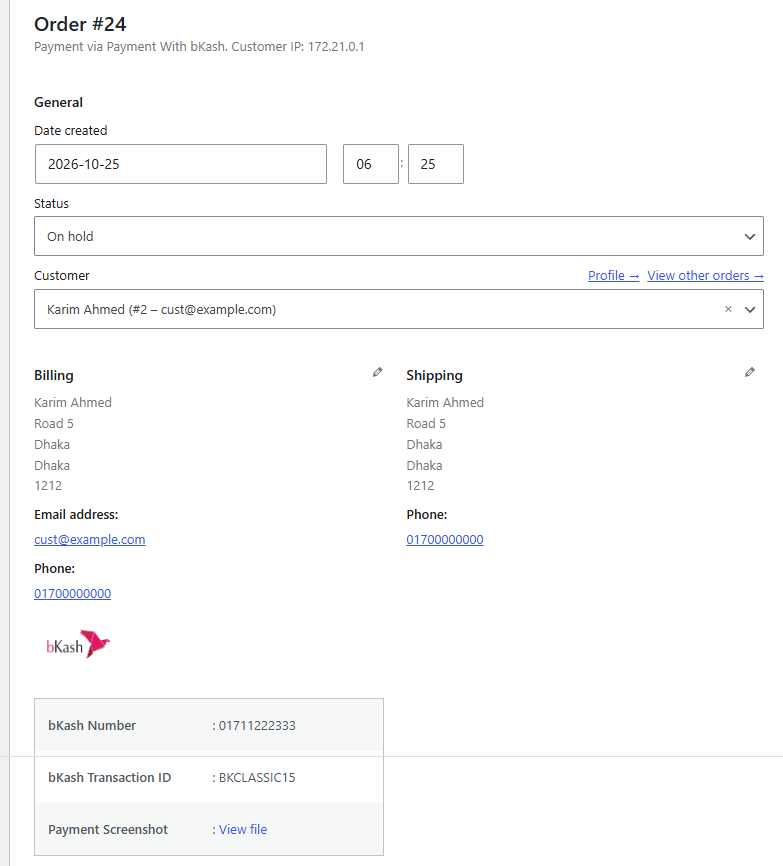
- Number, Transaction ID and payment details on the admin order screen, the orders list and the customer’s My Account > Orders.
- Custom thank-you page message and order email instructions per method.
- Bangla translation included (বাংলা) for the checkout, emails and settings. Translation ready for other languages.
বাংলায়
বিকাশ (bKash), নগদ (Nagad), রকেট (Rocket), উপায় (Upay), সেলফিন (CellFin), বাংলা কিউআর (Bangla QR) ও ব্যাংক ট্রান্সফারে ম্যানুয়াল পেমেন্ট নিন। কাস্টমার টাকা পাঠিয়ে চেকআউটে নম্বর ও ট্রানজেকশন আইডি দেন, চাইলে পেমেন্টের স্ক্রিনশটও। একাধিক বিকাশ/নগদ নম্বর বা ব্যাংক অ্যাকাউন্ট, ঢাকার ভেতরে/বাইরে অগ্রিম ডেলিভারি চার্জ, ডুপ্লিকেট ট্রানজেকশন আইডি প্রতিরোধ এবং পূর্ণ বাংলা অনুবাদ রয়েছে।
Perfect for
- Bangladeshi WooCommerce stores and F-commerce (Facebook commerce) sellers.
- Shops that accept bKash, Nagad, Rocket, Upay, Bangla QR or bank payments without a payment gateway contract.
- Stores that want an advance delivery charge to cut down on fake orders.
How it works
- The customer selects a payment method at checkout and sees your number, QR code or bank details.
- They pay from their own app or bank.
- They enter their number and Transaction ID (and, if you ask for it, upload a screenshot) and place the order.
- The order waits as “On hold” (or the status you choose) while you check the payment, then you process it.
Video guide
For suggestions and support, contact us here.
Privacy & Data Sharing
Customer payment data. The customer’s payment number, Transaction ID and any payment screenshot are stored on your own site, attached to the order. Nothing is sent to CodeCareBD or any third party. Screenshots are kept in a private folder; delete them with the order if your policy requires it.
Optional usage analytics. This plugin can send usage and diagnostic data to the developer to help fix bugs and prioritise features. This is disabled by default. Nothing is collected or sent unless you explicitly opt in via the admin notice shown after activation. Declining (or ignoring) the notice leaves the plugin fully functional.
There are two separate, optional opt-ins:
-
Usage & diagnostics. When enabled, we collect: WordPress, PHP, MySQL and WooCommerce versions; your active theme, locale and whether the site is multisite; the plugin version and activation/deactivation/update events; which of the plugin’s features are enabled; and a one-way (SHA-256) hash of your site URL. The raw site URL is never sent.
-
Product update emails (separate checkbox). Only if you tick this, we additionally collect your site administrator email to send occasional product updates.
You can change or withdraw your choice at any time from Settings Data Sharing in your WordPress admin. Turning data sharing off stops all collection and requests deletion of previously collected data. Uninstalling does the same.
Data is sent over HTTPS to https://track.shakvaro.cloud and is handled as described in our privacy policy: https://shakvaro.com/wp-insights/privacy