

CI BMI Calculator
v1.1.0Calculator.io · 2023年11月8日 上架
Check your health with our free BMI Calculator.
- 正在使用
- 100+
- 评分
- 5.0 / 5
- 累计下载
- 3,233
- 最近更新
- 2026年10月19日
贡献者
 Calculator.io
截图
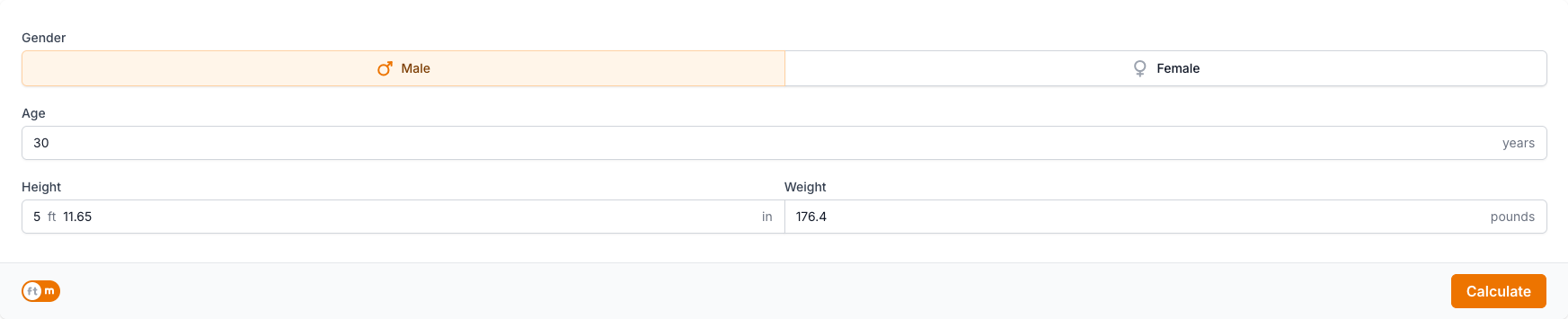

Check your health with our free BMI Calculator. Instantly calculate your Body Mass Index for adults and children using official WHO and CDC guidelines.
Add the calculator to any page, post or widget area with the shortcode [ci_bmi_calculator].
What you enter: Gender, Age, Height, Weight.
What you get: Body Mass Index (BMI).
Features:
- Works as soon as it is activated: no account, no API key and no settings page.
- Calculates in your visitor’s browser. Nothing they type is sent to calculator.io or anywhere else, and the plugin loads no ads, trackers or external scripts.
- Responsive: the form and the results sit side by side on wide pages and stack on narrow ones. The frame resizes itself to fit the calculator.
- Optional light, dark or automatic (follows the visitor’s system setting) theme, a custom accent colour and a maximum width, all set in the shortcode.
- The calculator runs in an iframe, so your theme’s styles cannot break it and it cannot break your theme.
More about this calculator: https://www.calculator.io/bmi-calculator/
Usage
Add the BMI Calculator shortcode to your page, post or sidebar:
[ci_bmi_calculator]
Or add the following code to your template where you would like the BMI Calculator to appear:
<?php echo do_shortcode( '[ci_bmi_calculator]' ); ?>
All attributes are optional:
title–1(default) shows the calculator heading with its icon,0hides it. Example:[ci_bmi_calculator title="0"]theme–light(default),dark, orautoto follow the visitor’s light/dark system setting. Example:[ci_bmi_calculator theme="auto"]accent– an accent colour for buttons and highlights, as a hex value. Example:[ci_bmi_calculator accent="#2563eb"]max_width– the widest the calculator may be: a number followed bypx,%orrem. The calculator is centred when it is narrower than its column. Example:[ci_bmi_calculator max_width="720px"]
Attributes can be combined: [ci_bmi_calculator title="0" theme="auto" accent="#2563eb" max_width="720px"]
Source code and libraries
The plugin’s own JavaScript and CSS are shipped unminified and human-readable: assets/js/*.js (except assets/js/lib/), assets/css/main.css, assets/css/ci-widget.css, assets/css/ci-embed.css and the PHP file. main.css is the compiled, unminified stylesheet of calculator.io. The calculator is also published on the calculator.io website: https://www.calculator.io/bmi-calculator/
Third-party libraries bundled in assets/js/lib/. Where a file is minified, the readable source is available at the upstream address:
- math.js 3.37.1 (Apache-2.0) –
assets/js/lib/math.min.js, minified build. Source: https://github.com/josdejong/mathjs - marked 15.0.12 (MIT) –
assets/js/lib/marked.min.js, minified build. Source: https://github.com/markedjs/marked - Inputmask 5.0.9-beta.70 (MIT) –
assets/js/lib/input-mask.min.js, minified build. Source: https://github.com/RobinHerbots/Inputmask - lazysizes 5.3.2 (MIT) –
assets/js/lib/lazysizes.js. Source: https://github.com/aFarkas/lazysizes - Air Datepicker 3.3.0 (MIT) –
assets/js/lib/air-datepicker.js. Source: https://github.com/t1m0n/air-datepicker - Inter font (SIL Open Font License 1.1) –
assets/fonts/inter-v20-latin.woff2. Source: https://github.com/rsms/inter