
Change Last Modified Date
v1.4.8djuric · 2017年7月29日 上架
Change or prevent updating Last Modified date for individual posts.
- 正在使用
- 3,000+
- 评分
- 4.3 / 5
- 累计下载
- 4.3 万
- 最近更新
- 2025年9月11日
贡献者
 djuric
截图
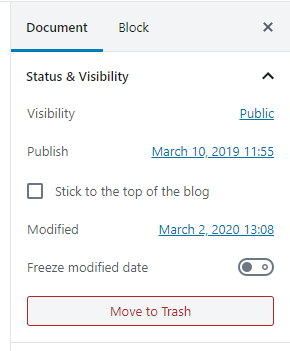
Using this plugin you can easily change or prevent updating the last modified date for each post. Controlling the last modified date can come in handy when you would like to control “order by last modified” for posts (or custom post type).
When this plugin is active it will enable Last modified date options in Status & Visibility panel in sidebar. Changing the modified date can be done by clicking the date link and selecting a new date for the post. It’s also possible to disable future updates of the last modified date by setting the “Freeze modified date” option to on.
Custom post types support
To update the last modified date, plugin is using “rest_pre_insert_{$post_type}” hook which is executed before “init” where other custom post types are usually registered. This is the reason why plugin is not aware of any additional post types other than those registered by WordPress core. To support additional post types you can add constant in following format to wp-config.php:
define( 'CLM_DATE_POST_TYPES', ['post-type-slug-1', 'post-type-slug-2'] );
Custom post types are also required to have “custom-fields” support declared.
Support
For support or code contributions please refer to Github repo.