

Caching Out – Page Cache, Speed & Core Web Vitals
v1.27.2CachingOut · 2026年10月21日 上架
Makes your WordPress site faster, and tells you the truth when something else is holding it back. Caching is on from activation. No key, no account.
- 正在使用
- 10 以下
- 评分
- 暂无
- 累计下载
- 927
- 最近更新
- 2026年11月13日
贡献者
 CachingOut
截图




Makes your WordPress site faster, and tells you the truth when something else is holding it back.
Activate Caching Out and your pages are cached straight away. Each page is kept as a ready-made copy and served before WordPress loads, while browser caching, compression and lazy loading cut what every visitor has to download. There is nothing to set up first.
Anything that can change how your site looks stays off until you switch it on. The things that only make it faster are already on.
Google measures how quickly your pages load, respond and settle as Core Web Vitals, and visitors do not wait for slow pages. Caching Out is designed to improve all three: LCP, INP and CLS. Performance results vary depending on hosting, theme, plugins and traffic.
Why we built Caching Out
Most caching plugins give you a page of switches and leave the rest to you. When a page will not cache, when a checkout misbehaves, or when the site is still slow for a reason no cache can fix, you are left guessing, or switching things off one at a time until something changes.
Caching Out is built to give you answers instead:
- “Why isn’t this page cached?” Type in the address. Caching Out tells you the reason in plain English, whether that’s how it should work, and what to change if it isn’t.
- “What is slowing this page down?” The Page Audit reads your pages the way a visitor would and lists what it found. Where a Caching Out setting is the fix, there is a button that changes it. Where the change has to happen in your theme or at your host, it says so in plain words.
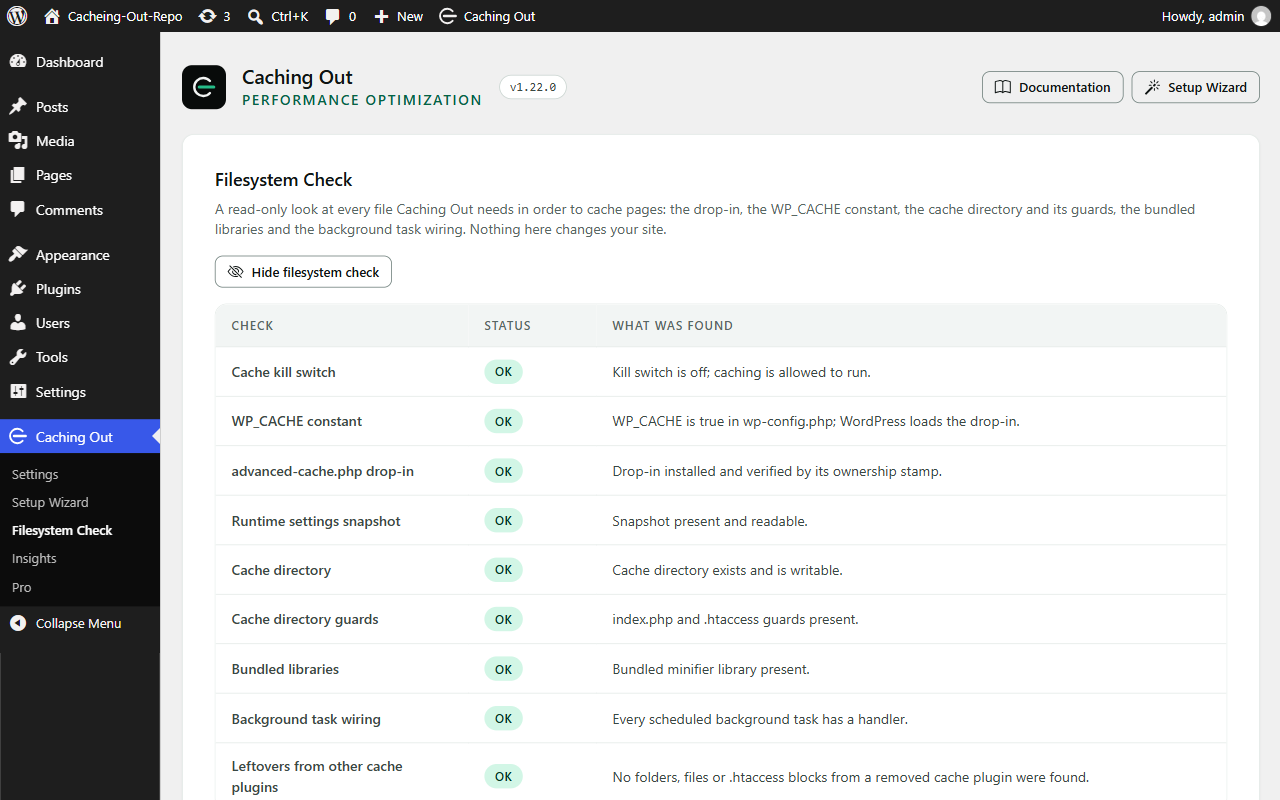
- “Is the plugin actually working?” The Filesystem Check verifies every file page caching needs. If something on your host is blocking the plugin, it tells you immediately – and tells you what to do about it.
- “Will it fight my other plugins?” Not over its files. Caching Out never overwrites a file that belongs to another plugin, and if another cache already handles page caching, it leaves it alone and tells you.
All of this is in the free plugin, and none of it needs an API key.
Why it is free
A cache sits between your site and every visitor, so you should be able to see what it is doing before you trust it with them. That is why the free plugin is complete on its own and stays free: page caching, Check a page, the Page Audit, the Filesystem Check and every safety rule below.
It needs no licence key and no account, it never contacts our servers and it sends no usage data. Caching Out Pro is an optional add-on for sites that want more, described further down; nothing in this plugin stops working without it.
What it will never do
These rules are fixed. They have no settings, they cannot be switched off, and they are the same in the free plugin and in Caching Out Pro. Caching Out will never:
- Serve a cached page to a logged-in visitor
- Cache, or serve from the cache, a request carrying a session, authentication or cart cookie – including PHPSESSID
- Store a response that sets a session or authentication cookie
- Cache cart, checkout or account pages in WooCommerce or Easy Digital Downloads – they are excluded with no configuration, by their real address, even when you rename them
- Cache wp-admin or wp-login.php
- Cache anything but an ordinary page view (a GET request) that returned 200
- Send a visitor a half-written page: cache files are written to a temporary file and renamed into place
- Write into, overwrite or delete a drop-in file or .htaccess block that belongs to another plugin
- Read, write or remove object-cache.php
- Leave anything behind: deleting the plugin removes its options, its scheduled tasks, its cache directory, the drop-in, the WP_CACHE line it wrote and its .htaccess block
And if you ever need it, one line in wp-config.php – define( ‘CACHINGOUT_DISABLE_CACHE’, true ); – switches all cache reading and writing off, in every version.
Already using another cache?
Caching Out checks before it touches anything. Page caching needs one file, wp-content/advanced-cache.php. Caching Out records a fingerprint of the file it writes and compares it before every write, overwrite or delete. If another plugin owns the file, Caching Out leaves it exactly as it is, does not switch page caching on, and shows a notice naming the plugin the file belongs to. Every other optimisation carries on working.
The same rule covers your .htaccess. A marker block belonging to another plugin is never written into and never removed. Before Caching Out writes its own block it checks the result, then replaces the file in one step; if the file cannot be written, nothing is written at all, so a half-written server configuration is never left behind, and no copy of your .htaccess or wp-config.php is ever left on disk. Deactivation never edits .htaccess or wp-config.php.
Off until you choose it
Anything that can change how a page looks waits for you:
- Minify CSS and Minify JavaScript
- Defer JavaScript
- Lazy loading of CSS background images
- Database cleanup, which is manual and shows you the row count before anything is deleted
Everything in the free plugin
- Page caching served from the drop-in, before WordPress and its plugins load. Cache lifespan in hours, optional separate cache files for mobile.
- Purging when a post or page is saved, trashed or restored, when a term, menu, theme, widget or customizer setting changes, when a comment is approved, and from the Purge button in the admin bar. Archives and the pages that list a changed post are purged with it.
- Check a page: enter an address and see what the cache decided for an anonymous visitor and why – correct behaviour (a cart page, a logged-in page, a page that asked not to be cached) or something you can change, with the fix and the matching help page. It can also fetch the page to check the rules that apply once it is generated.
- Page Audit: reads your tracked pages the way a visitor would – over a loopback request to your own site – and lists what it found, with a button wherever a plugin setting answers the finding.
- Filesystem Check: the drop-in, the WP_CACHE constant, the cache directory, the settings snapshot the drop-in reads and the scheduled tasks. Each row says what state it is in and what to do about it.
- A status strip at the top of the Cache tab: whether page caching is on, how many pages are cached right now, whether the drop-in is ours and in place, and the cache lifespan.
- Browser caching: Expires headers, GZIP and Brotli for Apache through the checked .htaccess writer. On NGINX the documentation carries the equivalent snippet to paste into your server configuration.
- Lazy loading for images, iframes and self-hosted video, with an exclusion list, an above-the-fold allowance, missing width and height attributes added to reduce layout shift, and optional lazy loading of CSS background images.
- Hero-image priority: the image most likely to be the largest one on screen is marked high priority and preloaded, with an exclusion list.
- Minify CSS and JavaScript, and defer JavaScript, each off until you switch it on, each with its own per-file inclusion and exclusion controls. Minified copies are written to disk; the original tag keeps its attributes and only the URL changes. Already-minified files are left alone.
- Database cleanup by hand: revisions, auto-drafts, trashed posts, spam and trashed comments, and transients, with the number of rows shown before anything is deleted. Nothing is scheduled and nothing runs unattended.
- Heartbeat control and DNS prefetch for the domains you list.
- Compatibility handling for WooCommerce, Easy Digital Downloads, WPML, Polylang and page builders, which register their exclusions into the one place that decides whether a page may be cached.
Caching Out Pro
The free plugin above is complete on its own and stays free. Caching Out Pro is a separate add-on, installed alongside it, for sites that want more:
- Troubleshooting: something broke? Caching Out shows you what’s changed since your site last worked, with the likely causes first. Try one fix at a time, see it before it’s applied, and undo it in one click if it doesn’t help.
- Optimize CSS delivery, combine CSS and JS, delay JS, Google Fonts (combine and self-host), WebP and AVIF serving where copies already exist, and YouTube click-to-load
- Image compression: pick a heavy image from the Page Audit or the Media Library, see it before and after, and keep the smaller file at the same address – one image at a time, on your own server, always restorable
- Unused CSS/JS: stops named plugin files loading on pages that do not need them, with a scan, a preview, a dependency check, a never-unload list, suggested rules from a built-in catalogue and an optional weekly scan
- Activity: a record of every change the plugin makes, with one-click revert
- Performance Insights: a PageSpeed dial, a baseline, re-tests and history
- Cache preloading, a step you switch on
- Database: scheduled cleanup, orphaned metadata and table optimisation
- CDN rewriting, and purge add-ons for Cloudflare, Varnish and Sucuri
- WP-CLI commands, settings export and import, and Multisite Network Admin
- Email support from the team who built it – plus an assistant that already knows your setup. It knows which plugins you run, which settings you have on and what the Page Audit found, so you never have to explain your site before asking a question. Answers draw on our documentation and the plugin’s own decision for your page, with links so you can check.
The assistant is scoped to Caching Out and your site’s configuration: 50 questions a day and 300 a month per licence. It is not a general-purpose chatbot; answers are AI-generated and can be wrong, so check anything consequential against the linked source.
Every feature in every paid plan; the paid plans differ in the number of sites and the length of support, never in what the plugin does. In both editions, anything that can change how a page looks stays off until you switch it on.
Details: https://cachingout.com/pricing/
Privacy: nothing leaves your server
The free plugin does not need a licence, never contacts our servers, and makes no outbound request of its own.
The one exception is the Page Audit and the Filesystem Check, which fetch pages from your own site over a loopback request when you run them or when the tracked-page schedule runs. Nothing is sent anywhere else and nothing leaves your server.
The free plugin sends no usage data. Telemetry belongs to Caching Out Pro, where it is opt-in with the box unticked, sends aggregate figures only – never page content and never personal data – and is disabled outright by define( ‘CACHINGOUT_DISABLE_TELEMETRY’, true );.
The free plugin sets no cookies of its own. It reads cookie names on the request, because it must – a visitor carrying a session, authentication or cart cookie is never served a cached page – but no cookie value is stored, logged or sent anywhere.
Third-party libraries
The admin screens draw their icons from 63 Bootstrap Icons 1.13 glyphs (https://github.com/twbs/icons, MIT licence), kept as SVG path data in includes/class-icons.php; no icon font, stylesheet or script is shipped. Bootstrap itself is no longer used (removed in 1.22.0). Minify CSS and Minify JavaScript use matthiasmullie/minify (https://github.com/matthiasmullie/minify, MIT), shipped unminified in vendor/. assets/THIRD-PARTY-LICENSES.txt in the plugin folder names each bundled file, its version and its licence.
The plugin’s own three front-end scripts (the lazy loading helpers) are printed inline from assets/js/*.min.js; their readable source is in assets/js/src/.