

Bulk Content Toolkit
v1.6.0Thomas Lloancy · 2024年11月14日 上架
Custom meta fields in native Quick Edit and Bulk Edit. WooCommerce, LearnPress, ACF, any plugin. No CSV.
- 正在使用
- 50+
- 评分
- 5.0 / 5
- 累计下载
- 3,055
- 最近更新
- 2026年10月15日
贡献者
 Thomas Lloancy
截图
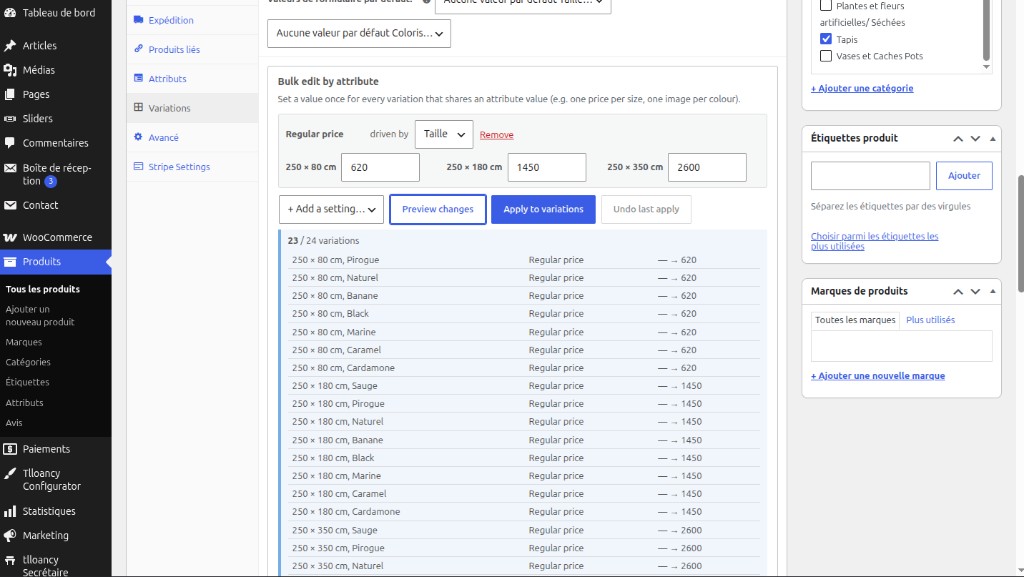
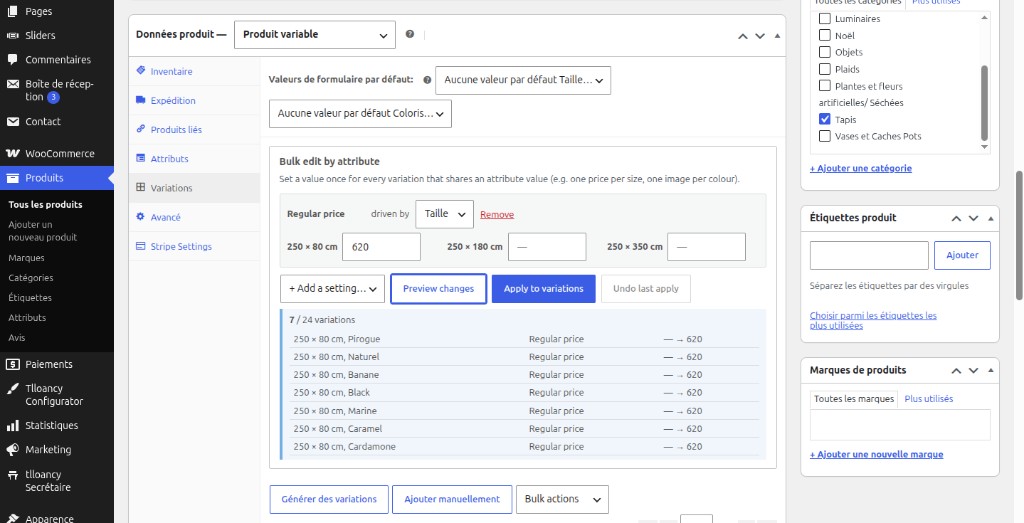
Bulk Content Toolkit adds any custom meta field to the native WordPress Quick Edit row and Bulk Edit panel — automatically, without writing a single line of code.
Most bulk edit plugins hardcode which fields they support. Bulk Content Toolkit reads your actual database and exposes every meta field that exists on your site, regardless of which plugin created it.
How it works
- Go to Settings Bulk Edit.
- Pick a post type (products, courses, pages, custom types…).
- Move the fields you want into the “Selected Fields” column.
- Save — those fields now appear in Quick Edit and Bulk Edit inside the native WordPress UI.
Works with everything
Because the plugin reads directly from wp_postmeta, it works with any field from any plugin — without any integration code:
- WooCommerce: _price, _sale_price, _stock_status, _manage_stock, _tax_status, and all product meta
- LearnPress: _lp_price, _lp_coming_soon, _lp_max_students, _lp_passing_condition, and all course meta
- ACF (Advanced Custom Fields): any field saved to post meta
- Elementor, WPML, Yoast SEO, and any other plugin that writes to wp_postmeta
Automatic field type detection
The plugin samples your existing data and infers the correct input type — checkbox, select, number, date, color, URL, textarea, and more. Common WooCommerce and LearnPress fields are hardcoded to their correct type.
100% native
No new UI to learn. No external spreadsheet. No CSV. Fields appear in Quick Edit and Bulk Edit exactly where WordPress users already expect them.
WooCommerce variations (new)
On a variable product, open the Variations tab: the “Bulk edit by attribute” panel lets you say “all 3×4 cost 49.90, all 6×8 cost 149, every banana variation gets the banana photo” in one go. One setting is driven by one attribute. Preview first, apply, undo if needed. Screenshots 1 and 2 show a price per size, then a partial apply. Nothing changes on sites without WooCommerce.