Bulk COGS Editor for WooCommerce
v1.3.1Dinesh Yadav · 2026年10月10日 上架
Fast WooCommerce COGS bulk editing with saved presets, CSV/XLSX import, live previews, history, and rollback for efficient product cost updates.
- 正在使用
- 10 以下
- 评分
- 暂无
- 累计下载
- 664
- 最近更新
- 2026年11月17日
贡献者
 Dinesh Yadav
截图


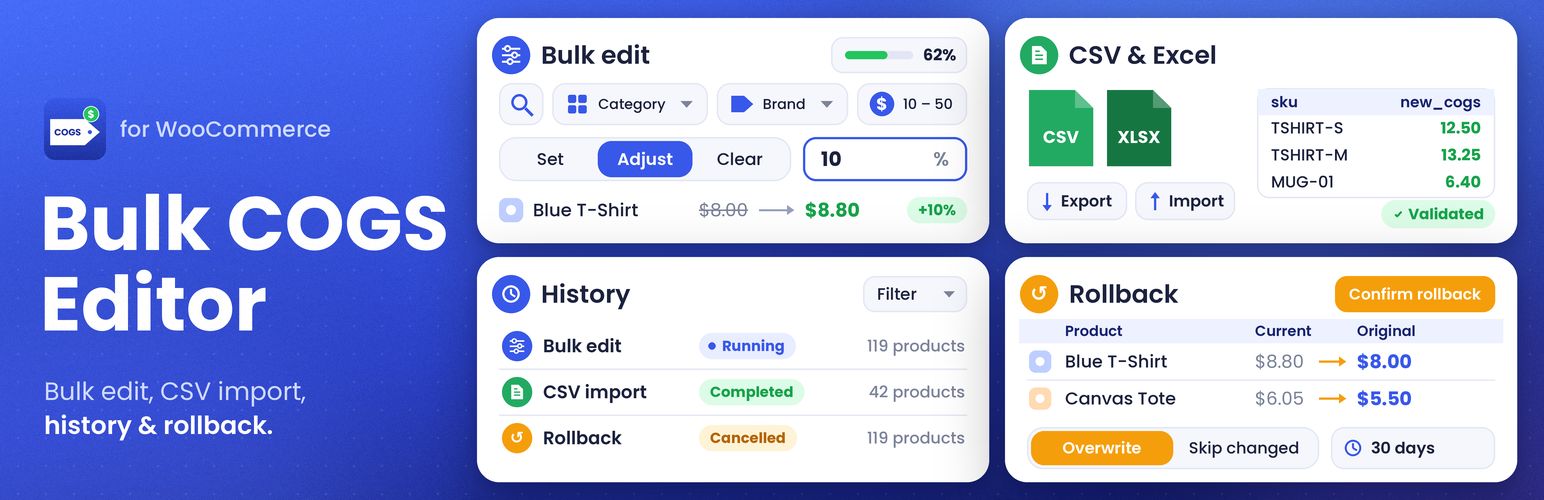
Bulk COGS Editor for WooCommerce is a fast, powerful bulk editing solution for managing WooCommerce COGS with WooCommerce’s native Cost of Goods Sold feature. Quickly filter large catalogs, save recurring filter setups as presets, preview proposed changes, and apply updates through background batch processing with live progress tracking.
Save reusable presets for recurring supplier cost adjustments, import WooCommerce cost of goods from UTF-8 CSV or Excel (XLSX), export cost data, and track operation history with safe or overwrite rollback options while retaining original values. Product selling prices and order data are never altered.
Use the editor to manage WooCommerce cost of goods for products and variations. There is nothing extra to configure beyond enabling Cost of Goods Sold in WooCommerce. For setup instructions and a step-by-step guide, see the Bulk COGS Editor documentation.
Watch the plugin in action
Why use Bulk COGS Editor?
- Save time on supplier price changes. Keep WooCommerce cost of goods current for a category, brand, or selected group instead of editing products one by one.
- Work from your spreadsheet. Bring WooCommerce COGS data into your catalog or prepare updates from exported product data.
- Make informed changes. Check the effect on product costs before committing an update.
- Keep a record of your work. Identify past WooCommerce COGS operations and decide whether eligible changes need to be reversed.
How it works
- Open Products > Bulk COGS Editor and choose Bulk edit.
- Choose your filters and find the matching products. Browse their selling prices, regular prices, and current COGS before choosing a cost update.
- Choose a WooCommerce COGS action, review the preview, optionally edit individual New COGS values with the pencil controls, and select the products to update.
- Review and confirm the update, then follow its results in the editor.
Quick 60-Second Demo – YouTube Short Video
Features
- Search by product name, SKU, GTIN, ISBN, EAN or UPC to find products and variations.
- Filter products and variations by category, brand, product type, stock status, current price, or current WooCommerce COGS.
- Find products with empty COGS, explicit zero COGS, positive COGS, or empty or zero COGS using the COGS value filter. Choose Greater than selling price to find products whose COGS exceeds their current selling price, including sales; products without a selling price are excluded. Choose Greater than regular price to compare COGS with the regular price before discounts; products without a regular price are excluded. Numeric COGS ranges remain available for Any value, Greater than zero, Greater than selling price, and Greater than regular price.
- Set an exact WooCommerce cost of goods value, increase or decrease it by a fixed amount or percentage, or clear it.
- Browse matching products with images, selling prices, regular prices, and WooCommerce COGS before entering a new cost. Then preview proposed COGS and the exact difference, with pagination and product selection. The three bulk editing steps use full-width sections.
- Process WooCommerce cost of goods updates through Action Scheduler, WooCommerce’s background task system, with progress and cancellation controls.
- Edit individual New COGS values with a pencil in bulk previews. Save, cancel, or reset each edit to Step 2; saved overrides stay across pages and are included in the confirmation summary.
- Import CSV or XLSX costs using product IDs or SKUs, edit valid products’ New COGS inline before applying, export matching WooCommerce COGS to CSV, and download validation and update reports.
- Inspect recorded outcomes and retained original WooCommerce cost of goods in History, with rollback review and confirmation.
- Save reusable filter presets to your account and manage their names, rules, and deletion in the Presets tab.
- Configure history retention and choose whether rollback overwrites later WooCommerce COGS edits or skips changed products.
- Recover a stuck editor operation through a confirmed force-clear action in Settings when normal cancellation does not work.
- Review cached notices for published products and variations with missing COGS or costs above selling prices, with background refresh and configurable notice placement.
- Bookmark or share the current editor tab using its URL, and move between tabs with browser Back and Forward.
- View operation timestamps and rollback deadlines in your WordPress date format, time format, and site timezone.
- See updated product counts and elapsed time after successful updates, with an optional review link and a dismissible review notice.
Performance for large catalogs
Bulk processing reduces repeated product searches and counts. It loads reusable product data in batches and groups cache cleanup to reduce repeated work. This makes managing WooCommerce COGS across thousands of products practical from the WordPress dashboard.
The plugin saves progress checkpoints and each product’s result to support recovery after interruptions. WooCommerce cost of goods values are saved through WooCommerce’s product APIs, preserving its hooks and cache handling.
All updates can be started and monitored from the WordPress dashboard, including on shared hosting. WP-CLI is not required. For larger catalogs, such as more than 5,000 or 10,000 SKUs, an optional WP-CLI runner may help WooCommerce COGS updates finish sooner. See Installation for details; any speed improvement depends on your hosting and workload.
Import and export WooCommerce cost of goods with CSV or Excel
CSV and XLSX import
Choose CSV mode and click Import on the Bulk COGS Editor page. Upload a UTF-8 CSV or XLSX file.
The upload limit follows WordPress’s maximum upload size, shown beside the file field. The plugin has no separate file-size or row-count limit. Hosting upload, memory, storage and execution limits still apply.
Sample CSV
Export products to CSV, fill in the blank new_cogs column, then import the file to preview your changes.
Use this format for your CSV file, replacing the example IDs, SKUs, and costs with your product data:
id,sku,new_cogs
123,PRODUCT-001,25.50
124,PRODUCT-002,40.00
Your file must include new_cogs and at least one product identifier: id or sku.
- You can omit either
idorsku. If both are provided, they must identify the same product. - Enter costs as decimal numbers without currency symbols, such as
25.50. - Leave a cost blank to skip that row.
- Duplicate product rows are excluded and listed in the error report.
Older files can use cogs when the new_cogs header is missing.
XLSX imports read raw values from the first worksheet. Replace formulas with values and store SKUs as text to preserve leading zeros.
XLSX requires PHP’s ZIP, XMLReader and DOM extensions. Exports use CSV format.
Preview and apply
Preview preparation runs in background batches without changing products. Progress is saved between batches, and you can close the page and return to check it. Preparation time varies with file size, product mix, hosting, and background worker availability.
When ready, review products and download validation errors if needed. Use the pencil beside New COGS to correct a valid product’s staged cost, then Save or Cancel. Saving changes only the preview; select products, review the selected changes, and confirm the update to change product costs. Preparation can be cancelled separately from an applied update. Completed imports with no skipped, failed, or unprocessed products have no update error report to download.
Original uploads are deleted after preparation. Staged previews and reports expire after about 24 hours. Retention extends while an applied update is active.
History and retention
Operation history and original cost records follow the retention period set in Settings. See the retention FAQ below. Daily cleanup preserves active operations and data needed for reports.
The plugin also keeps records that prevent the same preview from being applied more than once, including simultaneous Apply requests. These records follow the configured retention period and are removed only when they are no longer needed.
Requirements
- WordPress 6.7 or later
- WooCommerce 10.3 or later
- PHP 7.4 or later
- WooCommerce Cost of Goods Sold feature enabled in WooCommerce settings
If Cost of Goods Sold is unavailable or disabled, the editor is turned off and explains what is needed. When supported and permitted by your account, the availability notice offers Update Now for an older WooCommerce version or Enable Cost of Goods Sold for a disabled feature. Otherwise, ask an administrator to complete setup.
Privacy
Bulk COGS Editor for WooCommerce does not send product, customer, order, or store data to external services. All WooCommerce COGS calculations and WooCommerce cost of goods updates are performed locally on your WordPress/WooCommerce installation.
Developer resources
Bulk COGS Editor for WooCommerce is open-source software and is made to be extended. The source code is available in the GitHub repository.