
Breadcrumb Block
v1.2.1Phi Phan · 2022年10月22日 上架
A lightweight breadcrumb block with multiple separators, primary taxonomy and terms, short titles, SEO-friendly, and WooCommerce support.
- 正在使用
- 2,000+
- 评分
- 5.0 / 5
- 累计下载
- 3.7 万
- 最近更新
- 2026年11月25日
贡献者
 Phi Phan
截图
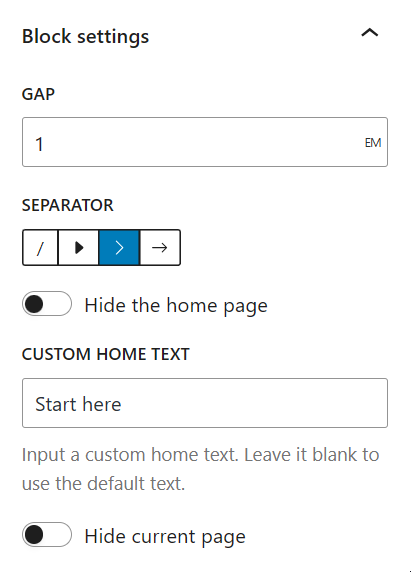
Add a breadcrumb trail to your WordPress site with more control and useful features than the default Breadcrumb block, while keeping things simple and lightweight.
Breadcrumb Block is a single-block plugin designed to do one thing well: display flexible, SEO-friendly breadcrumb navigation without unnecessary complexity or overhead.
Why choose Breadcrumb Block?
- Multiple separator icons: Choose from a collection of built-in separator icons to match your site’s design.
- Primary taxonomy selection: Choose which taxonomy appears in breadcrumb trails for each post type, instead of relying on the default taxonomy.
- Primary term selection: Set a primary term for individual posts to control which term and parent hierarchy appear in the breadcrumb trail.
- Short titles: Use shorter labels for posts and taxonomy terms without changing their actual titles.
- SEO-friendly: Automatically generates JSON-LD structured data for search engines.
- WooCommerce compatible: Supports breadcrumb trails for WooCommerce products and product categories.
- Easy customization: Customize labels, separators, markup, and breadcrumb items through block settings and developer-friendly hooks.
- Works everywhere: Use it in the Block Editor, Site Editor, and template files.
No complicated setup, no bloated features. Just a lightweight breadcrumb block with the extra controls you actually need.
How to customize the breadcrumb
-
How to change/remove an item?
add_filter( 'breadcrumb_block_get_item', function ( $item_args, $context, $breadcrumbs_instance ) {
  // Ignore items without context.
  if ( ! $context || ! ( $context['object'] ?? false ) ) {
    return $item_args;
  }

  // Eg: remove a term.
  if ( 'term' === ( $context['type'] ?? '' ) && 'term-slug' === $context['object']->slug ) {
    return false;
  }

  // Eg: Change the title of a page.
  if ( 'page' === ( $context['type'] ?? '' ) && page_id_to_change === $context['object']->ID ) {
    $item_args[0] = 'Make it shorter';
  }

  return $item_args;
}, 10, 3 );
$item_args is a 3-item array:
[$item_label, $item_link, $item_attrs]
$context is an associative array:['type' => 'item type', 'object' => 'item object'].typecan be one of the following values:front_page,home,shop,page,post,single,term,taxonomy,post_type_archive,search,404,paged,author,date_year,date_month,date_day,attachment. -
How to change the markup of the block?
add_filter( 'breadcrumb_block_get_breadcrumb_trail', function ( $markup, $args, $breadcrumbs_instance ) { return $markup; }, 10, 3 ); -
How to add or remove the items from the breadcrumb trail?
add_filter( 'breadcrumb_block_get_items', function ( $items, $breadcrumbs_instance ) { return $items; }, 10, 2 ); -
How to use a custom separator for the breadcrumb trail?
add_filter( 'breadcrumb_block_get_args', function ( $args ) {
  // For example, change separator.
  $args['separator'] = '<svg xmlns="http://www.w3.org/2000/svg" fill="currentColor" width="1em" height="1em" viewBox="0 0 16 16"><path fill-rule="evenodd" d="M3.646 1.646a.5.5 0 0 1 .708 0l6 6a.5.5 0 0 1 0 .708l-6 6a.5.5 0 0 1-.708-.708L9.293 8 3.646 2.354a.5.5 0 0 1 0-.708z"/><path fill-rule="evenodd" d="M7.646 1.646a.5.5 0 0 1 .708 0l6 6a.5.5 0 0 1 0 .708l-6 6a.5.5 0 0 1-.708-.708L13.293 8 7.646 2.354a.5.5 0 0 1 0-.708z"/></svg>';
  return $args;
} );
The custom separator should be an inline SVG. To make sure it displays properly, it should have three attributes: width, height, and fill. The values of these attributes should be as follows:
fill="currentColor" width="1em" height="1em".
Using this hook, you can customize other attributes such as container, before, after, list_tag, item_tag, item_before, item_after, separator. -
How to prepend the blog page to all single posts?
add_action( 'breadcrumb_block_single_prepend', function ( $post, $breadcrumbs_instance ) { if ( 'post' === $post->post_type ) { $blog_id = get_option( 'page_for_posts'); if ( $blog_id ) { $breadcrumbs_instance->add_item( get_the_title( $blog_id ), get_permalink( $blog_id ) ); } } }, 10, 2 ); -
How to show a shorter title for an item?
Each public post type and taxonomy has a
Breadcrumb short titlefield: a panel in the block editor sidebar for posts, and a field on the term edit screens. When it is set, the trail and the JSON-LD structured data show the short title, while the item keeps its real title everywhere else.To migrate short titles from other SEO plugins, or to override the value per item, use the
breadcrumb_block_get_short_titlefilter. For example, to fall back to the Yoast SEO breadcrumb title:add_filter( 'breadcrumb_block_get_short_title', function ( $short_title, $object ) { if ( '' === $short_title && $object instanceof WP_Post ) { return get_post_meta( $object->ID, '_yoast_wpseo_bctitle', true ); } return $short_title; }, 10, 2 ); -
How to show a different taxonomy or term for a single item?
Settings > Breadcrumb Block maps each post type to the taxonomy shown in its single-item trails (Auto by default –
categoryfor posts,product_catfor products). Pick a public taxonomy – flat ones like tags work too; their terms simply show without a parent path.To pin a specific term per post, use the
Primary termdropdown in theBreadcrumbsidebar panel: it lists the terms assigned to the post from the taxonomy selected in the block settings, and the selected term (with its parent terms) replaces the default one in the trail and the JSON-LD. When nothing is selected, the default applies.To migrate primary terms from Yoast SEO, or to override the value per item, use the
breadcrumb_block_get_primary_termfilter. For example, to fall back to the Yoast primary category:add_filter( 'breadcrumb_block_get_primary_term', function ( $primary_term, $post ) { if ( ! $primary_term && class_exists( 'WPSEO_Primary_Term' ) ) { $yoast_primary = new WPSEO_Primary_Term( 'category', $post->ID ); $term_id = $yoast_primary->get_primary_term(); if ( $term_id ) { return get_term( $term_id ); } } return $primary_term; }, 10, 2 );
If this plugin is useful for you, please do a quick review and rate it on WordPress.org to help us spread the word. I would very much appreciate it.
Please check out my other plugins if you’re interested:
- Content Blocks Builder – Build custom layouts and blocks visually in the Block Editor without needing a code editor, using only core blocks and native Gutenberg features.
- Meta Field Block – A single block to display custom fields in the Block Editor without coding. It supports ACF, MetaBox, WooCommerce, meta, rest field, shortcode and more. Works everywhere: in the Site Editor (FSE), the Block Editor, inside Query Loop, WooCommerce Product Collection, Term Query blocks, and even in template files.
- SVG Block – A block to display SVG images as blocks. Useful for images, icons, dividers, and buttons. It allows you to upload SVG images and load them into the icon library.
- Icon separator – A tiny block just like the core/separator block but with the ability to add an icon.
- Block Enhancements – Adds practical features to blocks like icons, box shadows, transforms, etc.
- Counting Number Block – A block to display numbers with a counting effect
- Better YouTube Embed Block – A block to solve the performance issue with embedded YouTube videos. It can also embed multiple videos and playlists.
The plugin is developed using @wordpress/create-block.