

Brasa Store Speed for WooCommerce
v1.0.0Design Master · 2026年11月7日 上架
Find out why your WooCommerce store is slow and fix it: speed test, mobile check, cart fragments fix, database cleanup and PageSpeed score.
- 正在使用
- 10 以下
- 评分
- 暂无
- 累计下载
- 324
- 最近更新
- 2026年11月7日
贡献者
 Design Master
截图
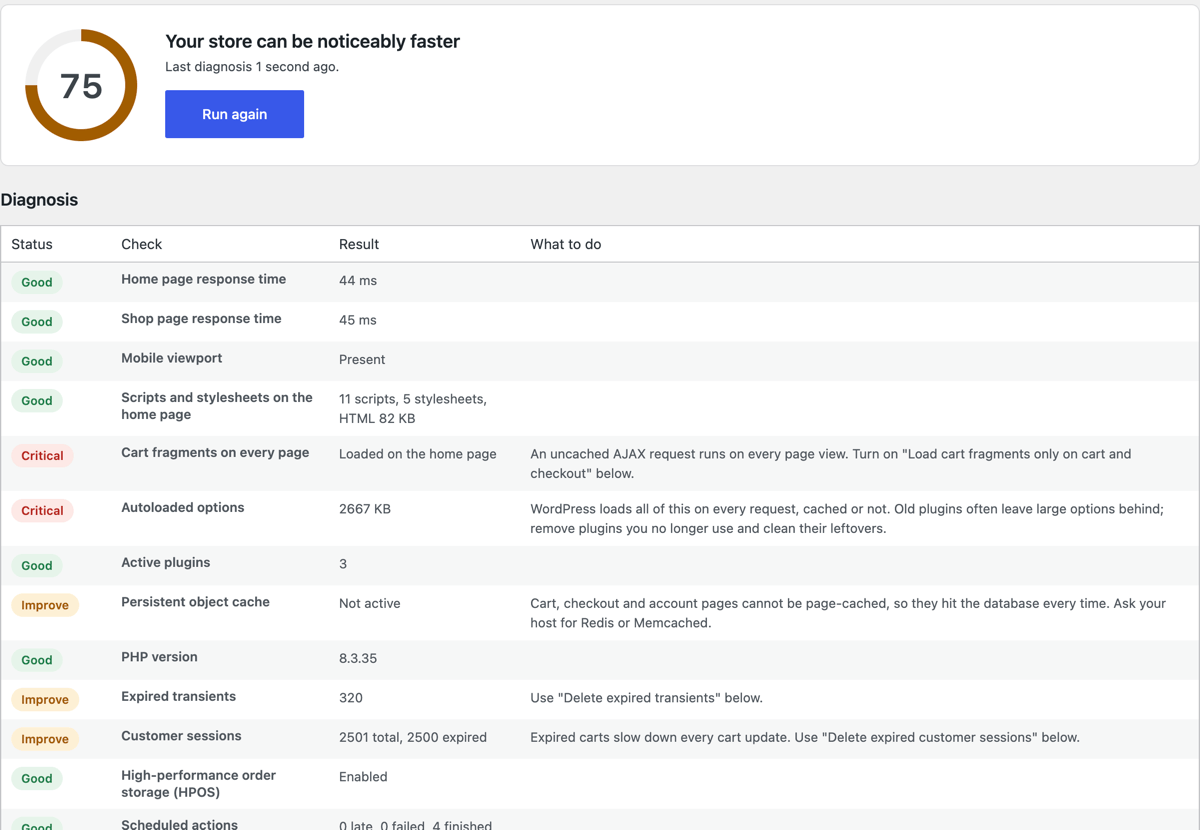
A slow store loses sales, mostly on phones. Brasa Store Speed runs a 20-second diagnosis of your WooCommerce shop, shows a score from 0 to 100 and tells you, in plain words, what is slowing it down and what to do about each item. The safe fixes are one click away.
It is a diagnosis tool, not another cache plugin: it works alongside WP Rocket, LiteSpeed Cache, W3 Total Cache, WP-Optimize, SiteGround Speed Optimizer or no cache at all.
What the diagnosis checks
- Server response time (TTFB) of your home page and your shop page, measured as a visitor would see it.
- Mobile readiness: responsive viewport tag, and whether your theme blocks zooming into product photos.
- Page weight: how many scripts and stylesheets your home page loads.
- WooCommerce cart fragments firing an uncached AJAX request on every page view.
- Autoloaded options: the database bloat WordPress loads on every single request.
- Active plugins count.
- Persistent object cache (Redis / Memcached) for cart, checkout and account pages.
- PHP version.
- Expired transients left in the database.
- WooCommerce customer sessions and expired carts.
- High-performance order storage (HPOS).
- Action Scheduler: late, failed and old finished actions (the hidden cause of many slow admins).
- Heavy images: product photos over 500 KB.
One-click optimizations (all off by default)
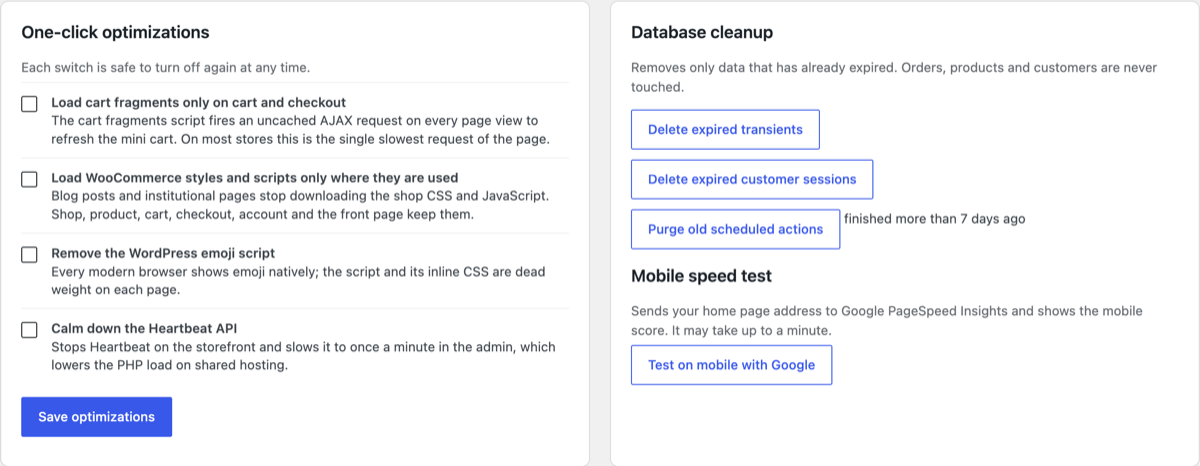
- Load cart fragments only on cart and checkout.
- Load WooCommerce CSS and JavaScript only on pages that use them.
- Remove the WordPress emoji script.
- Calm down the Heartbeat API to lower CPU usage on shared hosting.
Safe database cleanup
- Delete expired transients.
- Delete expired WooCommerce customer sessions.
- Purge scheduled actions that finished more than 7 days ago.
Orders, products, customers and posts are never touched.
Mobile speed test
One click opens Google PageSpeed Insights with your store already filled in, to see the mobile score and Core Web Vitals (LCP, INP, CLS).
Who makes it
Brasa Store Speed is made by Design Master, the team behind DMCommerce, a hosted e-commerce platform for stores in Brazil. The plugin is complete and free, with no paid version and no locked features. Its own screen shows a short note about DMCommerce with a link; you can hide it with one click, and nothing is shown anywhere else in your admin.
Privacy
The plugin does not collect, store or send any data about your site or your customers. It has no tracking and no account to create.
External services
The plugin does not send any data to external services. The “Test on mobile with Google” button is a plain link that opens Google PageSpeed Insights (https://pagespeed.web.dev/) in a new tab with your home page address in the URL; Google only receives it if you click. Google’s Terms of Service and Privacy Policy apply there.
The diagnosis requests your own home and shop pages from your own server to time them; these requests never leave your site.