

BlockTuner
v1.0.2jsilff · 2026年8月13日 上架
Extra CSS design controls on any block: overflow, crop, layout, transforms, effects, responsive. No builder, no lock-in.
- 正在使用
- 10 以下
- 评分
- 暂无
- 累计下载
- 376
- 最近更新
- 2026年9月23日
贡献者
 jsilff
截图
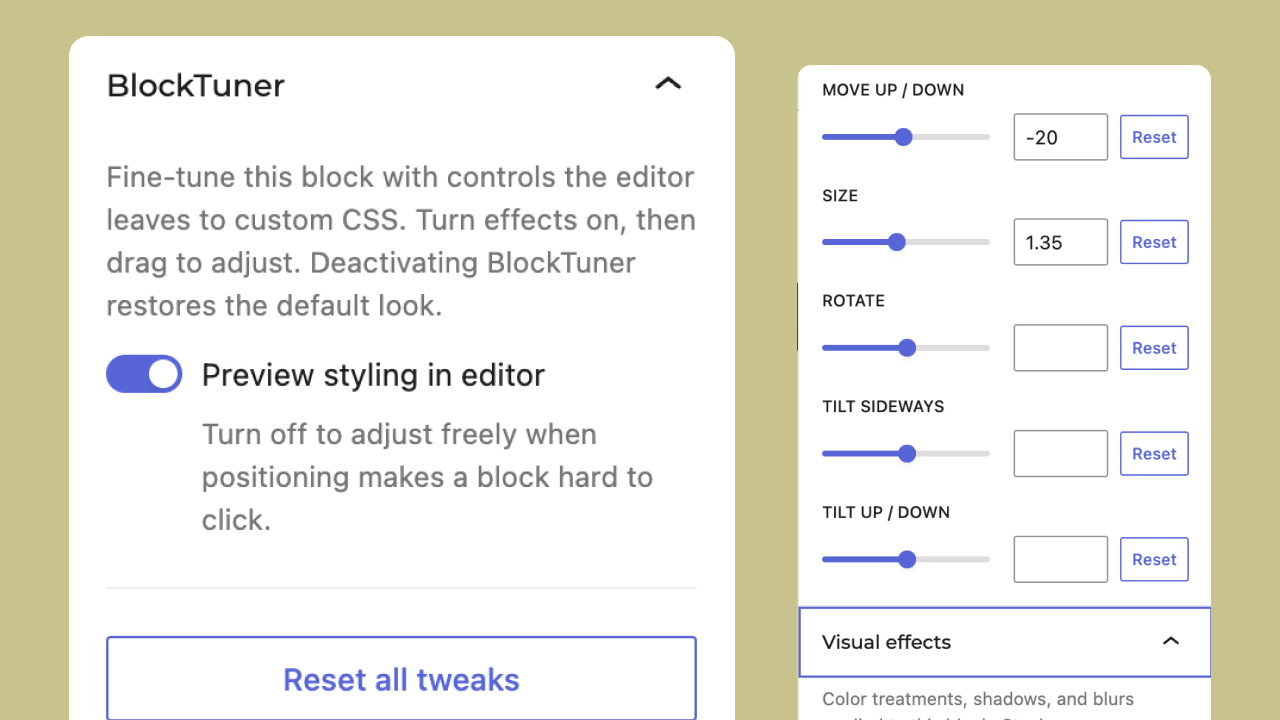
BlockTuner adds the design controls the WordPress editor leaves hard to reach. Select any block and tune it in the sidebar: overflow and crop, stack order, display and flex layout, transforms (move / scale / rotate / skew), blend modes, shadow, and stackable filter and backdrop effects — all as form controls, with no free-text CSS or script fields.
It is not a block, not a builder, and not a wrapper. It augments whatever block you have selected — a Group, a Column, an Image deep inside a nested layout — so you tune exactly the element you want without remaking content or picking from a tree.
- Works on every block type.
- Controls only what core does not expose: overflow, per-edge clip, z-index, display / flex, transform (translate / scale / rotate / skew), mix-blend-mode, shadow, and stackable backdrop-filter and filter effects.
- Responsive: keep settings the same on mobile, reset to default on small screens, or set different values for phones.
- Optional live editor preview toggle.
- No duplicate controls for spacing, padding, margins, colors, backgrounds, or corner radius — those already live in core.
- Styles are applied at render time, not baked into your content.
- Deactivate the plugin and every block returns to its default presentation. Nothing breaks and nothing needs rebuilding.
How it works
Tuning is stored as a hidden blockTuner attribute in the block’s markup comment (never in the visible HTML). On the front end, BlockTuner applies styles at render time: an inline style attribute for same-as-desktop tuning, or a unique class plus media-query CSS printed from wp_footer when small-screen reset/custom is enabled. Remove the plugin and the injection stops — the stored attribute is inert and the block renders with its default styling.