
Block Visibility Manager
v1.0.2robertoiacono · 2025年7月14日 上架
Control Gutenberg block visibility by user role, device, date, and time. Dynamically show or hide blocks under specific conditions.
- 正在使用
- 10 以下
- 评分
- 暂无
- 累计下载
- 736
- 最近更新
- 2026年6月13日
贡献者
 robertoiacono
截图


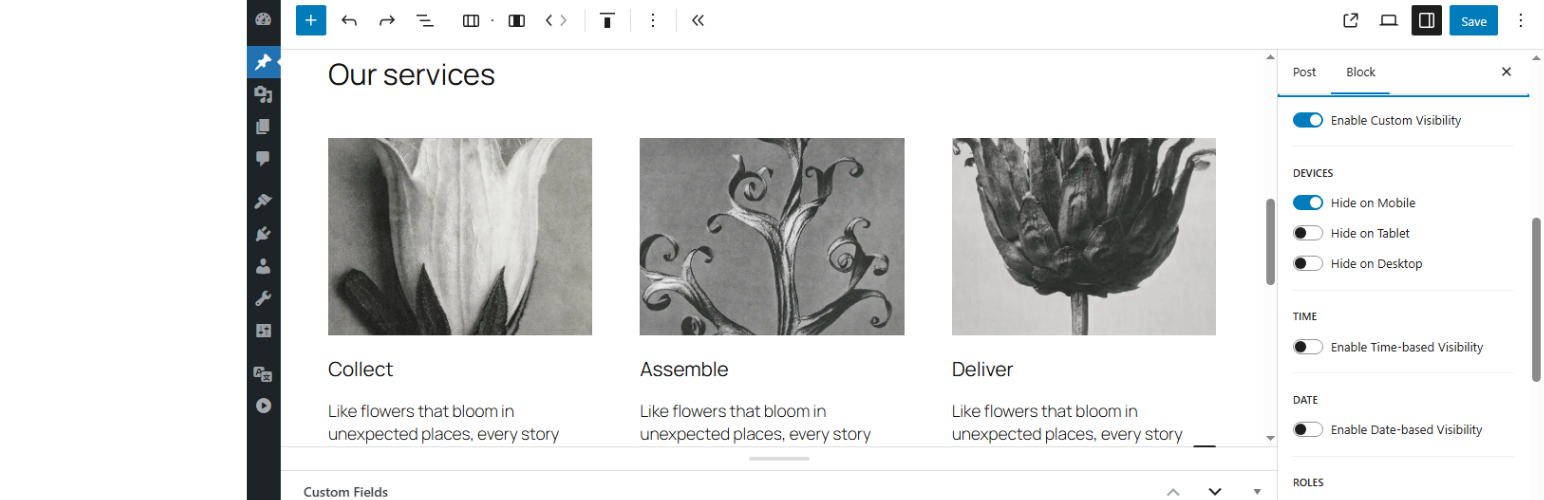
Block Visibility Manager gives you fine-grained control over which blocks support visibility rules in the block editor.
You can conditionally show or hide individual block based on:
- Time
- Date and time
- User roles (including guests)
- Device type (mobile, tablet, desktop)
Benefits
- Show a block only during a limited time (e.g. event banners)
- Hide a block for guests
- Improve content relevance and scheduling without complex tools.
- Keep the editor clean by enabling visibility only where needed.
- No performance overhead or custom block lock-in.
- 100% native: works seamlessly with WordPress Core and Gutenberg.
Features
- Time Scheduling – Show or hide blocks between specific times, everyday (based on server time).
- Date & Time Scheduling – Show or hide blocks between specific dates with time for granular control, based on UTC+0 timezone. For example you can display a block only on Amazon Prime Days, from 00:00 of the first day to 23:59 of the last day.
- User Role Targeting – Restrict visibility based on WP user roles, such as Administrator, Editor, Subscriber, and others — or hide/show blocks specifically for guests (non-logged-in users).
- Device-Based Display – Conditionally hide blocks on mobile, tablet, or desktop. his is achieved using fixed CSS media queries, ensuring consistent behavior across themes without relying on JavaScript.
- Selective Block Control – Choose which blocks support visibility settings.
- Fully Native – Built using core WordPress components and filters only.
Who Is It For?
- Content creators who want to show time-sensitive content.
- Developers and site builders who prefer native, non-bloated solutions.
- Agencies looking to offer clients role-based or scheduled content blocks.
- Marketers who need to hide/show promotions or messages dynamically.
Why Use This Plugin?
Need to:
- Show a block only during a limited time (e.g. event banners)?
- Hide a message from logged-out users?
- Disable visibility options on blocks that don’t need them.
- Avoid third-party plugins that add extra blocks or scripts?
Block Visibility Manager solves these problems cleanly and natively.
Technical Notes
No Blocks Added
This plugin does not add any new blocks. Instead, it extends existing core WordPress blocks using official filters and native UI components, keeping your site fast, lean, and fully compatible with WordPress standards.
Device-Based Visibility
The hiding functionality for mobile, tablet, or desktop relies purely on CSS using display: none;. No JavaScript is involved. This ensures lightweight and consistent behavior across different themes.
Server-Side Visibility Filtering
Other visibility conditions (such as time range, date range, or user roles) are enforced server-side. If a block does not meet the defined conditions, it is entirely removed from the rendered HTML output.
Editor Behavior
Visibility settings currently apply only on the frontend. Blocks remain fully visible in the editor to avoid confusion during content creation. Visibility conditions are not previewed in the block editor at this time.
Block Visibility for WordPress Block Editor
This plugin is designed exclusively for the WordPress Block Editor (Gutenberg). It does not support other page builders such as Elementor, Beaver Builder, WPBakery, or others.
If you are using a block-based theme or editing content with the native WordPress block editor, this plugin will seamlessly integrate. For other builders, visibility settings will have no effect.