

Block Class Manager – Global CSS Classes & Responsive Styles for Gutenberg
v0.0.7Block Class Manager · 2026年7月20日 上架
Manage reusable CSS classes and responsive styles directly in Gutenberg. Build consistent layouts without repetitive block styling.
- 正在使用
- 10+
- 评分
- 5.0 / 5
- 累计下载
- 814
- 最近更新
- 2026年11月10日
 Block Class Manager
截图
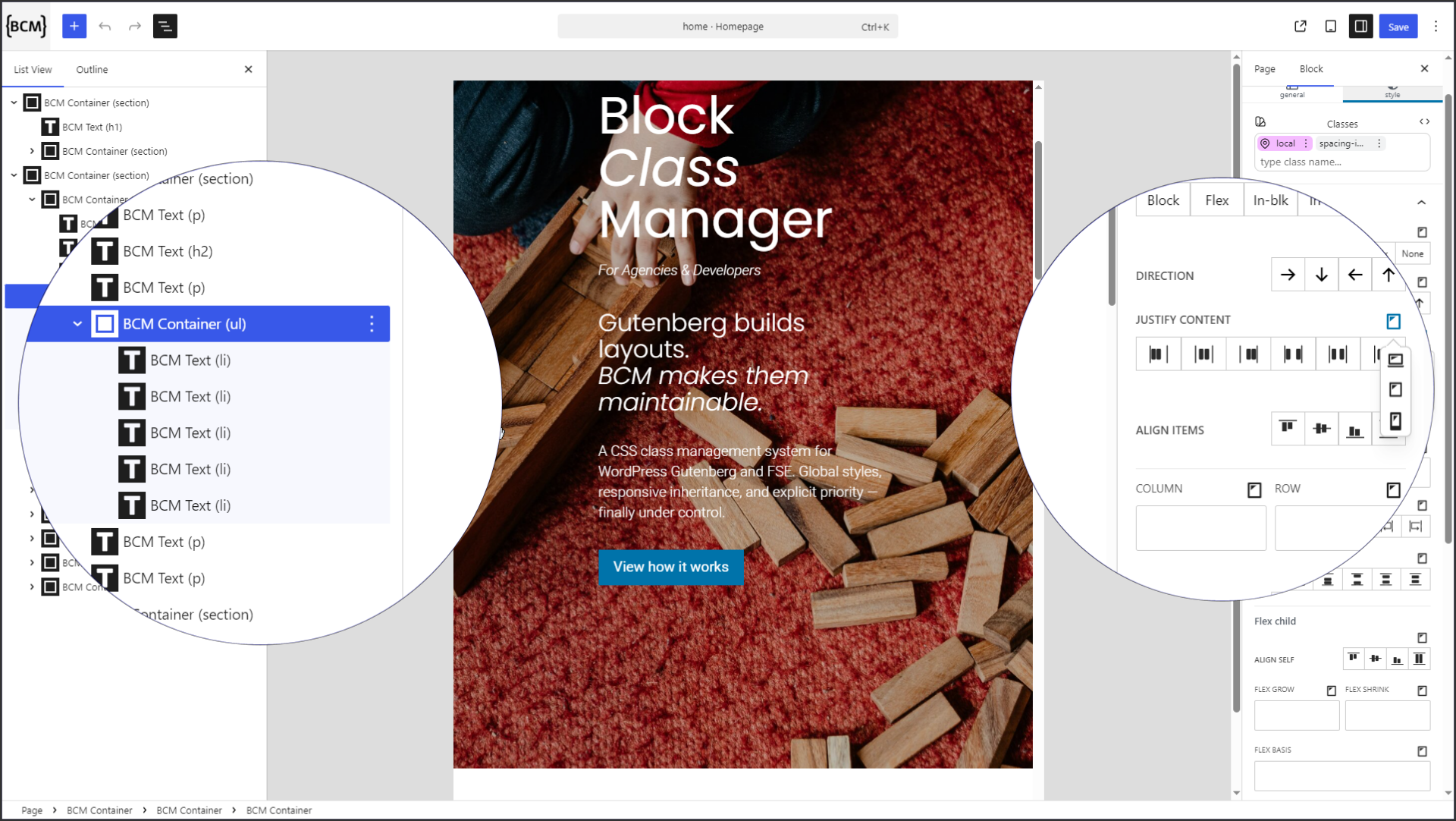


Manage reusable CSS classes and responsive styles directly in Gutenberg. Build consistent layouts without repetitive block styling.
Manage reusable CSS classes and responsive styles directly in Gutenberg
Create a class once, reuse it across BCM blocks, and control how it behaves on desktop, tablet, and mobile without repeating the same styles over and over.
Block Class Manager enhances the native Gutenberg workflow with a structured, class-based styling system without replacing Gutenberg with another page builder or block library.
🚀 Try BCM in WordPress Playground
Want to see BCM in action without installing anything?
Explore Global Classes, responsive styling, and the BCM workflow directly in a real WordPress editor.
✨ Global Classes & Responsive Styling
Create once. Reuse across your layouts.
BCM lets you create reusable Global Classes and apply them to BCM blocks. Define your styling rules once and reuse them wherever the same design pattern is needed.
You can also control responsive values for desktop, tablet, and mobile, using the breakpoint values provided by your active WordPress theme.
With BCM you can:
- Create and manage up to 10 reusable Global Classes
- Apply Global Classes to BCM blocks
- Convert local styles into reusable Global Classes
- Configure responsive values per device
- Control layout and styling directly inside Gutenberg
- Generate frontend CSS automatically
- Add HTML attributes such as id, data-*, and aria-*
- Use BCM with pages, posts, and FSE template parts
🎨 Local Styles & CSS Management
BCM provides visual controls for configuring CSS properties directly inside Gutenberg.
You can customize individual blocks using local styles or apply Global Classes to share styling rules across your layouts.
This gives you flexibility to manage both individual elements and reusable design rules without repeatedly configuring the same properties.
🔄 How It Works
- Create or select a BCM block: Container, Text, Media, or Button.
- Style the block: Use local styling controls for your specific block.
- Create a Global Class: Turn reusable styling rules into a class.
- Reuse the class: Apply the same Global Class to other BCM blocks.
- Adjust responsive values: Define how your styles behave across desktop, tablet, and mobile.
Your styling rules are managed directly inside the Gutenberg editor, while BCM generates the corresponding frontend CSS.
🧱 Lightweight Foundation Blocks
BCM includes a small set of configurable foundation blocks:
- Container: Build flexible layouts and organize nested content.
- Text: Create text elements using different HTML tags.
- Heading: Configure semantic heading elements.
- Media: Add and configure image elements.
- Button: Create customizable button elements.
These blocks provide a lightweight foundation for BCM’s styling workflow. Their appearance and layout can be controlled through local styling properties and reusable Global Classes.
BCM is not a page builder or a traditional block library. It extends the native Gutenberg experience with a structured styling system while keeping the WordPress Block Editor at the center of your workflow.
🔌 Gutenberg & WordPress Integration
BCM is designed to work alongside the WordPress block editor and block-based themes.
-
Gutenberg Editor
BCM controls are integrated directly into the WordPress block editor. -
Full Site Editing (FSE)
Compatible with block-based themes, templates, and template parts. -
WordPress Content
Supports pages, posts, and FSE template parts.
Using BCM Global Classes with native WordPress Core blocks requires BCM Extension.
The optional BCM Extension adds the Global Class Engine for native Core blocks, allowing you to use BCM Global Classes beyond BCM foundation blocks.
🚀 BCM Extension
BCM Extension adds advanced workflow and inspection features for larger and more complex Gutenberg projects.
Features include:
- Unlimited Global Classes
- Drag & Drop Global Class priority management
- Global Class usage counter
- Generated CSS Inspector (Global & Local CSS viewer)
- Style Origin Inspector (CSS cascade visualization)
- Enhanced responsive value indicators
- Global Class Engine for native WordPress Core blocks
- Enhanced “Additional CSS Class(es)” field with Global Class suggestions
The Extension is available separately as a free, pay-what-you-want add-on.
⚡ Why Block Class Manager
Styling Gutenberg layouts can become repetitive when the same spacing, layout, and design rules have to be configured again and again.
BCM introduces a reusable, class-based workflow so you can define styling rules once and reuse them across your layouts.
Instead of repeatedly configuring the same values on individual blocks, you can centralize reusable styles in Global Classes and control responsive behavior from the Gutenberg editor.
💡 Use Cases
- Create reusable styling patterns with Global Classes
- Standardize spacing and layout rules
- Reuse the same styles across multiple BCM blocks
- Build responsive layouts with desktop, tablet, and mobile controls
- Reduce repetitive block configuration
- Create more consistent Gutenberg-based websites
📦 Installation
Requirements
- WordPress 6.7 or higher
- PHP 8.0 or higher
Installation Steps
- Upload the plugin to
/wp-content/plugins/or install it through the WordPress plugin installer. - Activate Block Class Manager.
- Open the Gutenberg editor and add a BCM block.
- Start creating local styles and reusable Global Classes.