
bbPress2 BBCode
v2.0antonchanning · 2011年10月15日 上架
This plugin adds support for popular bbcode forum code to posts, comments, pages, bbpress 2.0 forums and buddypress activity and group forums.
- 正在使用
- 90+
- 评分
- 3.7 / 5
- 累计下载
- 2.1 万
- 最近更新
- 2016年5月21日
贡献者
 antonchanning
截图
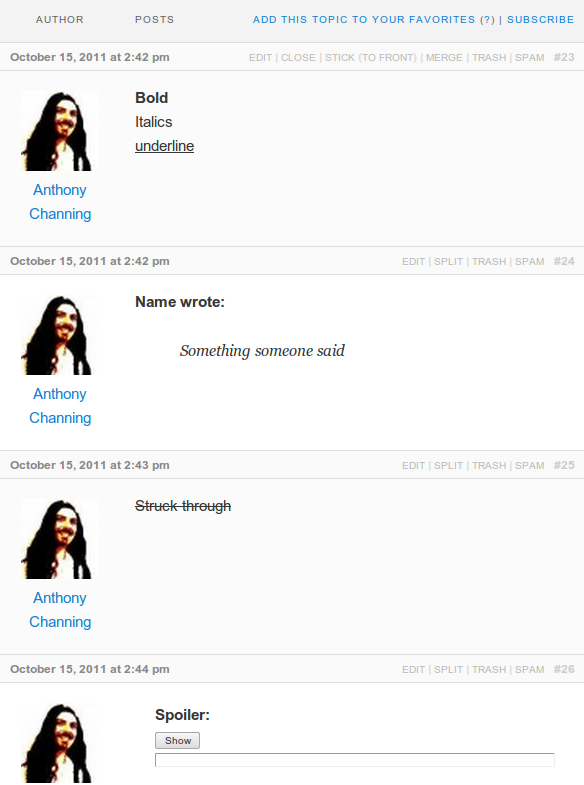

This plugin adds support for bbcode markup to wordpress, bbpress and buddypress.
It integrates with the ‘bbPress shortcode whitelist’ plugin to provide a safe
way of enabling BBCode without giving your users access to all shortcodes.
Bold: [b]bold[/b]
Italics: [i]italics[/i]
Underline: [u]underline[/u]
URL: [url]https://wordpress.org/[/url] [url=https://wordpress.org/]WordPress[/url]
Image: [img]https://s.w.org/style/images/codeispoetry.png[/img] [img=Code is Poetry]https://s.w.org/style/images/codeispoetry.png[/img]
Quote: [quote]Lorem ipsum dolor sit amet, consectetuer adipiscing elit,[/quote] [quote=NAME]Lorem ipsum dolor sit amet[/quote] [quote="NAME"]Lorem ipsum dolor sit amet[/quote] [quote author=NAME]Lorem ipsum dolor sit amet[/quote] [quote author="NAME"]Lorem ipsum dolor sit amet[/quote]
Color: [color="red"]named red[/color] [color="ff0000"]hex red[/color] [color=#ff0000]hex red again[/color]
Strikeout:[s]striked this out[/s]
Center Text:[center]center me[/center]
Computer code:[code]function HelloWorld($greet = 'World') { return 'Hello '.$greet } [/code]
Font size: [size=10]10px font size[/size]
Ordered lists: [ol][li][/li][/ol]
Unordered lists: [ul][li][/li][/ul]
List Item: [li]item[/li]
Named Spoiler: [spoiler=two plus two]four[/spoiler]
Unnamed Spoiler: [spoiler]Boo![/spoiler]
Contents appear to logged in users only: [user]This is a secret message[/user]
Contents appear to non-logged in users only: [guest]Log in to see secret message...[/guest]
I have enhanced support for the [url] and [quote] tags, and added potentially
useful css style class names in the html output of the tags, to allow for
exciting theming potential.
For example:
[quote=NAME]QUOTE[/quote]
will render as:
<div class="bbcode-quote bbcode-quote-NAME"><strong>NAME</strong><blockquote>QUOTE</blockquote></div>
Or if NAME matches the login name of a user on the system, it will render as:
<div class="bbcode-quote bbcode-quote-user bbcode-quote-NAME"><strong>DISPLAY_NAME</strong><blockquote>QUOTE</blockquote></div>
Where DISPLAY_NAME is the display name that user. With BuddyPress installed the name
also becomes a link to their profile page, otherwise if bbPress is installed, it becomes a
link to their forum user page.