

Auto Cloudinary
v1.3.1Junaid Bhura · 2017年11月14日 上架
Super simple Cloudinary auto-upload implementation for WordPress.
- 正在使用
- 200+
- 评分
- 4.4 / 5
- 累计下载
- 3.9 万
- 最近更新
- 2025年9月19日
贡献者
 Junaid Bhura
截图
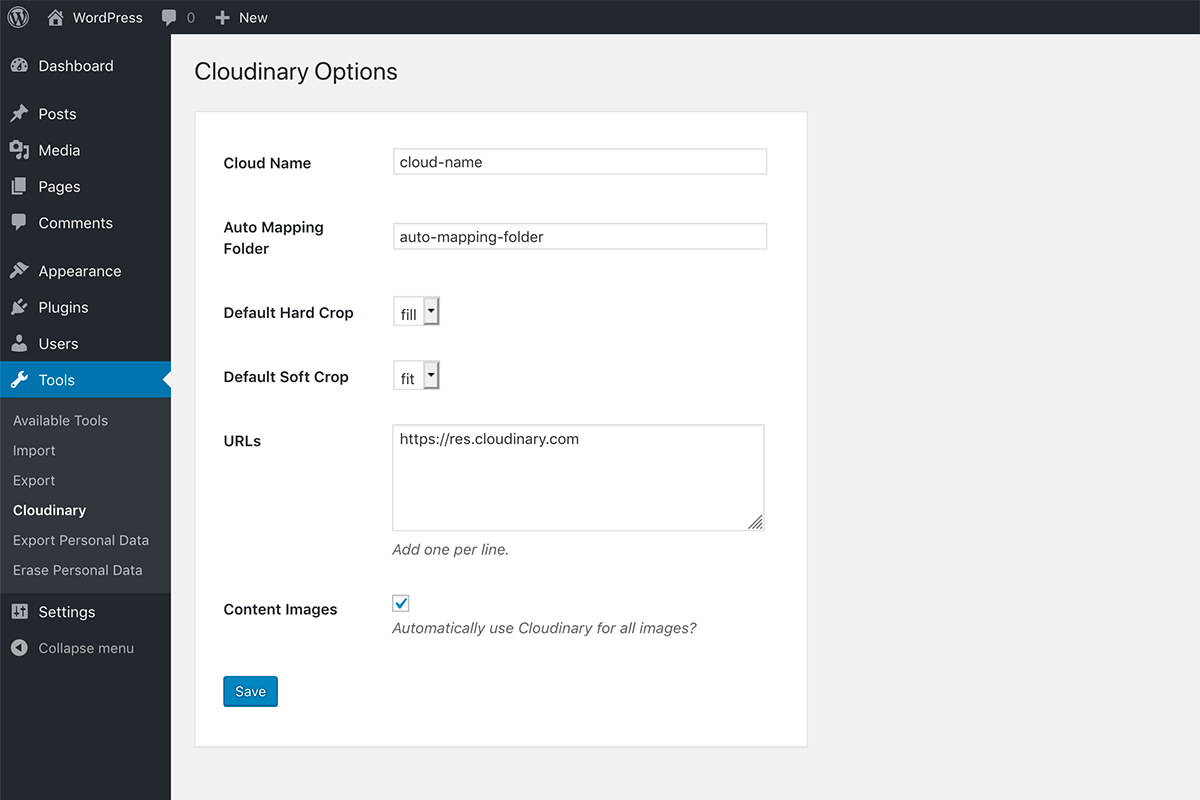
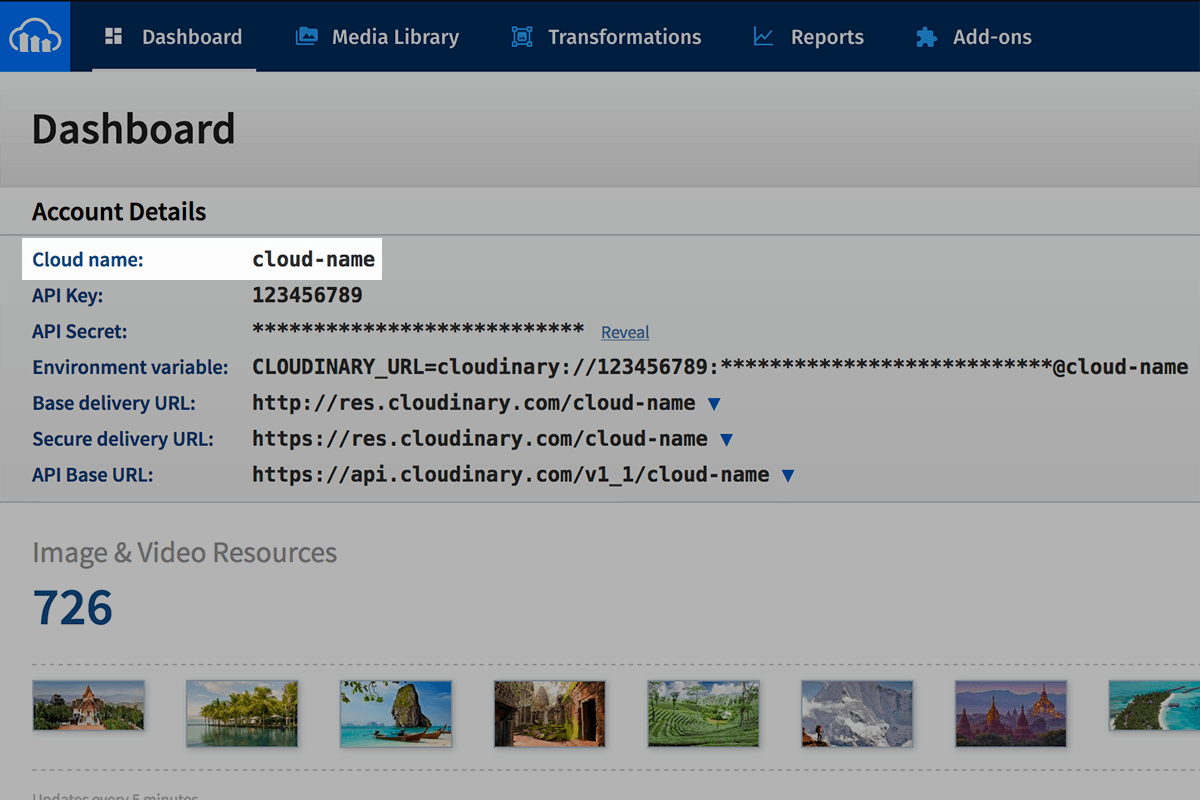
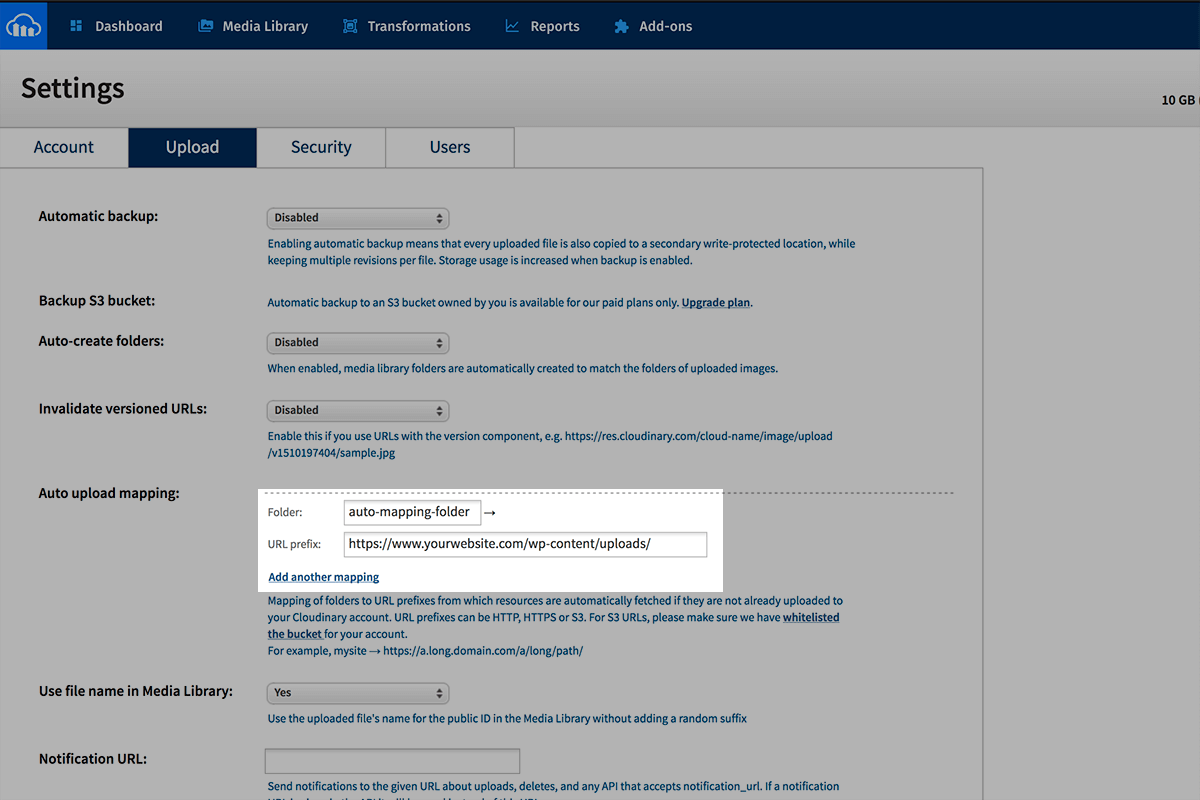
Check out the Github Repository ♥
This plugin provides a super simple Cloudinary auto-upload implementation for WordPress.
It is inspired by Photon and Tachyon.
Cloudinary will automatically fetch and serve the images from your media library like a CDN, without you having to worry about the complicated upload API! Just set up auto-upload in your Cloudinary settings, enter the details in the plugin’s options, and you’re all set!
Easy peasy 😎
Important
This plugin is incompatible with the official Cloudinary plugin. You’d need to disable that plugin before using this one.
Quick Links
Setup | Issues | Functions | Filters | Best Practices
Why did you build this plugin?
There already is an official Cloudinary plugin available. But in my opinion, it’s a bit of an overkill and takes over the admin UI. This plugin aims to be:
- Super simple and light-weight
- Totally seamless and out of the way
- A flexible tool for WordPress developers
What is Cloudinary Auto-Upload?
Cloudinary gives you two options to upload files to it’s servers:
- The complicated Upload API 😱
- The super easy and magical Fetch API 🎩
Upload API
TL;DR: Too complicated and in the way 👎
Cloudinary gives you an API, using which, you can manually upload the images to Cloudinary. So you’d need an API key, etc. The official plugin uses this method. When you upload an image to the media library, it in turn, uploads it to Cloudinary. This could be a problem if you have thousands of existing images, and might not be flexible enough to support custom architecture.
Fetch API
TL;DR: Magical 👍
This plugin uses the super easy Auto-Upload feature in the Fetch API. We just tell Cloudinary where to find the files on our server (or on S3 or anywhere on the Internet), and it automatically downloads it from there and saves it on to it’s servers the first time you ask for it, like a CDN would!
What does this plugin do?
This plugin does two main things:
- Provides a simple function
cloudinary_url()to get a Cloudinary auto-upload URL for any image in your media library, with all the Cloudinary transformations, so you can dynamically manipulate an image on the fly. - Attempts to automatically convert all image URLs on the front-end into a Cloudinary auto-upload URL, so you can use Cloudinary as an image CDN.
The magical function 🎩
cloudinary_url( $identifier, $args )
This function returns a Cloudinary Auto Upload URL for an image. Please read the Best Practices page before using this.
Parameters
- identifier (integer/string)(required) : Either the ID of the attachment, or a full image URL.
- args (array)(optional) : Arguments to manipulate the image.
Return Value
Returns a URL (string):
'https://res.cloudinary.com/cloud-name/auto-mapping-folder/2017/12/your-image.jpg'
Arguments
You can optionally send an array of arguments which can transform the image, and set a dynamic file name. Ex:
array(
    'transform' => array( // Optional. All transformations go here.
        'width'   => 300,
        'height'  => 200,
        'crop'    => 'fill',
        'quality' => '80',
        'gravity' => 'face',
    ),
    'file_name' => 'whatever-file-name-you-want', // Optional. If you want to use a dynamic file name for SEO. Don't use the file extension!
);
Here’s a full list of transformations you can achieve with Cloudinary.
Examples
<?php
$url_1 = cloudinary_url( 123, array(
    'transform' => array(
        'width'   => 300,
        'height'  => 200,
        'crop'    => 'fill',
        'quality' => '80',
        'gravity' => 'face',
    ),
    'file_name' => 'dynamic-file-name',
) );

$url_2 = cloudinary_url( 'https://www.yourwebsite.com/wp-content/uploads/2017/12/my-image.jpg', array(
    'transform' => array(
        'width'   => 100,
        'height'  => 100,
    ),
) );

// $url_1 : https://res.cloudinary.com/cloud-name/images/w_300,h_200,c_fill,q_80,g_face/auto-mapping-folder/2017/12/my-image/dynamic-file-name.jpg
// $url_2 : https://res.cloudinary.com/cloud-name/w_100,h_100/auto-mapping-folder/2017/12/my-image.jpg
?>

<img src="<?php echo esc_url( $url_1 ); ?>" width="300" height="200" alt="">
<img src="<?php echo esc_url( $url_2 ); ?>" width="100" height="100" alt="">