
A. Smith Health Monitor
v1.0.0asmithmedia · 2026年4月20日 上架
Detect plugin conflicts, measure performance impact, and get actionable health scores for every active plugin on your WordPress site.
- 正在使用
- 10 以下
- 评分
- 暂无
- 累计下载
- 425
- 最近更新
- 2026年8月27日
贡献者
 asmithmedia
截图


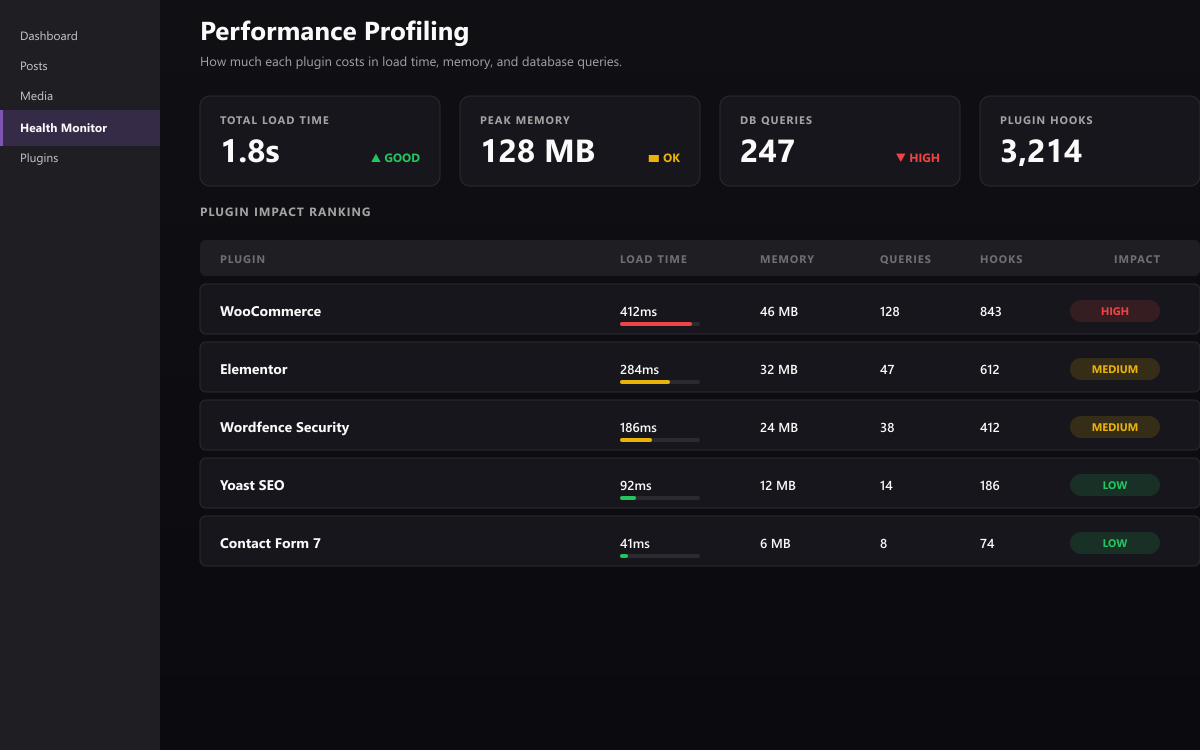


A. Smith Health Monitor scans your active plugins and gives each one a health score based on update status, compatibility, performance impact, and known conflict patterns. It flags common patterns such as running multiple caching or SEO plugins at the same time, which can contribute to site issues.
Key Features
- Plugin Health Scores – Each active plugin gets a score (0-100) based on update freshness, WordPress compatibility, active installs, support resolution rate, and rating.
- Conflict Detection – Detects multiple plugins in the same category (caching, SEO, security, backup, minification) that commonly cause conflicts.
- Performance Profiling – Measures each plugin’s footprint: file count, disk size, registered hooks, autoloaded options, and estimated memory usage. Labels plugins as lightweight, moderate, or heavy.
- Safe Mode – One-click conflict isolation testing. Temporarily hides all plugins except one to help identify which is causing issues. No database changes — uses WordPress filters. Auto-expires after 15 minutes.
- PHP Error Detection – Scans your debug log for plugin-related errors and groups them by source plugin.
- Hook Congestion Alerts – Warns when many plugins are hooked into sensitive WordPress hooks like
the_contentorwp_head. - Email Health Reports – Scheduled email digests (daily/weekly/monthly) with your site’s health score, issues, and recommendations.
- Actionable Recommendations – Prioritized suggestions to resolve conflicts, update plugins, and improve performance.
How It Works
- Install and activate the plugin.
- Visit Health Monitor in your admin menu.
- View your overall health score and per-plugin report cards.
- Click Run New Scan for a fresh analysis.
- Use Test in Safe Mode to isolate any suspicious plugin.
Privacy
Scans run locally on your site and are cached in WordPress transients. Optionally, you can enable “Allow enhanced plugin metadata lookup” in Settings to fetch public ratings and update data for your active plugins from the WordPress.org plugin directory. This option is disabled by default. No data is sent to A. Smith Media servers.
Pro Features (Optional Add-On)
The free version is fully functional on its own. A Pro add-on is available separately at asmith.media/health-monitor with:
- Auto-rollback on detected conflicts
- Real-time conflict monitoring dashboard
- Performance history and trends (Chart.js graphs)
- Slack and email alert notifications
- White-label reports for agencies
- PDF health report export