
Art WooCommerce Order One Click
v3.1.9Artem Abramovich · 2019年2月9日 上架
Plugin for WooCommerce. It includes the catalog mode in the store (there are no prices and the Buy button) and can turn on the Buy/Order button in one …
- 正在使用
- 3,000+
- 评分
- 5.0 / 5
- 累计下载
- 5.9 万
- 最近更新
- 2026年6月29日
贡献者
 Artem Abramovich
截图
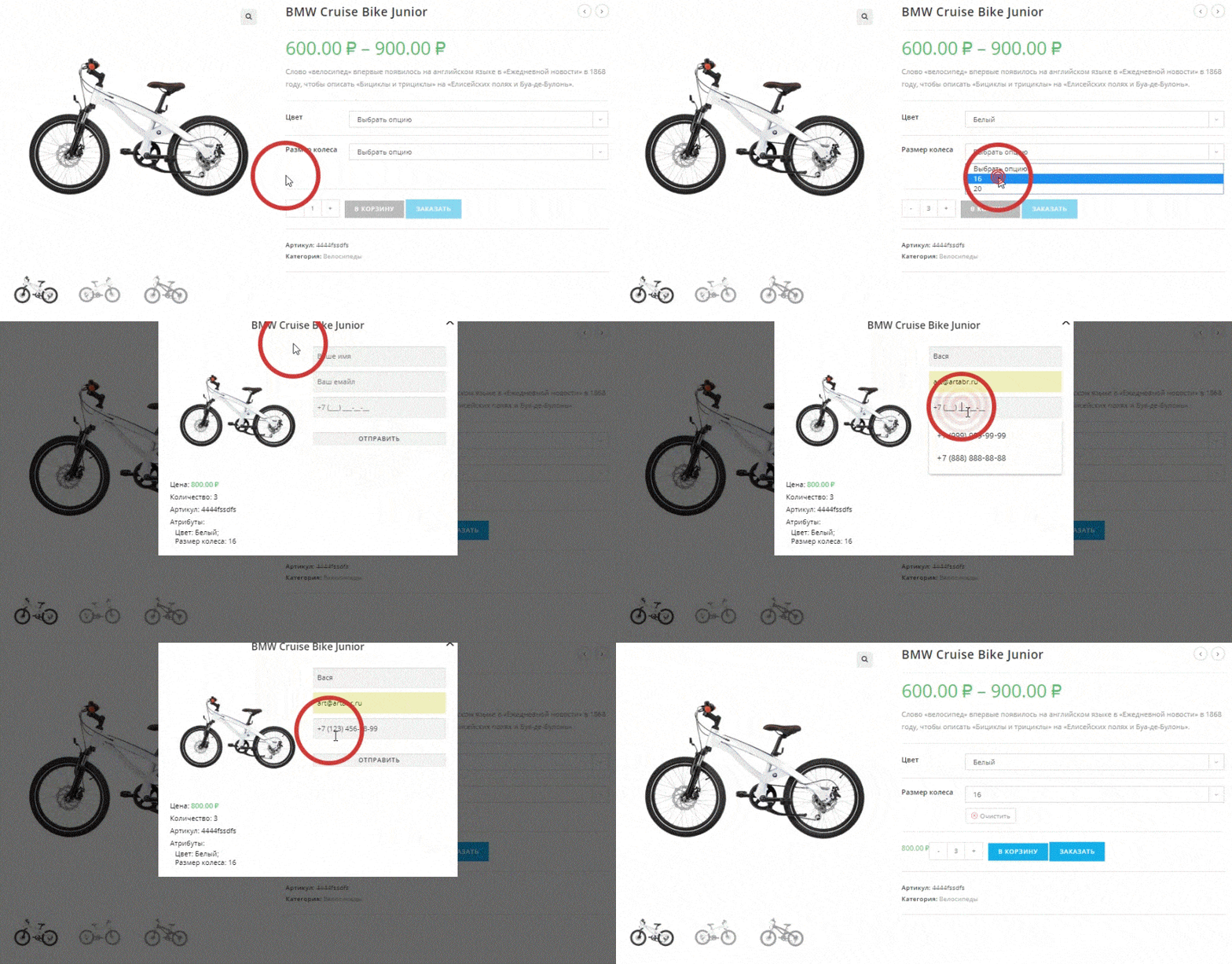



Plugin for WooCommerce. It includes the catalog mode in the store (there are no prices and the Buy button) and can turn on the Buy/Order button in one click. WooCommerce and Contact Form 7 are required for proper operation.
Attention!
Starting from version 3.0, the plugin has been completely rewritten to the new architecture. If you encounter performance problems after installing the plugin, switch back to version 2.4.3 and contact support or the support chat.
The plugin provides three modes of operation:
Catalog mode
On the pages of the categories and the store itself, the Add to Cart buttons are disabled. On the product page, the “Add to cart” button is hidden and the “Order” button appears.
Buy button mode
The button “Add to cart” works in the normal mode, that is, goods can be added to the cart and at the same time ordered in one click
Mode of operation with stocks
Special mode of operation. The Order button will appear automatically if:
- Price not available
- stock status “In Unfulfilled Order”
- stock status “Out of stock”, inventory management is enabled at item level and preorders allowed
In other cases, the Order button does not appear in this mode.
Special mode: no prices and stocks
Special mode. When turned on, it works the same way as normal mode. But if the goods have no price or the product out of stock, then only the Order button will appear.
The plugin has implemented the function of creating orders when sending a letter. But to work correctly, you need to correctly configure the forms in the Contact Form 7 plugin.
After the first activation, starting from version 3.0, a form with the required fields is created in the Contact Form 7 plugin. The AWOC Hidden Field button is no longer relevant. Only in the plugin settings you need to select the desired form.
Read more in the article
Follow on GitHub
Telegram Support Chat
Required Plugins
Recommended themes
And any other theme correctly created to work with WooCommerce
Attention!
The plugin is tested on all recommended themes, but too much depends on the theme itself and how the developers created it. Perhaps on some topics, some functionality may not work. This is especially true for premium themes and the use of builders
If you have any problems, write to support chat
Great thanks
- For patience and support Dmitriy Campusboy
- For code review and useful tips KAGG Design
- For useful tips and WordPress Digest Mikhail Kobzarev
- For code examples Jeroen Sormani
- For lively participation in the development of the plugin Telegram chat “WordPress & WooCommerce” and all participants
- For the best documentation in Russian by WordPress Site wp-kama.ru
Donate link:
Demo video
Only Russian language