

APH Syntax Highlighter
v1.2.2Agus Prawoto Hadi · 2016年8月21日 上架
Bringing SyntaxHighlighter 4 by Alex Gorbatchev into Wordpress easily. Easy to use with user-friendly GUI. Write-edit code in place
- 正在使用
- 10+
- 评分
- 暂无
- 累计下载
- 2,869
- 最近更新
- 2017年4月22日
 Agus Prawoto Hadi
截图


Syntax Highlighter developed by Alex Gorbatchev that has been developed 10+ years is a popular syntax highlighter. It is also widely used by a lot of blog and website.
Currently, it achieves version of 4, this version has significant change in the built method compared to the previous, this is, for some people, somewhat confused and hard to do.
This plugin helps you to bring this code highlighter to your WordPress easily, forget a headache builds. Provided with many features and user-friendly GUI, make it handy and easy to use
** Features. **
- Simple and easy to use
- Full GUI, don’t need to hardcode the parameters
- Custom container max-height. Useful when displaying long code.
- Easy to add custom CSS. Useful for responsive design.
- Easy to edit code that has been written in tinyMCE text editor (Screenshot 3)
- Write and edit code in place. The textarea code editor supports the tab and back tab, so you can directly edit or write your code, rather than switch back to your code editor.
- Load script on demand, load javascript and CSS files of syntax highlighter only when needed.
- Use Syntax Highlighter 4 by Alex Gorbatchev
- Ability to override global options and use individual options for each code block
- Custom Font Size
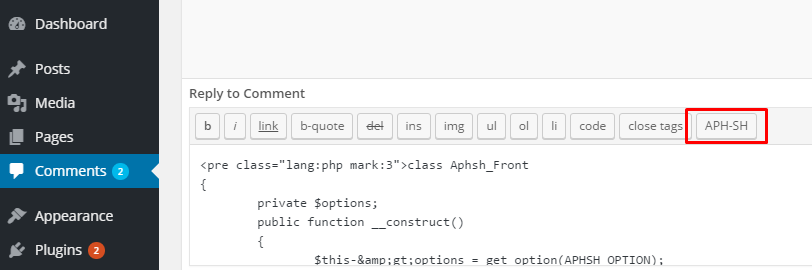
- Support TinyMCE Visual mode and Text Mode (Quick Tags), it also supports the Quick tags used in the admin comment page (screenshot 5)
- Use similar pattern with APH Prism Highlighter and Crayon Syntax Highlighter plugins, so your code will still work using those plugins
- Language added: dark plain (console style) and light plain
How To Use
After installing the plugin, go to the admin setting Settings > Syntax Highlighter to configure the global setting including the highlighter languages you want to load, theme, etc…
In the TinyMCE menu (add or edit post or page), there is a new button that can be used to pop up the code editor, simply copy-paste your code and fill in some options
This new button also can be found at the quick tags of comment editor in the Admin Edit Comments page. This quick tag appears when you edit or reply a comment.