
AnGo Scroll Analytics
v1.18.0andrewgolubev · 2026年9月20日 上架
Self-hosted, cookie-free scroll depth tracking. See how far visitors actually read your content right inside wp-admin.
- 正在使用
- 10+
- 评分
- 暂无
- 累计下载
- 1,572
- 最近更新
- 2026年11月23日
贡献者
 andrewgolubev
截图
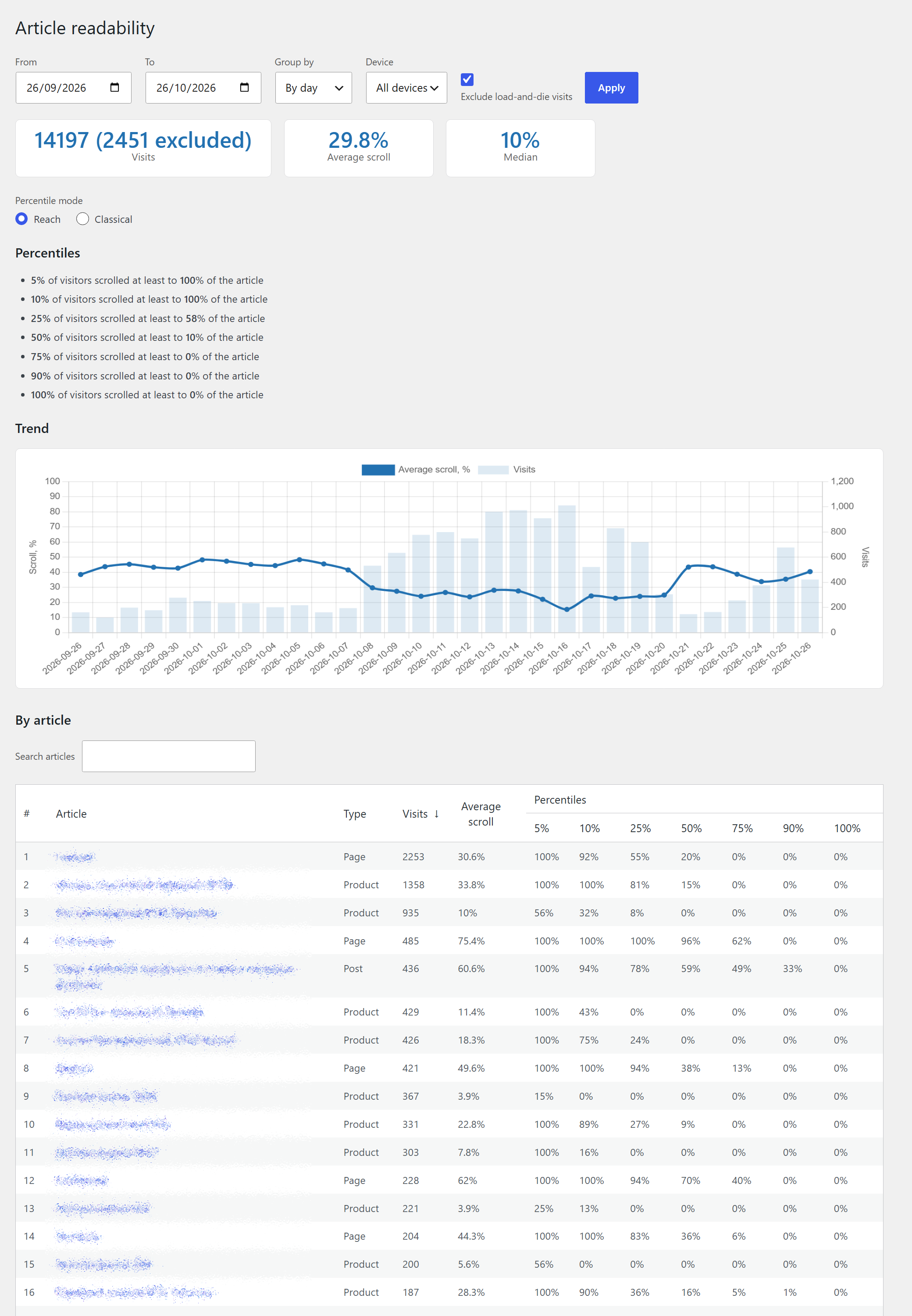
AnGo Scroll Analytics records how far visitors scroll through your content and displays the results on a dedicated “Readability” screen in wp-admin. It answers the question a pageview count cannot: did anyone actually read past the first screen?
Unlike heavy external analytics suites or heatmap SaaS tools, AnGo Scroll Analytics runs 100% natively on your server. There are no external scripts, no cookies, no third-party data sharing, and no complex event setups.
Why site owners and developers choose AnGo
- Smart “Load-and-Die” Bot Filtering: automated hits (bots, scrapers, and Slack/Discord link previews) load the page and vanish instantly at 0% scroll. AnGo detects and excludes these zero-time visits by default so your reading averages stay accurate — and the Visits card always shows how many were left out.
- Privacy-First & Cookie-Free (GDPR friendly): stores zero personal data, sets no cookies, and never logs raw IP addresses (only a temporary hash is used for the spam rate limit).
- Ad-Blocker Resilient: neutral file and endpoint naming (scroll-depth.js and /wp-json/ango/v1/depth) that matched none of the EasyList, EasyPrivacy, uBlock Origin and AdGuard filter lists at the last check — and the FAQ explains why those names must stay plain.
- 100% Local & Self-Contained: the admin charts are powered by a locally bundled Chart.js build. Neither your front end nor wp-admin makes external CDN requests.
- Every Public Content Type Tracked: posts, pages, WooCommerce products and custom post types from any plugin are measured the moment they exist — media attachments are the one exception, and a filter trims any type you don’t want counted.
- Clean Database Citizenship: logged-in administrators and authors are ignored by default so you don’t pollute your own stats, and deleting the plugin removes its custom table and options completely — zero leftover database bloat.
What the Readability dashboard shows
- Flexible date filtering — any custom range (the last 30 days by default), grouped by day or by month, with one-click presets beside the date inputs (Last 7 / 30 / 90 days, This month) that fill both dates and apply at once — plus a Device filter (All devices / Mobile / Tablet / Desktop) that narrows the whole dashboard to one class of visitor, because a phone flick reaches 100% far cheaper than a desktop scroll.
- At-a-glance summary cards: total visits (with the count of excluded bot/preview hits), average scroll depth %, and median.
- A full percentile breakdown — 5/10/25/50/75/90/100, phrased in plain English (“X% of visitors scrolled at least to Y% of the article”) — with a Reach / Classical switch between “how far did readers actually get” and the standard PERCENTILE.INC percentiles users know from Excel.
- A visual trend chart: reading depth as lines — the average, the median and the low-percentile tail (P5/P10/P25) — against traffic volume as bars, over time. The median and tail lines follow the Reach / Classical percentile mode like the rest of the dashboard, and a Linear / Logarithmic switch on the visits axis keeps one launch day from flattening the everyday baseline into noise (the axis title always says which scale is active).
- A sortable per-article table: title, content type, visits, average scroll and a seven-column sortable Percentiles group per article (the 50% column is the median), with a live “Search articles” box and a # column numbering the current view. Every row is also a drilldown: click it (or its Stats button) to scope the cards, percentiles and trend chart to that one article — a labeled scope bar with a Back button sits above the cards, and the table itself stays site-wide so another article is always one click away.
- A lightweight, server-rendered “Readability brief” widget on the Dashboard home screen: the same numbers for the last 7 days at a glance.
How it works under the hood
The tracking script loads on the single page of every public post type and measures depth through the scrollable height of the document — not the share of the article visible on screen, so a page that fits on one screen records 100%.
- Initial arrival: a visit is registered as soon as the page loads. A visitor who reads the top screen without scrolling still gets a row, with 0%.
- Efficient beacons: data is sent to the server only when reading progress actually advances (checked every 5 seconds), and when the visitor leaves the page or switches tabs (via navigator.sendBeacon, or fetch with keepalive). A failed send is retried at the next check. Each beacon also carries a coarse device class — mobile, tablet or desktop, computed in the visitor’s browser; no user-agent string is collected.
- One row per visit: each visit occupies a single row in {prefix}_ango_visits, updated as the reader gets further down the page. A new tab or a new session is a new visit.
Performance & scale
Designed for small-to-medium blogs and content sites: the statistics are computed on the fly with direct SQL queries, and the REST endpoint is rate-limited to 60 requests per minute per IP hash (changeable via the ango_rate_limit filter). Without a persistent object cache each beacon costs two lightweight options-table queries — a spam brake, not a firewall. At hundreds of thousands of visits, transient caching or cron-based aggregation is worth adding; a typical blog does not need it.