

AltoFAQ – AI FAQ Generator & Schema
v1.0.27The Really Useful App Company · 2026年7月4日 上架
AI FAQ generator: turn any post into a clean FAQ accordion plus valid FAQPage schema. No API key, no setup. Free for 10 a month.
- 正在使用
- 10 以下
- 评分
- 暂无
- 累计下载
- 1,063
- 最近更新
- 2026年11月25日
 The Really Useful App Company
截图

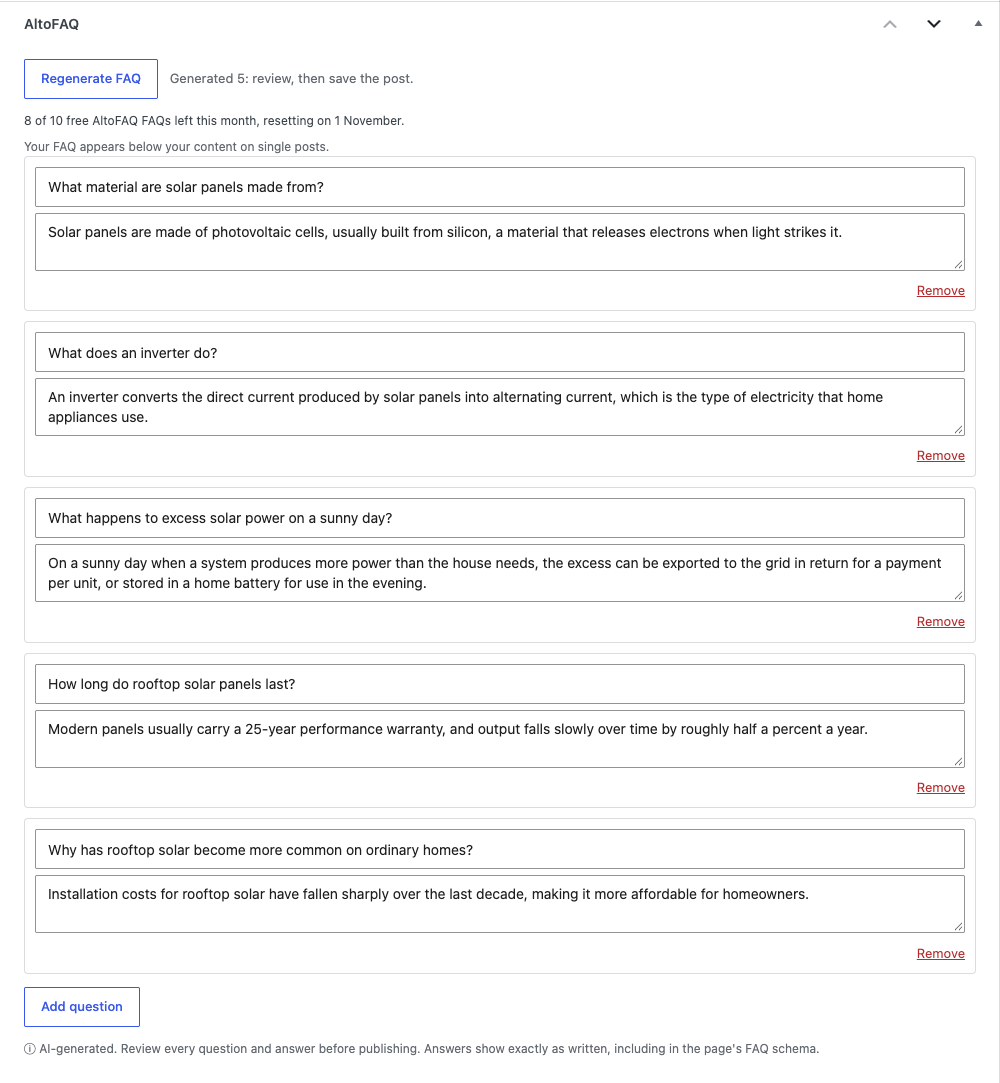

No API key. No account. No setup. AltoFAQ runs the AI on our hosted service, so there is nothing to configure. You generate each FAQ with one click from the post editor, free for the first 10 every month.
Each FAQ is a set of questions a reader of your post is likely to ask, each answered from your content. You review and edit them, and once you save the post they appear as an accessible accordion with valid FAQPage structured data, wherever you put the [altofaq] shortcode or, if you switch on automatic insertion, below the article.
Watch it work: a short demo on a test site, with an AI-generated voiceover.
Google retired FAQ rich results in May 2026, so this is not a “rich results” plugin. What FAQ content still does: FAQPage schema is still valid and parsed, AI search engines (AI Overviews, ChatGPT, Perplexity) favour clean structured Q&A, featured snippets still benefit, and a clear FAQ is genuinely useful to readers.
The free plan covers 10 FAQs per month; AltoFAQ Pro raises that limit to 500 a month.
- No API key or third-party account. The AI runs on our service.
- One click to generate an FAQ from the post editor, then edit or remove any question before it shows.
- Bulk generation for posts you have already published: select them on the Posts or Pages list, or generate for every post that has no FAQ from Settings. Each one waits for your review on one screen, with its own Approve and Discard.
- Optional generation when you publish. The questions wait in the editor for your approval and are not shown, or added to your schema, until you approve them.
- Accessible accordion display, built on native HTML so it works with the keyboard and screen readers.
- Valid FAQPage JSON-LD that always matches the questions shown on the page.
- Show it via the
[altofaq]shortcode, or auto-insert it into single posts and pages. - Privacy-friendly: automation is off until you switch it on. To generate an FAQ we send the post title and content, with a site ID (a hash of your site URL) and the plugin version. The External services section below lists everything that is sent.
- Pro: up to 500 FAQs a month.
External services
This plugin connects to the Really Useful App Company API to generate FAQs. It is required for the plugin’s core feature.
- What is sent and when: the plugin sends the post title and post content to the API on each of these actions, and nothing else triggers a send of your content:
- when you click “Generate FAQ” in the editor
- when you publish a post with “Generate an FAQ when a post is published” ticked
- when you use “Generate FAQs (AltoFAQ)” on the Posts or Pages list, or “Generate FAQs for posts that have none” in Settings
- Also sent: a site ID (a hash of your site URL) for usage counting, and the plugin version, so we can tell which release a report relates to. We treat the site ID as personal data, because it can be matched to your site’s address. Our privacy policy explains how we use it. Whether this site’s review prompt was shown, snoozed, dismissed or clicked is also sent, so we can tell whether that prompt is working. It records the site, not the individual user, and says nothing about what you did on WordPress.org afterwards. If you choose to give us an email address, it is sent on its own, only when you submit your email address on the settings screen. It is optional, you are asked once (and again only after we have deleted it), and every feature keeps working if you skip or dismiss it. It is sent only if you tick the sign-up box, together with the wording you agreed to. We use it to send release notes and product updates and to give you a way to reach us. These emails are sent from our Microsoft 365 mailbox. You can unsubscribe from any message, and we delete it 24 months after your last contact with us. Whether this site’s email prompt was shown, dismissed or submitted is also sent, so we can tell whether it is working; it does not include the address itself.
- Where it goes: the API (default
https://api.thereallyusefulappcompany.com), which uses Anthropic as an AI subprocessor to generate the text. - Terms / privacy: https://www.thereallyusefulappcompany.com/altofaq/terms , https://www.thereallyusefulappcompany.com/altofaq/privacy , https://www.anthropic.com/legal/privacy
Nothing is sent until you click generate, start a bulk run, or publish with “Generate an FAQ when a post is published” ticked. If you choose to give us an email address, it is sent when you submit it.