

Ajiokart Marketplace Purchase Links
v0.3.5ajiokart · 2026年10月22日 上架
Show Ajiokart marketplace buying options on WooCommerce products or any page with a shortcode.
- 正在使用
- 10 以下
- 评分
- 暂无
- 累计下载
- 186
- 最近更新
- 2026年10月22日
贡献者
 ajiokart
截图

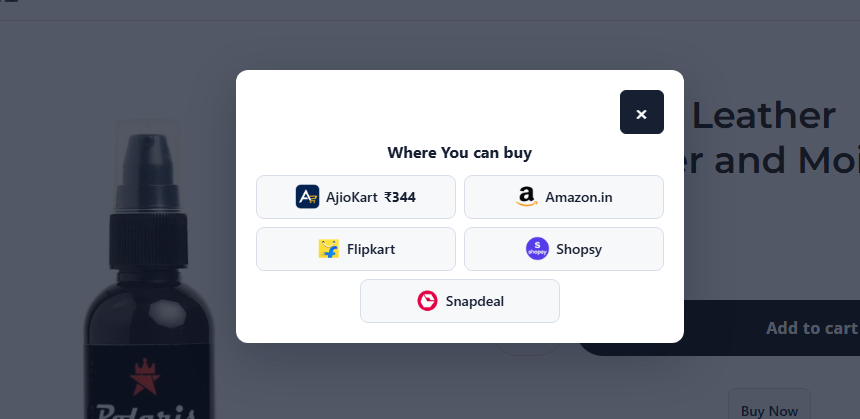
Ajiokart Marketplace Purchase Links loads the AjioKart Constant Commerce widget from https://markets.ajiokart.com/widget/constant-commerce.js to display marketplace buying options. The widget loads current product options from AjioKart’s marketplace feed. WooCommerce is optional when you supply the AjioKart Product ID in the shortcode.
With WooCommerce active, choose any of four automatic positions: after the product button on shop listings and Product Collection blocks that include a Product Button, after Add to cart on product pages, before product tabs, or after product tabs. The first two open a modal dialog. The tab positions display marketplace options inline on the page. WooCommerce block product templates are supported through their compatibility hooks. On category pages with custom product cards that omit WooCommerce loop hooks, the plugin places mapped product widgets beside the card button. Customize the heading, modal button text, and widget colors in Settings > Ajiokart Marketplace Purchase Links. The screenshots below show the inline and dialog views.
The widget only appears for products with an AjioKart Product ID. Simple products use the ID in Product data > General. For variable products, enter a separate ID for each variation. The selected variation ID takes priority, and the parent ID in General is used when the selected variation has no ID. A variable product-page widget stays hidden until a selected variation or its parent fallback has an ID.
Use [marketplace_trust product_id="G9G37R72PZ"] in a page, post, widget, or Shortcode block to place a modal widget for a specific AjioKart Product ID. This works on a WordPress site without WooCommerce. Use display="inline" for inline options. With WooCommerce active, [marketplace_trust] on a product page uses the current product mapping. For a variable product, the selected variation ID takes priority and the parent ID is used if that variation has no ID. The shortcode works independently of the four automatic position settings, but the main Enable setting must be on. The widget is omitted when no valid Product ID is available.
External service
When a widget is displayed, the visitor’s browser loads its script from AjioKart’s Constant Commerce service at https://markets.ajiokart.com/widget/constant-commerce.js. When inline options are shown or a modal is opened, the widget requests https://markets.ajiokart.com/offers with the configured AjioKart Product ID as the productid query parameter to retrieve current offers and product details. Clicking a marketplace option opens https://markets.ajiokart.com/p.php with that Product ID, the selected marketplace, and the AJIOKART.com referral label; the visitor is then redirected to the selected marketplace. These browser requests can also convey standard request information such as the visitor’s IP address, browser user agent, and referrer according to the visitor’s browser settings. No WooCommerce customer or order details are added to these requests by this plugin.
AjioKart’s Terms & Conditions: https://ajiokart.com/p/terms-and-condition
AjioKart’s Privacy Policy: https://ajiokart.com/p/privacy-policy