
AI Content Writer – Automatic Content Generator and Auto Poster
v2.6.0BeautifulPlugins · 2025年1月27日 上架
AI Content Writer helps you automatically generate high-quality, SEO-optimized content for your blog or website.
- 正在使用
- 100+
- 评分
- 5.0 / 5
- 累计下载
- 1.3 万
- 最近更新
- 2026年11月22日
贡献者
 BeautifulPlugins
截图




AI Content Writer – Automatic Content Generator and Auto Poster is a powerful AI tool that helps you generate high-quality content for your blog or website in minutes using advanced AI technologies like ChatGPT, OpenAI, Google Gemini, and more. With AI Content Writer, you can create engaging articles, blog posts, and other content in minutes, without the need for a professional writer. Simply enter a few keywords, and AI Content Writer will generate a unique, well-researched article that is ready to publish. AI Content Writer uses advanced natural language processing technology to create content that is both informative and engaging, making it the perfect tool for bloggers, content marketers, and website owners.
🚀 Upgrade to Pro | 💻 Live Demo Site | 📄 Plugin Documentation | 🎧 Support
🎬 See AI Content Writer in Action
✨ Free Features
- Full Auto-Blogging Pipeline: Campaigns automatically generate titles, write articles, add featured and in-article images, and publish posts on a schedule — hands-free from keyword to published post.
- Autopilot Campaigns: Zero-input auto-blogging — the AI studies your published posts, learns your site’s niche and audience, and keeps writing new matching articles automatically. No keywords needed.
- Powerful AI Models: Generate content with Google Gemini (free tier available) or ChatGPT (OpenAI) — including the latest GPT-6.2 Astra, GPT-6.2 Sol, GPT-6.1 Sol, Gemini 3.8 Flash, and Gemini 3.6 Flash models — with live model lists and per-provider Test Connection buttons.
- Busy-Provider Fallback: When an AI provider is overloaded, the request is retried, moved to another model, then handed to another provider you have a key for — campaigns keep publishing, and the logs say which provider wrote each article.
- Structured, SEO-Complete Articles: Every article arrives with an SEO title, meta description, focus keyword, URL slug, excerpt, and suggested tags & categories — applied automatically.
- Works with Yoast SEO, Rank Math, All in One SEO & SEOPress: AI-generated SEO data is written straight into your SEO plugin — no copy-pasting. Sites without an SEO plugin get a built-in meta description fallback.
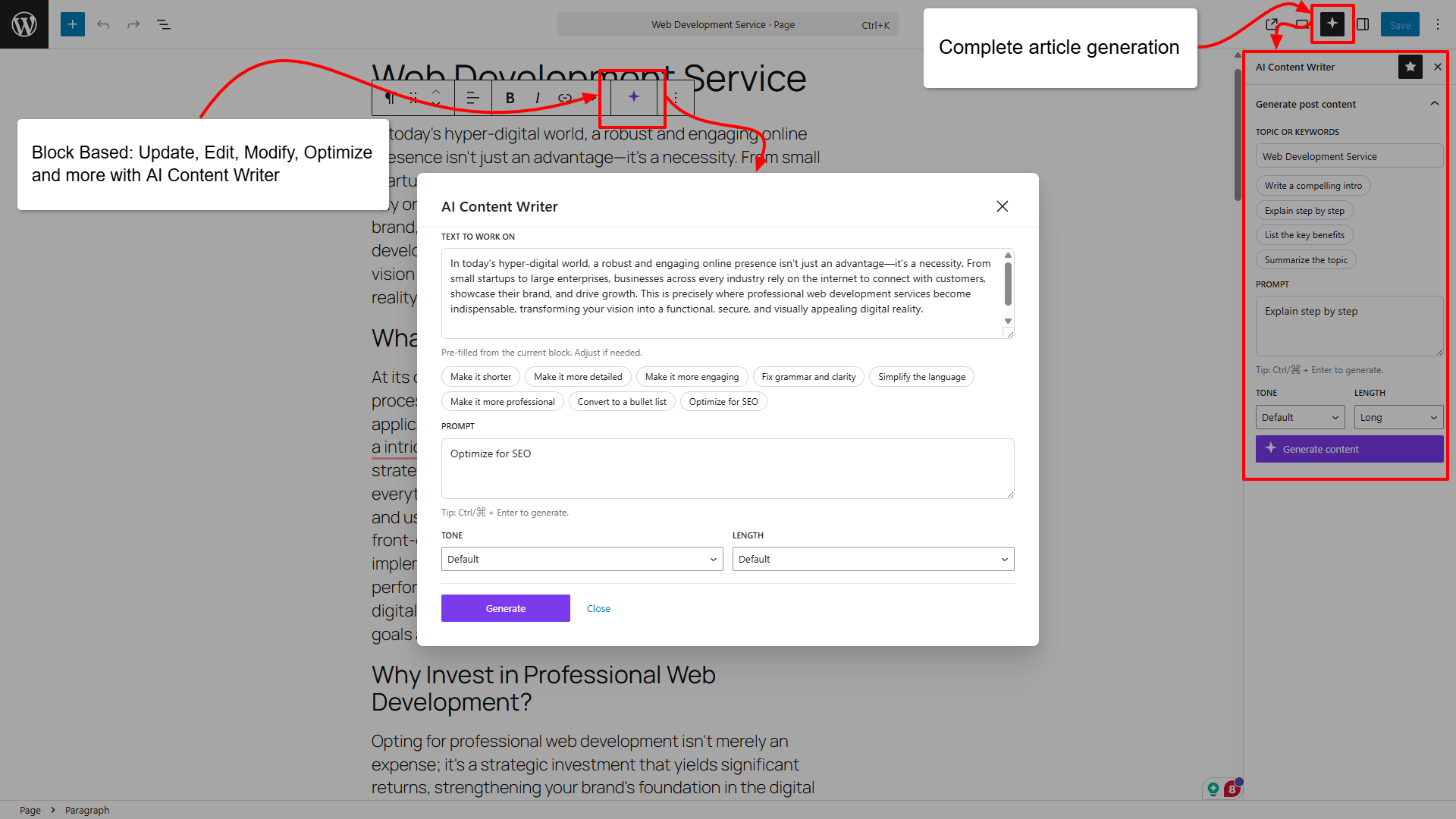
- Block Editor AI Assistant: Generate or rewrite content directly inside the block editor with tone, length, and language presets. Generated posts are saved as real blocks (headings, paragraphs, lists, images) on block editor sites.
- Classic Editor, Elementor & WooCommerce Support: An “AI Writer” button on classic (TinyMCE) editors — including the Elementor Text Editor widget and WooCommerce product description fields — with generate and rewrite-selection modes.
- 23 Content Languages & 11 Writing Tones: Write in Spanish, French, German, Japanese, Arabic, and 18 more languages, in tones from professional to humorous — per campaign or per generation.
- Review Queue: Approve, regenerate, or delete generated posts before they go live — combined with draft-first publishing for full editorial control.
- Bulk Title Import: Paste your own article titles into a campaign and let the AI write them all.
- One-Click Generate Content Page: Write a single complete article — choose the AI provider, language, tone, featured image, and images in the article, and the post is created ready to review.
- Author, Categories & Tags per Campaign: Every published post gets the author and taxonomy you configured — or AI-suggested categories and tags.
- Featured and In-Article Images: Every post gets a featured image and, if you want, up to 6 images placed between its sections — stock photos from Pexels, Unsplash & Pixabay, or unique AI images from OpenAI GPT Image or Google Gemini, with alt text and attribution built in.
- Images from the Source Page: Articles and RSS Feed campaigns can keep the images of the page each post is imported from, credited and linked back to the source.
- Image Generator Integration: Choose the free Image Generator plugin as the image source to make every image with its branded templates, AI and stock photos.
- Reliable Image Pipeline: If the image source fails, your other configured sources are tried. Advanced options set the AI image style, image shape, and a daily limit for AI images.
- Campaign Dashboard & Logs: Progress bars, last/next-run times, per-campaign log filtering, and a statistics dashboard.
- Duplicate Guard: Exact and normalized-slug title matching prevents the same article from being generated twice.
- Secure by Default: API keys are stored masked, all output escaped, all input sanitized.
📊 Available Campaign Types
- Articles: Generate articles on trending topics scraped from Bing.com and Bing.com/news.
- RSS Feeds: Generate content from any RSS feed to keep your website updated with the latest news and articles.
- Autopilot: Zero-input campaigns — the AI analyzes your existing published content and writes new articles that match your site. Works with Gemini or ChatGPT (Pro providers appear automatically when Pro is active).
- Gemini: Keyword campaigns powered by the Google Gemini API — free tier available. (Freemium)
- ChatGPT: Keyword campaigns powered by the OpenAI API. (Paid)
- Claude, DeepSeek & OpenRouter: Additional keyword campaign types with AI Content Writer Pro.
🚀 Pro Features
Upgrade to AI Content Writer Pro for the complete automation suite:
- Claude (Anthropic) AI Provider: Generate content with Claude Fable, Opus, Sonnet, and Haiku models — including Fable 5.2, Opus 5.5, Sonnet 5.5, and Haiku 5.5. – Pro
- DeepSeek AI Provider: A very cost-effective alternative with DeepSeek Flash and V4 Pro. – Pro
- OpenRouter Provider: One key for hundreds of models — Claude, GPT, Gemini, Llama, Mistral, and more. – Pro
- SEO Pack — FAQ Sections & Schema: Auto-generated FAQ sections with FAQPage structured data (rich-results eligible), written in the article’s language and added as blocks on block editor sites. – Pro
- Internal Linking Automation: A “Related Articles” section linking posts that share categories or tags. – Pro
- SEO Score Gate: Posts scoring below your quality threshold are held as drafts instead of auto-publishing. – Pro
- Source Citations: Credit original sources with a nofollow link on scraped campaigns. – Pro
- Drip Scheduling: Human-like randomized publishing gaps, a daily publishing window, and per-day caps. – Pro
- Custom Prompt Templates: Replace the built-in prompt per campaign with your own, using {title}, {keywords}, {language}, and {tone} variables. – Pro
- Publish Webhooks: Notify Zapier, Make, n8n, or any URL when a post goes live — auto-share to social media. – Pro
- Faster Campaign Frequencies: Run campaigns every 5, 10, 15, or 30 minutes. – Pro
- 999 Posts per Campaign: Raise the campaign target from 20 to 999. – Pro
- Search & Replace + HTML Cleaner: Rewrite scraped content with find/replace pairs and strip unwanted elements by CSS selector. – Pro
- Busy-Provider Fallback for Pro Providers: Claude, DeepSeek, and OpenRouter requests are retried when the service is busy, and your other configured providers take over. – Pro
- License & Automatic Updates: Activate once and receive Pro updates right on the Plugins screen. – Pro
Who Should Use AI Content Writer?
- Bloggers who want to keep their blogs active with engaging content, quickly and easily.
- Content Marketers who need to produce high-quality content for their websites and clients.
- Website & Small Business Owners who want to attract more visitors by publishing regularly without hiring a professional writer.
- Freelancers & Agencies who need to deliver content for clients without spending a lot of time and effort.
- Affiliate Marketers who want SEO-friendly content that ranks well in search engines.
Get Started Today:
Install AI Content Writer – Automatic Content Generator and Auto Poster from the WordPress plugin repository and take control of your content creation process. With AI Content Writer, you can create high-quality content quickly and easily, without the need for a professional writer. Get started today and see the difference that AI Content Writer can make to your blog or website!
External Services
This plugin relies on third-party services to provide its functionality. Below is a detailed explanation of the services used, the data sent, and links to their terms and policies:
Google Gemini API – FREE/PAID
- Purpose: The Google Gemini API is used to generate content using AI technology.
- Data Sent: The plugin sends the content to the Google Gemini API for processing. Text-based user input such as prompts or topics provided by the user. No personal or sensitive information is sent unless explicitly entered by the user in the content prompt.
- When Data is Sent: Data is sent to the Google Gemini API when the user generates content using the plugin, and image descriptions are sent when Google Gemini is the image source.
- Terms of Service: Google Gemini API Terms of Service and Gemini API Additional Terms of Service
- API Documentation: Google Gemini API Documentation
ChatGPT, OpenAI API – PAID
- Purpose: The ChatGPT API is used to generate content using AI technology.
- Data Sent: The plugin sends the content to the ChatGPT API for processing. Text-based user input such as prompts or topics provided by the user. No personal or sensitive information is sent unless explicitly entered by the user in the content prompt.
- When Data is Sent: Data is sent to the ChatGPT API when the user generates content using the plugin, and image descriptions are sent when OpenAI GPT Image is the image source.
- API Documentation: ChatGPT API Documentation
- Pricing: OpenAI API Pricing
- Terms of Service: ChatGPT API Terms of Service
- Privacy Policy: OpenAI Privacy Policy
Pexels API
- Purpose: The Pexels API is used to search for and display free stock images for the generated content.
- Data Sent: The plugin sends the search query to the Pexels API to retrieve free stock images related to the content. No personal or sensitive data is sent.
- When Data is Sent: Data is sent to the Pexels API when the user searches for images for the generated content.
- Terms of Service: Pexels API Terms of Service and Pexels Privacy Policy
- API Documentation: Pexels API Documentation
Unsplash API
- Purpose: Used to find free stock photos for the featured image and the images in the article when Unsplash is the image source.
- Data Sent: The image search query (a keyword or the post title). No personal or sensitive data is sent.
- When Data is Sent: When a post needs images and Unsplash is the selected image source, or when its connection is tested.
- Terms of Service: Unsplash API Terms and Unsplash Privacy Policy
Pixabay API
- Purpose: Used to find free stock photos for the featured image and the images in the article when Pixabay is the image source.
- Data Sent: The image search query (a keyword or the post title). No personal or sensitive data is sent.
- When Data is Sent: When a post needs images and Pixabay is the selected image source, or when its connection is tested.
- Terms of Service: Pixabay Terms of Service and Pixabay Privacy Policy
Bing and RSS feed sources
- Purpose: Articles campaigns search Bing News for your keywords, and RSS Feed campaigns read the feeds you enter, to find topics and source pages to write from.
- Data Sent: The campaign keywords (Articles campaigns) or a request for the feed URL you entered (RSS Feed campaigns). No personal data is sent.
- When Data is Sent: When an Articles or RSS Feed campaign runs.
- Terms of Service: Microsoft Services Agreement and Microsoft Privacy Statement
Notes:
By using this plugin, users acknowledge that data is transmitted to the above services. We encourage users to review their terms and policies to ensure compliance with their data-handling practices. The plugin developers are not responsible for the data handling practices of the external services.