

Vsourz Form Entries for Contact Form 7
v2.1.6Vsourz Digital · 2017年7月13日 上架
Save Contact Form 7 submissions to the database and manage entries from the WordPress admin.
- 正在使用
- 6 万+
- 评分
- 4.5 / 5
- 累计下载
- 123 万
- 最近更新
- 2026年11月6日
贡献者
 Vsourz Digital
截图
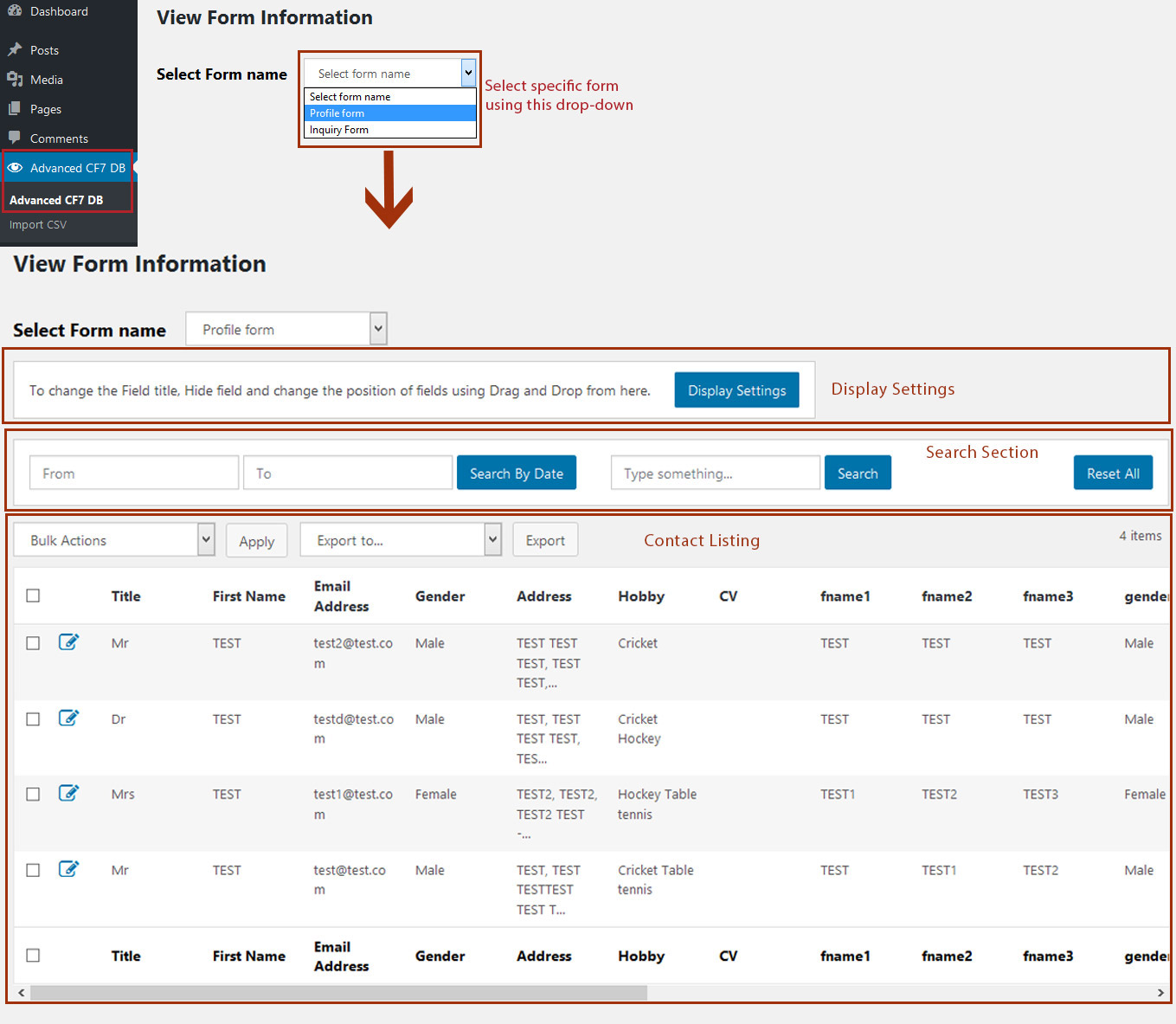


Easy plug & play plugin to store all enquiry details received through website Contact Form 7 forms. Simply install & activate plugin to store all your enquiries in wp-admin.
Every form that is submitted in the website will be captured into database using “Vsourz Form Entries for Contact Form 7” plugin. Follow below steps to view form details:
- Select form from drop-down
- View all form data for that particular form
- Option to search / filter forms by keyword or date range
- View attachments in wp-content/uploads/advanced-cf7-upload
- Option to download attachments from wp-admin
Features
- Compatible with Multisite feature – Efficient data management by storing form details website wise
- Securely stores form data into database
- Easily modify enquiry data
- View list of all forms received through Contact Form 7
- Search / filter form details using keyword
- Search / filter enquiries using custom date-range filter
- Export data in CSV, Excel format by applying filters
- View attachment download link
- Advanced pagination with an option to jump to any page to view specific entries
- Enable/Disable columns with personalized tabular structure
- Drag & Drop with ease to view data in customized tabular view
- Option to select multiple entries at a time for deleting / exporting entries
- Rename field label names easily
- Import form details using CSV
- Filter to exclude data from creating record in CF7 database
- Modify form data before creating record in CF7 database
Commercial Features
1. Advanced CF7 DB – GDPR Compliant
Advanced CF7 DB – GDPR Compliant plugin assists website and web-shop owners to comply with European privacy regulations known as GDPR. Advanced CF7 DB – GDPR Compliant is an add-on of Advanced CF7 DB, it is based on GDPR rules to export or erase user’s personal data stored with advanced CF7 DB.
Download Advanced CF7 DB – GDPR Complaint plugin from here
Advanced CF7 DB – GDPR Compliant Plugin Features
- Compatible with the latest WordPress version 5.1.1 and later for GDPR compliances
- Manages data as per new regulations and up to the mark performance
- View personal data of individual record On-Request, categorized as per CF7 forms and websites
- Erase personal data specific to CF7 that are not required
- Website owners can export a ZIP file containing a user’s personal data, including data collected by Advanced CF7 DB plugin
- Website owners can erase a user’s personal data, including data collected by Advanced CF7 DB plugin
2. Schedule Report
We have introduced a new add-on “Schedule Report” focusing on day-to-day business specific requirement like:
- Daily Report
- Weekly Report
- Monthly Report
Reports will be automatically generated and will be available to you in your e-mail address as per scheduled routine.
Download Schedule Report plugin from here
Schedule Report Plugin Features
- Auto-generated CSV report are sent in emails at scheduled time
- Schedule multiple email events for receiving different enquiry form reports
- Option to select datasheet columns for reports to be generated
- Option to filter data while creating the scheduled event for a particular report
- Option to create email templates by defining To, From, Email message for schedule reports
- Scheduled Report will also be added to wp-cron and will be triggered as per schedule
3. Advanced CF7 DB – User Access Manager
Need to provide access to other users? Your, search ends now, this plugin provides access to individual users or user groups and accordingly user(s) can view or edit their contact form DB data.
Download Advanced CF7 DB – User Access Manager plugin from here
Advanced CF7 DB – User Access Manager Plugin Features
- Provide access of CF7 DB to view & update data to individual users or user groups
- Provide access to single user for creating single/multiple forms
Plugin Customization
Restrict IP address storage – Various countries restrict websites to store end users IP address. We have a provision to Restrict IP address storage. Now, IP address can be neglected while storing form’s data into database.
How to restrict IP address storage?
Navigate to -> wp-content/themes/{active theme folder}/functions.php
Open the functions.php file and place the code do_shortcode( ‘[cf7-db-display-ip]’ ); at the end of the file.
For support, email us at: wp.support@vsourz.com
How to use?
- Install Plugin via WordPress Admin – Go to Admin > Plugins > Add New.
- View form entries – Go To Admin >> Advanced CF7 DB >> Advanced CF7 DB >> Select form name.
- Import CSV file – Go To Admin >> Advanced CF7 DB >> Import CSV >> Select form name.
External services
This plugin integrates with the following third-party services. We list what is sent, when, and links to each service’s terms and privacy policies so site owners can review them.
-
Freemius (freemius.com)
- What it’s used for: managing add-on availability, license/trial activation, upgrade/purchase prompts and optional analytics related to plugin usage and errors.
- What data is sent and when: when you explicitly connect your site or enter/activate a license, the plugin sends details such as your site’s URL, WordPress version, plugin slug and version, admin email (for account linkage), and purchase/license identifiers. Freemius may also collect anonymized usage and error reports if that feature is enabled.
- Why: to validate licenses, enable add-ons, display purchase/upgrade information, and provide update/analytics services.
- Links: Terms: https://freemius.com/terms/ Privacy: https://freemius.com/privacy/
-
Envato/CodeCanyon (codecanyon.net / envato.com)
- What it’s used for: external purchase pages linked from the plugin (for example add-on purchase links). The plugin does not submit purchase data directly to Envato; visiting purchase links redirects the user to the Envato/CodeCanyon marketplace where purchase and account data are handled by Envato.
- What data is sent and when: when you follow a purchase link you will be redirected to CodeCanyon/Envato and any data exchanged (purchase/payment/account) is handled by Envato according to their terms.
- Links: Terms: https://codecanyon.net/legal/market Privacy: https://www.envato.com/privacy/
If you do not wish to use these services, avoid connecting via the plugin’s connect/activation UI and do not follow purchase links. The plugin will continue to function for storing, viewing, importing and exporting Contact Form 7 submissions without connecting to external services.