
Admin Right Click Menu
v1.3Thor Sarup · 2016年8月21日 上架
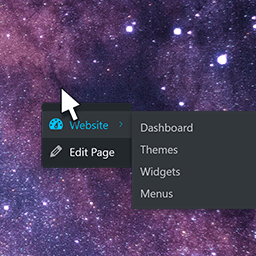
The default WP Admin Toolbar (frontend) is moved to a right click menu (context menu).
- 正在使用
- 10+
- 评分
- 暂无
- 累计下载
- 2,257
- 最近更新
- 2016年8月23日
需要 WordPress 4.0+已测试到 4.6.30
贡献者
 Thor Sarup
截图


Useful for websites where the default Admin Toolbar is not fitting well into the design. Many website owners/clients show the their website to their customers from laptops that are also used for administration of the website and thus the experience is ruined by the black toolbar right in the top.
With Admin Right Click Menu you can still use the handy frontend admin shortcuts – e.g. ‘Edit Page’ – just in a small fly-out menu. The menu is initially hidden but is activated by right clicking on user-defined element(s) on the website.