
AddSynapse – AI Website & Store Assistant for WooCommerce
v1.3.17AddSynapse · 2026年10月19日 上架
Run your WooCommerce store or WordPress site from Claude or ChatGPT, or chat in wp-admin with your own AI key. Every change is a draft you approve.
- 正在使用
- 100+
- 评分
- 5.0 / 5
- 累计下载
- 2,119
- 最近更新
- 2026年11月23日
贡献者
 AddSynapse
截图
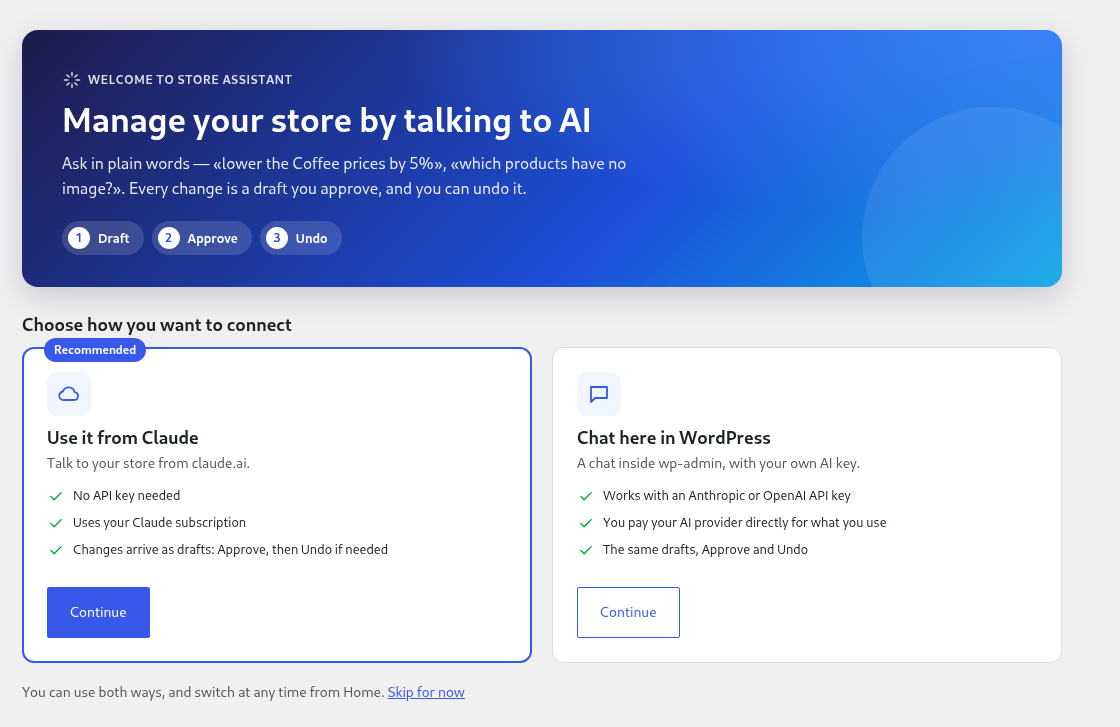

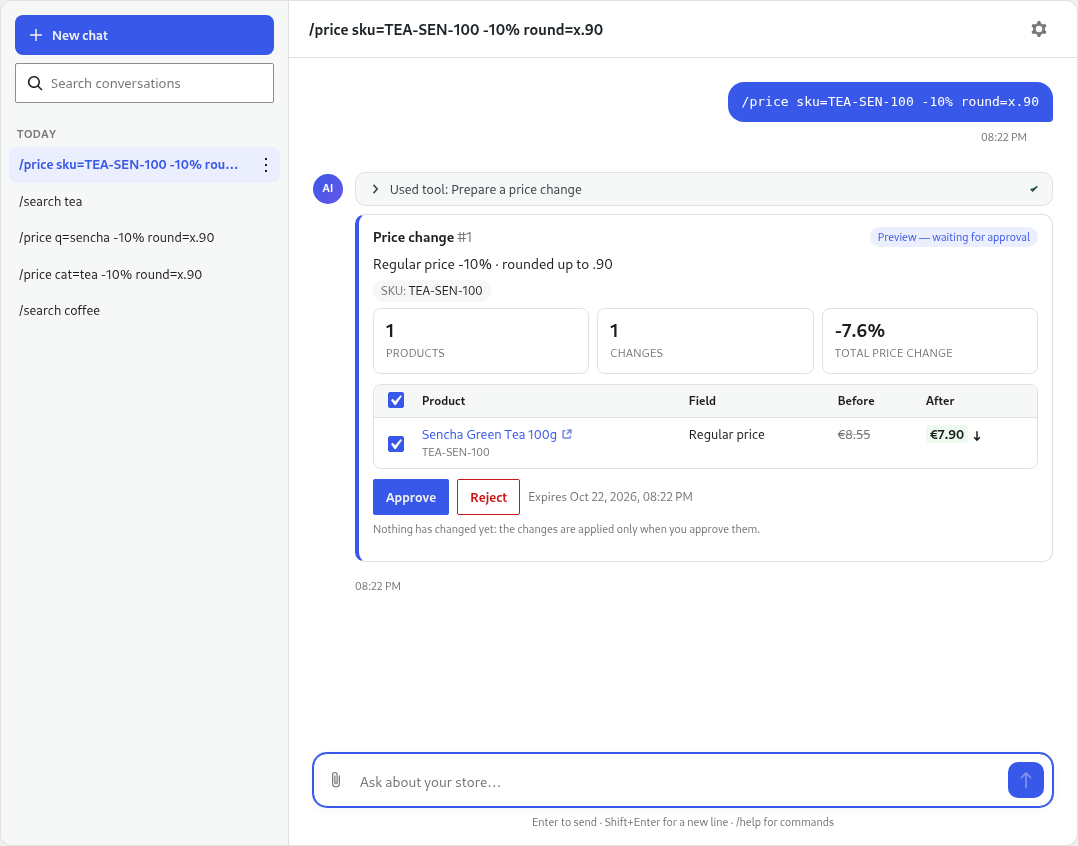
Talk to your store. Approve what changes.
AddSynapse turns your WordPress site or WooCommerce store into something you can simply talk to. Ask “which products are low on stock?”, “what were my best sellers last month?”, “lower every price in Summer Dresses by 10%” or “write better SEO titles for my bags” — and get real answers from your own data, plus ready-made drafts of the changes you asked for.
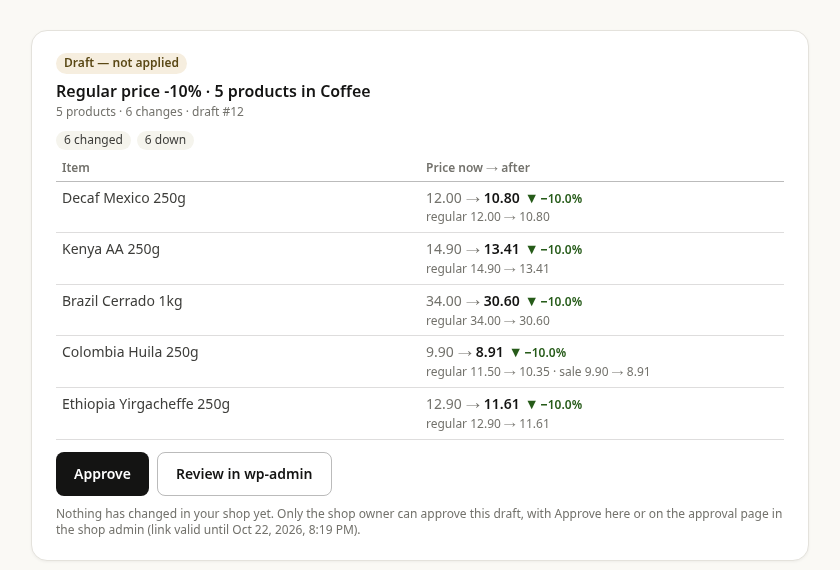
Nothing changes on your site until you press Approve. And every approved change can be put back exactly as it was with Undo.
For store owners, shop managers and site owners who want answers and routine edits without clicking through dozens of screens. Use it two ways — or both:
1. From Claude or ChatGPT, with no API key
Connect your site once and use it from the Claude you already pay for, on claude.ai or the Claude apps.
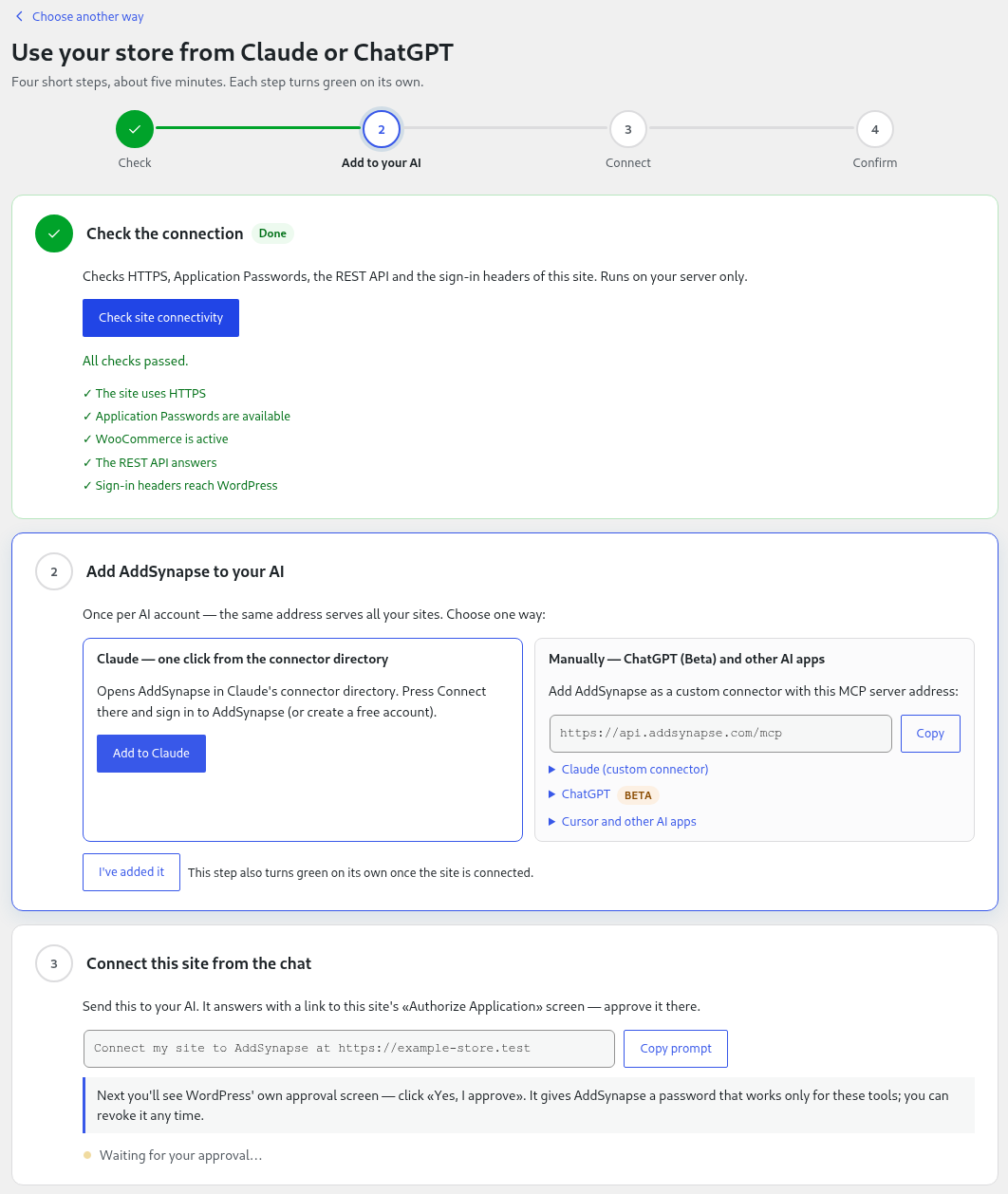
- No API key, no setup files. A short wizard on AddSynapse Home checks your site; you connect it from Claude and confirm on this plugin’s own page.
- Drafts you approve inside the chat. Prices, sales, stock, SEO, coupons, page texts, menus and images: Claude shows each draft as a card with the exact before and after values. Nothing changes until you press Approve.
- Exact Undo, only if nothing else changed the same data since.
- All your stores in one place with one free AddSynapse account.
- Locked down by design. A separate key that only this plugin accepts, valid only on its own store routes, and every write needs a single-use approval signed when you press Approve.
ChatGPT. The same connection works from ChatGPT: «Store Manager for WooCommerce» is an app in ChatGPT, on any ChatGPT plan. In the wizard press Connect to ChatGPT (or Connect to Claude).
Google Analytics and Search Console. Through your AddSynapse account, Claude or ChatGPT can also read your site’s Google Analytics and Search Console (read-only), after you connect them on app.addsynapse.com. This plugin sends nothing to Google.
This way needs a free AddSynapse account (created during the connection) with a daily allowance of actions; larger allowances are on paid plans at addsynapse.com. See External services for exactly what is sent.
2. A chat inside wp-admin, with your own AI key
Paste an Anthropic (Claude) or OpenAI (GPT) API key in Settings and the chat on AddSynapse Chat works with no account and no plan. You pay your AI provider directly. It reports on your store in plain words and edits one product at a time: descriptions, SEO, images, prices, stock, categories and brand. See the FAQ for details.
Main benefits
- Real answers from your own products, orders and pages — customers only as anonymous references.
- Works on plain WordPress too: pages, posts, menus and SEO.
- Every change is a draft a person approves, with exact Undo.
- Never touches users or passwords and never runs code or SQL.
Store Assistant Pro (separate add-on)
Store Assistant Pro is a separate, paid add-on for the wp-admin chat (bulk edits, CSV imports, pages and design, catalog, coupons and orders, AI included): https://addsynapse.com/store-assistant. Everything above works without it; this plugin does not check for it and links to it only on its own screens (see the FAQ).
AddSynapse is operated by WebOrange (Ioannis Sakkoulas).
External services
Slash commands, previews, Approve and Undo in wp-admin need no service. Until an administrator saves an AI key (1, 2), creates an account (4), starts the AI-app connection (5) or allows usage info (6), the plugin makes no outgoing requests (except the setup question in 5) and schedules no recurring tasks (only local one-off work you start). The wizard’s connectivity check is a request from your site to itself.
1. Anthropic API — api.anthropic.com (only with your own Anthropic key)
Called by your server (never the browser) with your key, only while a logged-in user chats. Save and test sends one tiny test message with no site data. For each question to the AI (slash commands are never sent): a small call picking tools and a title (message, previous answer, number of ticked products), then the main calls: message and conversation, the assistant’s instructions and tool list, site structure summary (active plugins, theme, taxonomies, attributes, currency, time zone, menu locations), admin and site language, ids of ticked products, the results of tools used (product, category, page, menu, SEO and order data — customers only as anonymous references, never names, emails, phones or addresses), and an image attached to that message: name, size, type and the image at most 1,024 pixels (on by default; with Settings “The AI sees the images you upload” off, only name, size and type).
- Anthropic commercial terms: https://www.anthropic.com/legal/commercial-terms
- Anthropic privacy policy: https://www.anthropic.com/legal/privacy
2. OpenAI API — api.openai.com (only with your own OpenAI key)
Same data and moments as 1, with store: false (asks OpenAI not to keep responses).
- OpenAI terms: https://openai.com/policies/business-terms
- OpenAI privacy policy: https://openai.com/policies/privacy-policy
3. Browser speech recognition — voice input (off by default)
Only if a manager turns on Voice input in Settings. The plugin sends nothing; after the microphone button is pressed the browser’s Web Speech API may send audio to its vendor (Chrome: Google, Edge: Microsoft, Safari: Apple or on device):
- Google privacy policy: https://policies.google.com/privacy
- Microsoft privacy statement: https://www.microsoft.com/en-us/privacy/privacystatement
- Apple privacy policy: https://www.apple.com/legal/privacy/
4. AddSynapse account — api.addsynapse.com (only if you create one from the plugin)
After “Save and test”, the plugin offers “Create a free AddSynapse account” (“Skip” hides it; shown again at most once, after 30 days). Only when an administrator clicks Create account, once (POST /api/v1/assistant/optin): the email in the card (prefilled with the admin email, editable), the home URL, whether “Send me news and offers” was ticked (unticked by default; news only after you confirm an emailed link) and the consent text version. It returns a site key (stored encrypted). Never your AI key, chats or store data.
With an account, at most daily while a user opens the plugin’s screens, it fetches announcements (POST /api/v1/assistant/announcements: site key, plugin version, site language; answer: text and at most one link, dismissible, no images or tracking). “Disconnect this site” or deleting the plugin stops it.
- AddSynapse terms of service: https://addsynapse.com/terms
- AddSynapse privacy policy: https://addsynapse.com/privacy
5. AddSynapse for Claude and ChatGPT — addsynapse.com (after you approve the connection; one setup question before)
“Connect to Claude” and “Connect to ChatGPT” open app.addsynapse.com with the site address and the chosen app (ai=claude or ai=chatgpt) in the link. Until set up, for an administrator (at most every 10 minutes) it asks whether you started in Claude: GET https://api.addsynapse.com/api/onboarding/pending?site=<site address> (site address only).
The connection, started from your AI app, opens this plugin’s page. For a logged-in administrator only, it asks which account started it (POST https://api.addsynapse.com/api/v1/assistant/relay-claim/preview: one-time code and site address; answer: account name and masked email). Only on Connect does the plugin create a random connection key, acting as you, and send it once over HTTPS (POST https://api.addsynapse.com/api/v1/assistant/relay-claim: key, user name, site address, one-time code — never in a web address); Cancel creates nothing. The site keeps only a keyed hash; unused within 15 minutes, the key is revoked. Sites connected earlier keep their Application Password until they reconnect.
The key works only on this plugin’s addsynapse-assistant/v1/remote/* routes over HTTPS (never users, plugins, settings, other routes or XML-RPC). When you ask your AI app, AddSynapse’s servers use it to read: site or store name and structure, pages, posts, custom content types, menus and media, products and variations, categories, stock and catalogue reports, sales totals and best sellers (never customer names, emails or addresses), and SEO data. Only after you press Approve (or Undo), with a single-use ticket AddSynapse signs at that moment (Ed25519, valid 5 minutes, bound to this site and the exact values), they write the approved values: pages, posts and custom content (title, excerpt, content, status, template; new posts and pages), menus, featured images, media details (alt text, title, caption, description), the look of the site (styles, templates, theme settings and logo, widgets, Additional CSS, Elementor), measurement codes and, only if you allowed it in Settings, small scripts, SEO titles, meta descriptions and focus keywords, and on WooCommerce stores product names and descriptions, product images (main image and gallery, also of variations; a new image from an https address is downloaded only when you approve), prices, sale prices and stock, categories, tags, brand and attributes, custom fields, new products (also with variations) and coupons. Each write is listed in Settings Approval log.
Image from a web address you give: only after Approve, your server downloads that one image from that website (not AddSynapse; https only; private, local and loopback addresses refused, also after redirects; JPG, PNG, WebP or GIF, ≤10 MB, 15 seconds). Undo deletes it while unused.
Before connecting, AddSynapse may open the public route addsynapse-assistant/v1/hello (answers only plugin name, AI-app support, version check). Disconnect AddSynapse (AddSynapse Home), deactivation or deletion revokes the key.
- AddSynapse terms of service: https://addsynapse.com/terms
- AddSynapse privacy policy: https://addsynapse.com/privacy
6. AddSynapse usage info — api.addsynapse.com (off by default)
A one-time notice “Help improve Store Assistant” offers Allow and No thanks. Only after Allow (or Turn on in Settings “Anonymous usage info”): POST https://api.addsynapse.com/api/v1/assistant/usage once right away, then at most weekly (WP-Cron), with a random ID made on your site (not derived from the site or any user), plugin, WordPress and WooCommerce versions, site language, consent text version. Never the site address, emails, content, store or customer data, or your AI key; used only to count installations and versions. Turn off, deactivation or deletion stops it and deletes the ID.
- AddSynapse terms of service: https://addsynapse.com/terms
- AddSynapse privacy policy: https://addsynapse.com/privacy
7. Measurement codes you approve — Google, Meta, Microsoft, TikTok (only after you approve one)
The plugin sends nothing itself. Only after you approve a measurement code (from Claude you give the provider and the ID; the plugin writes the provider’s official code), every public page loads that provider’s tag in your visitors’ browsers, which sends page views and visitor data to the provider under its terms: Google Analytics 4, Google Tag Manager and Google Ads (www.googletagmanager.com), Meta Pixel (connect.facebook.net), Microsoft Clarity (www.clarity.ms), TikTok Pixel (analytics.tiktok.com). With a cookie banner plugin it follows the visitor’s choice (Google Consent Mode v2, WP Consent API). Undo removes it.
- Google privacy policy: https://policies.google.com/privacy
- Meta privacy policy: https://www.facebook.com/privacy/policy/
- Microsoft privacy statement: https://www.microsoft.com/en-us/privacy/privacystatement
- TikTok privacy policy: https://www.tiktok.com/legal/page/global/privacy-policy/en