

AddOnBoss – Product Add-Ons & Extra Product Options for WooCommerce
v2.15.3BossMage · 2026年8月7日 上架
Extra product options, add-ons and custom fields for WooCommerce. Swatches, priced choices, conditional logic, personalisation. No variations needed.
- 正在使用
- 10 以下
- 评分
- 5.0 / 5
- 累计下载
- 3,004
- 最近更新
- 2026年11月21日
贡献者
 BossMage
截图
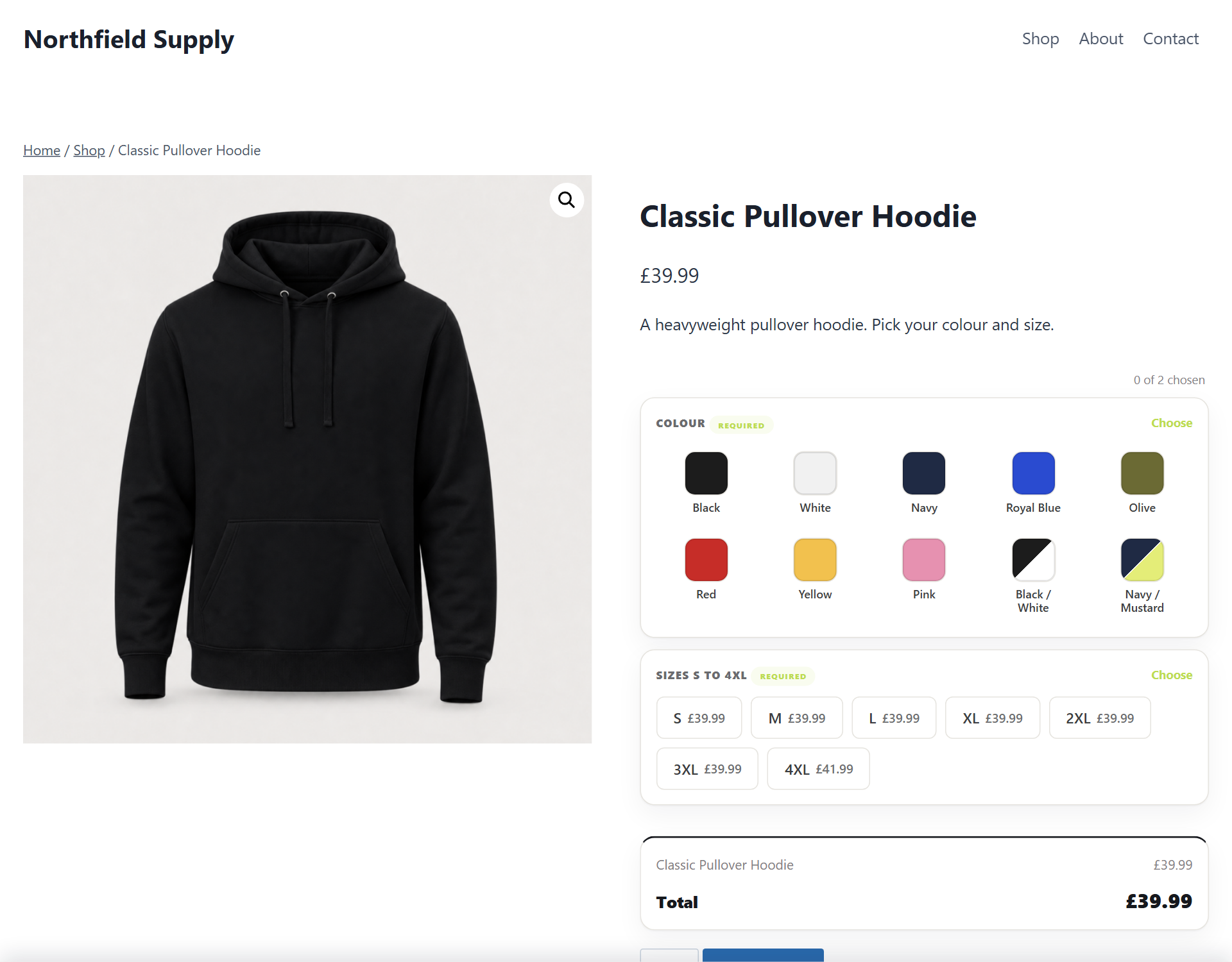
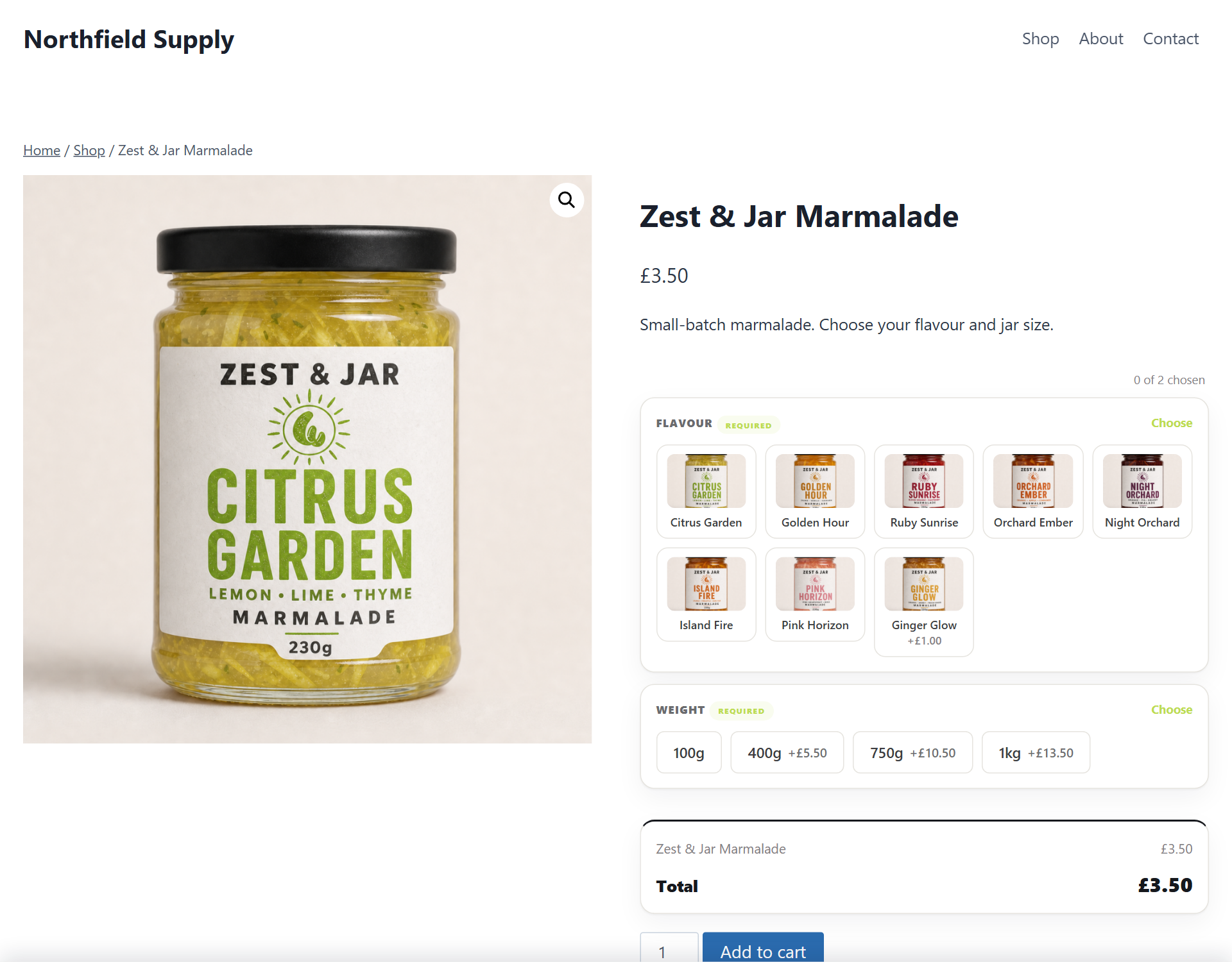
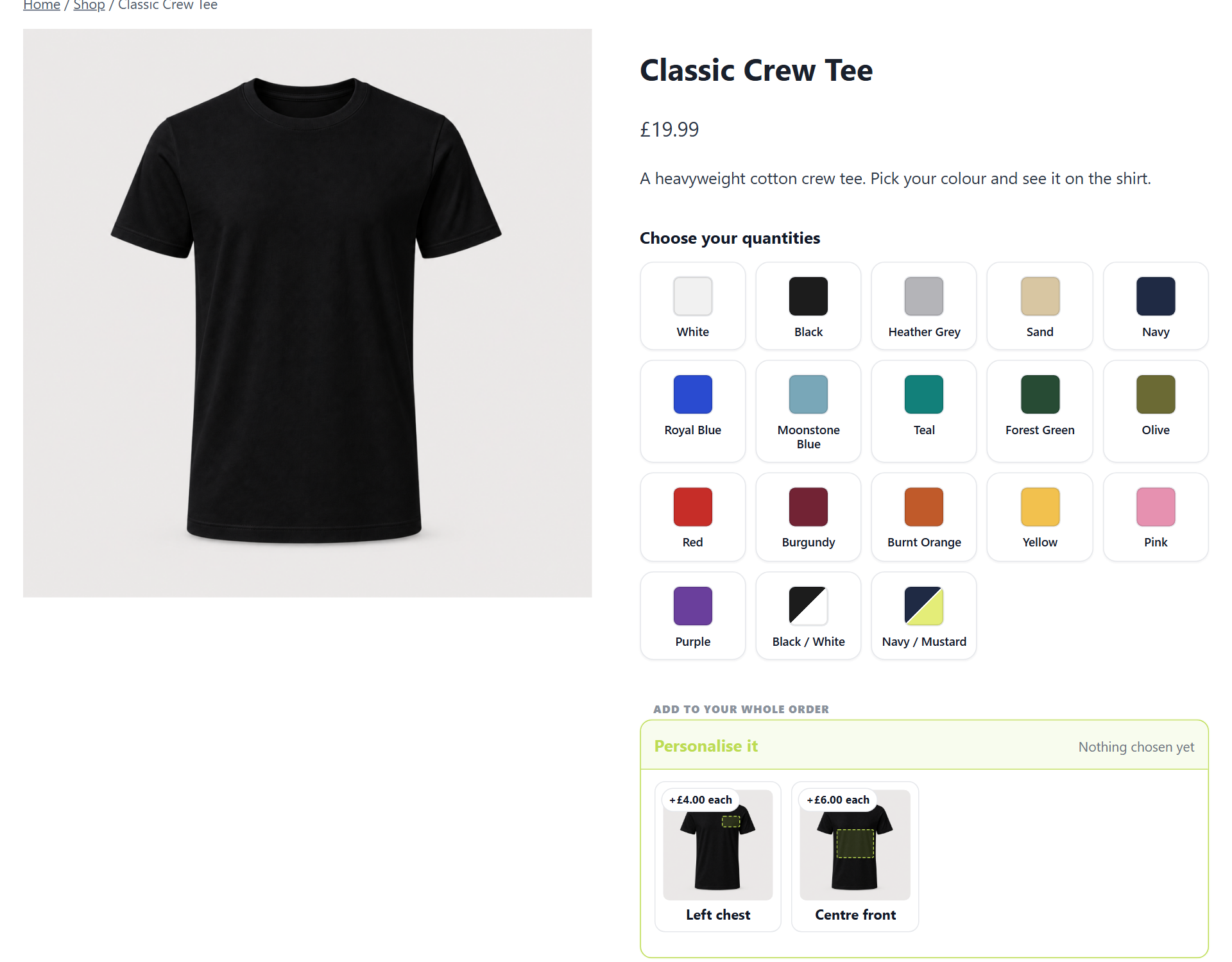
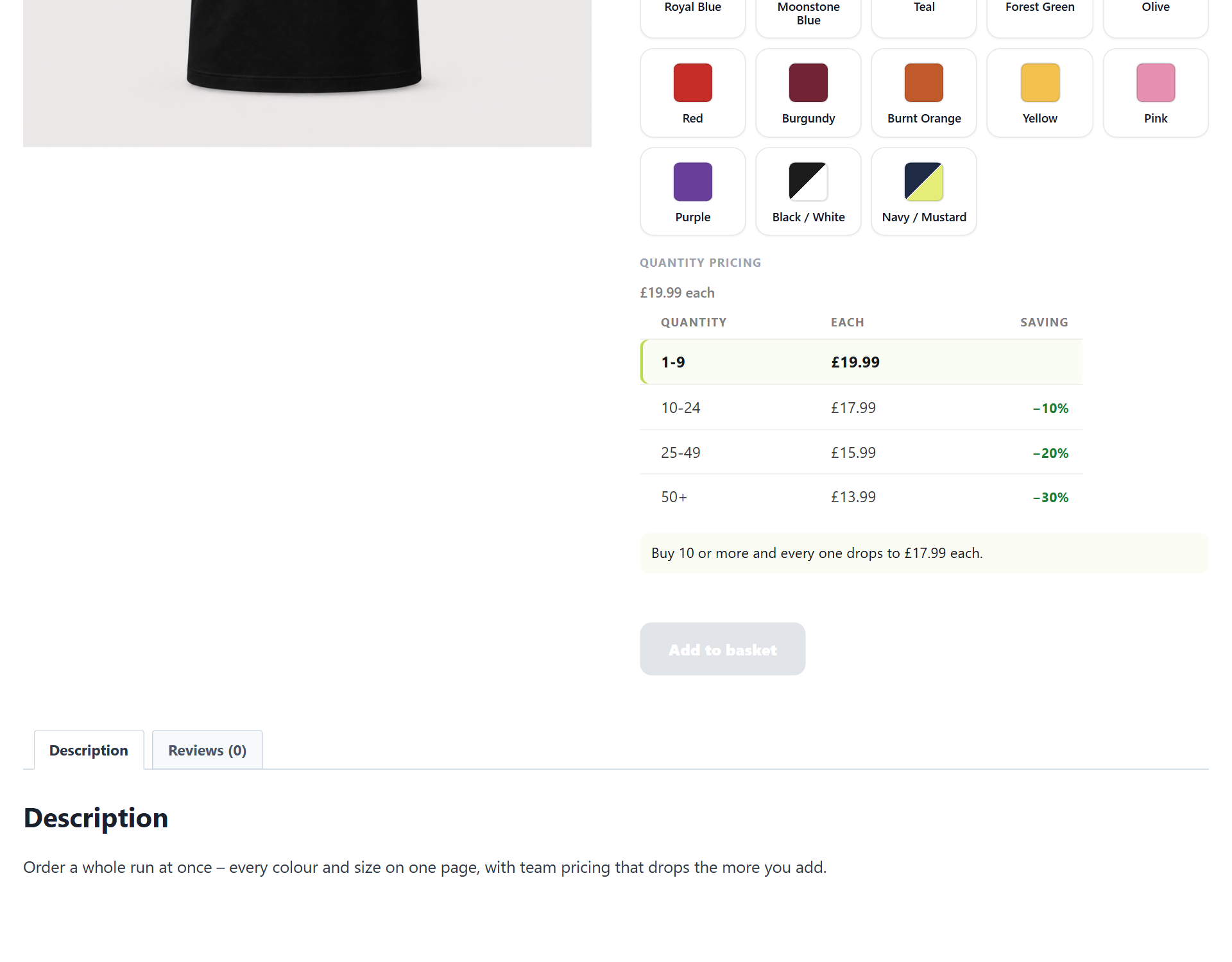
AddOnBoss adds extra product options, product add-ons and custom fields to a WooCommerce product page. Colour swatches, a dropdown of finishes, checkboxes for extras, a name to engrave, a gift message: each one can carry its own price, the total keeps up as the shopper chooses, and every answer lands on the order.
See how option sets replace variations:
Try it live: demo.bossmage.com is a full demo store running Pro. Put a name and number on a team kit, pick a colour and watch the photo change, order a whole size run in one grid. Click around and configure things, nothing breaks.
In the free plugin:
- Reusable option sets. Build Colours once and attach it to any product, like global product options you edit in one place.
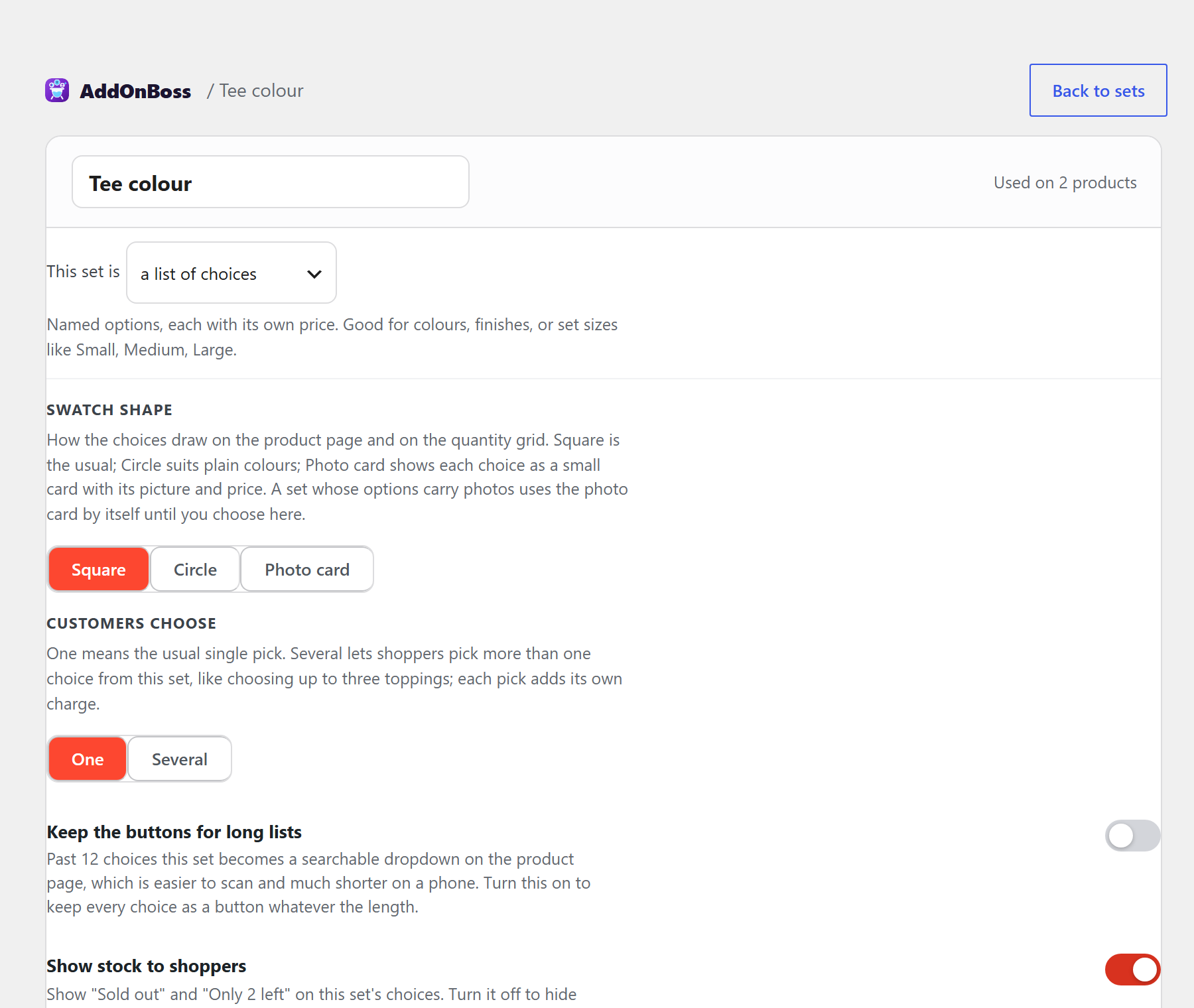
- Swatches, buttons or a dropdown, where shoppers pick one or pick several.
- Custom fields: text, a message, a number, a date, a time, a dropdown, a tick box, an email address and a colour.
- Priced choices, taxed as part of the product and not as a surcharge.
- Conditional logic: show or hide a set or a field from what the shopper picked or typed.
- A price they choose, for donations, tips and name your price extras.
No variations needed. A product with five colours and five sizes would be twenty-five variations to build and maintain. Here it is one option set, attached in a click, and the product stays a single simple product. Your product editor stays fast, and adding a colour next month does not mean rebuilding every combination.
What you can sell with it
- Personalised gifts. An engraved board with a finish to choose, a name to engrave and gift wrap as an optional extra, each carrying its own charge.
- Food and drink. Choose up to three toppings, add a sauce, leave a note for the kitchen. Every pick keeps its own price.
- Any shop with a variation problem. Five colours by five sizes offered as choices, instead of twenty-five variations to build and price. A made-to-order shop needs nothing else. A shop that counts stock on each colour and size wants Pro, where a single choice holds its own stock.
- A sweet shop (Pro). Pick and mix by the choice, with a limit on how many, and any single flavour able to sell out on its own while the rest stay on sale.
- A signage, framing or blinds shop (Pro). A price grid with width down one side and height across the other, or a rate per square metre applied to the exact size a customer types in.
- A workwear or print shop (Pro). A whole size run ordered in one grid, priced down by quantity band, with the customer’s logo uploaded, checked for resolution before it reaches your printer, and drawn on your own product photo as they type.
What makes AddOnBoss different
A library, not a form on every product. Many plugins in this category have you build a form on each product, so the same five colours get rebuilt fifty times and adding a sixth means fifty edits. Here an option set is a thing in its own right. Build Colours once, attach it wherever it belongs, and editing it in one place updates every product using it. If one product cannot be had in two of those colours, tick them off for that product alone and the rest of the shop is unaffected.
The free plugin is a whole product, not a taste of one. Option sets, several-choice sets with bounds, fourteen field types, groups and the full cart and order path are all here, and every one of them charges and taxes correctly. Pro adds jobs the free plugin does not attempt, like artwork upload and made-to-measure pricing. It is not the same plugin with something switched off.
Pro handles the jobs that usually need a second plugin. Price by the square metre from the dimensions a customer types, or from a width-by-height grid, the way the made-to-measure trade writes its own price lists. Order a whole size run in one grid, every colour by every size, priced down by quantity band as the run grows. Hold stock on a single choice, so one flavour sells out on its own while the rest stay on sale. Take the customer’s artwork, check it is high enough resolution before it reaches your printer, and draw their name or logo onto your own product photo as they type.
One engine, two plugins. AddOnBoss and BundleBoss run the same options engine and share one option-set library. A Colour set you build in either one is ready in the other, with no export, no second copy to keep in step, and no double charging when both are active.
And the money is right. Every charge joins the cart line through WooCommerce’s own pricing and tax, so it is taxed exactly as the product is, in the basis your store displays, and it lands on the order as part of the line. It is never a surcharge bolted on after tax. Worth checking before you commit to any options plugin, because getting it wrong is invisible until an accountant finds it.
What the free plugin does
This is the whole options product for a simple product. Build a set once, attach it anywhere, and the choices are priced and taxed as part of the line.
- Reusable option sets: define colours, sizes, finishes or weights once, attach them to any product, reorder and rename from one library. They show as swatches, buttons or a dropdown, and each choice can carry a charge.
- Choose one or choose several: a set can let shoppers pick more than one choice, like choosing up to three toppings, with an optional “at least” and “up to” bound. Every pick keeps its own charge and each one reads separately in the cart and on the order.
- Custom fields: a name to print, a message, a number, a date, a time, a dropdown, a tick box, an email address, a web address, a section label and an info block, each optional or required, each able to charge once or for each item.
- A colour field: the colour they want you to use, picked from swatches you define, each with its own optional charge, or typed as any colour if you allow it. The order carries the colour name and code, and your order screen paints the swatch.
- A price they choose: a field where the shopper enters an amount of their own, for donations, tips and pay-what-you-wish extras. You set the floor, the ceiling and a suggested figure, and one-tap suggested amounts fill the box.
- A hidden note for your own orders: a value that rides on every order of the product, a production route or a supplier code, shown only on your order screen and never to the customer.
- Long lists search themselves: past a dozen choices, a dropdown of text choices becomes a searchable list that filters as the shopper types, with unavailable choices shown but not pickable. Phones get the same control, sized for thumbs.
- Groups: gather related options under their own headings, so a long list reads in sections instead of one run.
- Rules that show and hide: show or hide a set or a field depending on what the shopper picked or typed, with “and” and “or” groups: up to six groups of eight conditions in each rule.
- Shoppers see what is left: an answered question gets a tick, a line under the total names what is still to choose, and Add to cart pressed too early names every unanswered question.
- A product can refuse a choice: use one shared Colour set across the shop and tick off the two colours this particular product cannot be had in. The set stays one set, so a colour added to it later is offered everywhere it was not refused.
- A correct cart and order path: options join the line through WooCommerce’s own pricing and tax, and the picks read on the order screen, in emails and on reorder.
- Links that choose: add ?colour=white&size=m to a product’s address and the page opens with those choices made.
Part of the BossMage family
AddOnBoss is made by BossMage, alongside BundleBoss.
BundleBoss builds bundles, mix and match packs and build-your-own boxes. AddOnBoss puts options, add-ons and personalisation on a product’s own page. Either works alone, and running both gives you one option-set library: a Colour set built for a bundle is there for a simple product too, and the other way round.
If you run both, keep BundleBoss up to date: AddOnBoss waits, with a notice, beside a much older BundleBoss.
Guides and screenshots for every feature are at bossmage.com/docs/addonboss.
What AddOnBoss Pro adds
AddOnBoss Pro is a separate paid plugin. The Solo plan has a 14-day trial, no card needed. It adds:
- Options on variable products, so a parent can offer sets alongside its own variations
- A quantity grid: order a whole range at once, every colour by every size, as one order
- Google Shopping for colour and size: a daily feed with an item per colour and size, each with its own photo, price and a link that opens it chosen
- Quantity discounts: price breaks by how many they buy (10 to 24 pay one price, 25 to 49 a lower one), shown as a trade price table or a card ladder, counted across a whole size run
- File and artwork upload, with a confined upload area, resolution checks before you print, and GDPR export and erase
- Print areas and product sides, with the customer’s name or logo drawn on your own product photo as they type
- Rules on numbers: reveal or hide a set or a field when an answer is more than, less than or exactly a number, on top of the show and hide rules every build has
- Choices that can’t go together: in a pick-several set, group the choices that exclude each other, like print and embroidery on the same breast. A blocked choice greys out and says why, the till refuses the pair whatever a browser posts, and a choice like “no printing needed” can stand alone
- Measured sizes: price by length, area or volume from the dimensions a customer types
- Price tables: a grid of prices, width down one side and height across the other, with a minimum charge and an optional margin on a cost grid. Shoppers pick a size or type their own and the right cell prices it
- Stock per option: hold a count on a single choice, so ten jars of one flavour sell out on their own while the rest stay on sale. Sales, cancels and restocked refunds keep the count, and nobody can order more than you have
- Shop filters: your shop’s own filters (WooCommerce’s, WOOF, YITH and the rest) find a product by the colours and sizes chosen through AddOnBoss. Shades fold into one short colour list (French Navy is Navy), sizes into a list per kind, and you check every match before anything is added
- A photo per choice that swaps the product image when they pick it
- Per-letter, percentage and per-unit-entered pricing for add-on fees
- Ask a field more than once: let a shopper add another engraving line, or ask for a name for each item they buy, so six shirts collect six names. Each one is priced and shows on the order separately
- Folding sections for a product with a lot of choices, so a long page reads as a handful of headings. A group holding something the shopper has to answer is never folded away
- Step by step: one question on the screen at a time under a row of steps, each checked before the shopper moves on, with an optional review before the button
- Fold as you go: the next question opens as soon as one is answered
- Popular setups: named starting points shown above the questions with their price. Nothing is chosen until one is pressed, and every answer can still be changed
- Ask once for a whole bundle: with BundleBoss Pro 6.0, a product’s questions can be asked once for the bundle, after the items
- Tags across the library: tag sets one at a time or forty at once, narrow the library by one tag or two, and rename, recolour, merge or delete your tags from one dialog. If you also run SupplierBoss the supplier’s own label arrives by itself, and imports never touch your own tags
Nothing you build in the free plugin is lost if you add Pro later, and nothing you built with Pro is deleted if you stop. Those settings stay on disk and come back with the plugin.
Requirements
- WordPress 6.4 or newer
- WooCommerce 8.0 or newer, tested to 11.3
- PHP 8.0 or newer
Declared compatible with WooCommerce High Performance Order Storage and with the block cart and checkout.
Tell us what you need
If AddOnBoss almost does what your shop needs, say so on the support forum for this plugin. We read every thread, and a specific description of the job you are trying to do is worth more to us than a feature name. What is being worked on next is at bossmage.com/roadmap.
Privacy
AddOnBoss does not collect, store or transmit any personal data of its own.
- A customer’s option choices and any text they enter, such as a name to engrave, are stored only as part of their cart and order: standard WooCommerce order data under your control, removed whenever you erase the order.
- Entered field values are covered by WordPress’s personal-data export and erase tools, so a data request returns them and an erase request deletes them. In Pro, where a customer can upload a file, those files are covered the same way.
- The plugin sets no advertising or tracking cookies.
Third-party services
The free version includes the Freemius SDK, which handles AddOnBoss Pro’s trial, checkout, licensing and updates. On first use it asks once whether you want to opt in to security and feature update emails, occasional offers, and sharing basic details with Freemius: your name and email address, the site’s address, title and language, the WordPress and PHP versions, and the list of plugins and themes.
Nothing is sent unless you choose to: by opting in, by starting a Pro trial or buying Pro, or by filling in the optional feedback form when you deactivate the plugin. If you skip the opt-in, the plugin works fully and the SDK sends nothing off your site. Freemius terms: https://freemius.com/terms/ and privacy policy: https://freemius.com/privacy/