

Add Custom Fields to Media
v2.0.4George Pattichis · 2012年7月19日 上架
Add custom fields to media uploader and access them in template files. Great for copyrights, image meta etc.
- 正在使用
- 80+
- 评分
- 5.0 / 5
- 累计下载
- 8,006
- 最近更新
- 2026年3月13日
贡献者
 George Pattichis
截图
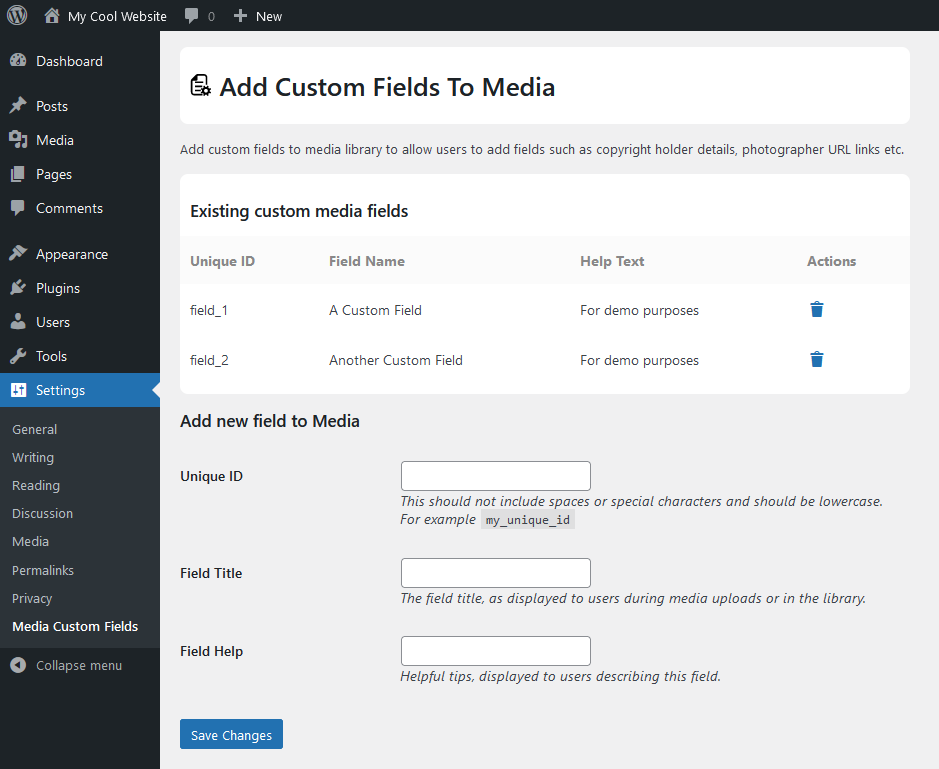

Allows users to add custom fields to the media uploader and access those fields in posts or template files. Great for adding copyrights, image meta etc.
To display the custom fields in your theme, use the following shortcode in post/pages:
[acfm id="123" field="my_custom_field"]
Where id is the ID of the media item and field is the name of the custom field.
For PHP templates, use the following code:
echo get_post_meta( 123, 'my_custom_field', true );
To use this plugin effectively, download and intall it on your WordPress blog. Next, access “Media Custom Fields” page in your admin Settings and create a new custom field for your media uploads.
- Unique ID – The unique variable name for this item. It may not contain special characaters or spaces
- Field Title – The name you want to appear in the media uploader
- Field Help – A descriptive message you want to appear in the media uploader
Once you’ve added a custom field, you can access it via the Media Library or during the Add Media process of uploading a new item.
This plugin was originally developed by Christopher Ross. The plugin has been adopted and refactored by George Pattichis who will continue development and maintenance.