

Accessibility New Window Warnings
v1.3.1Equalize Digital · 2021年8月27日 上架
Make links that open in a new window compliant with WCAG guidelines for accessibility by adding a warning for users.
- 正在使用
- 1,000+
- 评分
- 4.8 / 5
- 累计下载
- 2.8 万
- 最近更新
- 2026年9月2日
 Equalize Digital
 Amber Hinds
 Steve Jones
截图


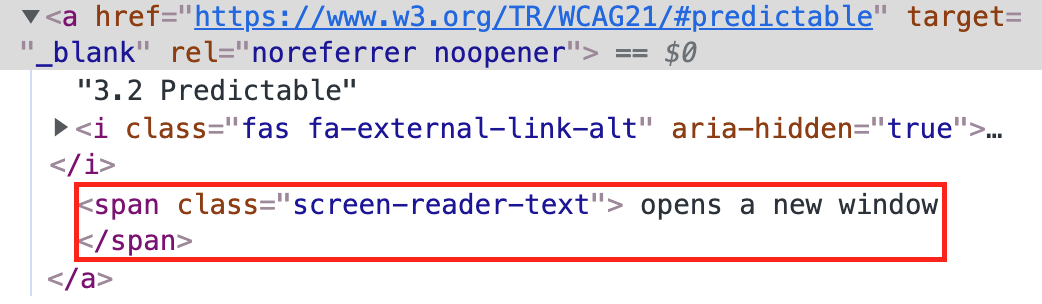


Web Content Accessibility Guidelines (WCAG) Success Criterion 3.2 (Predictable) specifies that web pages should appear and operate in predictable ways. It is a common practice to set links that go to off-site locations to open in a new window or tab when clicked. Opening new windows or tabs automatically when a link is activated can be disorienting for people who have difficulty perceiving visual content, and for some people with cognitive disabilities, if they are not warned in advance.
This plugin helps websites become more accessible and better meet WCAG guidelines for predicability by providing advanced warning if a link is going to open a new window or tab before the user clicks or activates it. Providing a warning allows the user to decide it they want to leave the current window, and the warning will help them find their way back, if they do decide they would like to go to the new window. It will help them understand that the “back” button will not work and that they have to return to the last window they had open, in order to find their previous location.
There are no settings in this plugin. Simply activate it and it will automatically find all links that open in a new window and add the following three fixes to each link:
1. A new window icon after the link text to denote that the link opens in a new window for sighted people.
2. A tooltip, visible on hover, that says “opens a new window.”
3. “Opens a new window” screen reader text that will be read out to blind or visually impaired people using screen readers immediately following the link anchor text.
Please note: new window warnings will be added to links and links that have been styled to look like buttons, including social media sharing and link icons. Depending upon what third party plugins are adding links to your site that open in new windows, some CSS styling may be required.
In addition to adding warnings for your users, this plugin integrates with the Accessibility Checker plugin; when Accessibility New Window Warnings is activated, it will automatically clear all “Link Opens New Window or Tab” warnings in Accessibility Checker scans of your website. Installing and activating this plugin is a great way to quickly remediate and remove a lot of open issues across you entire website.
The Accessibility New Window Warnings plugin is inspired by Techniques for WCAG 2.0 G201: Giving users advanced warning when opening a new window.
Localization
The Accessibility New Window Warnings plugin is ready for localization. We have added a Spanish translation and are open to more translations!
If you would like to contribute a translation to this plugin, please contact us or fork the repository on GitHub.