

Abbreviation Button for the Block Editor
v0.1Jb Audras · 2022年11月24日 上架
Add an abbreviation format button to the formatting toolbar in the block editor.
- 正在使用
- 300+
- 评分
- 4.7 / 5
- 累计下载
- 1.4 万
- 最近更新
- 2026年8月28日
 Jb Audras
 Guillaume TURPIN
 Whodunit
截图
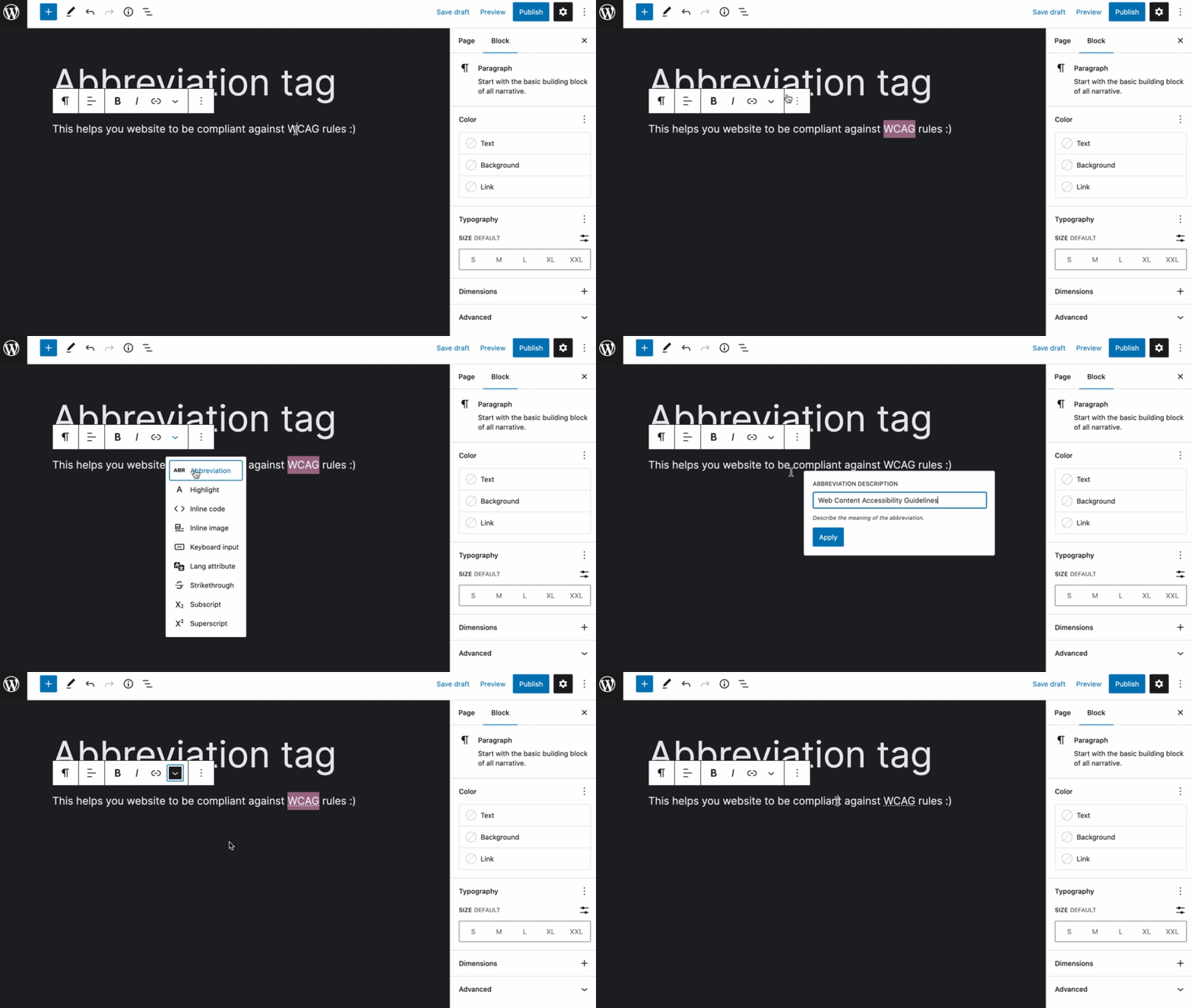

The goal of this plugin is to provide expansions or definitions for abbreviations by using the abbr HTML element. It helps to make your website compliant to the success criterion 3.1.4 of Web Content Accessibility Guidelines (WCAG).
It is always appropriate to use the abbr element for any abbreviation, including acronyms and initialisms. This HTML element helps to make sure the abbreviation is understood by assistive technologies, by informing the user agent that the characters are an abbreviation, and by providing its meaning using the title attribute.
This plugin adds a new abr format button in the formatting toolbar of the block editor.